

Automating SEO across several websites shouldn’t mean publishing the same strategy everywhere. The key to how to automate seo for a portfolio of websites is to centralize repeatable work while keeping decisions about audience, priorities, and quality specific to each site.
If you manage multiple domains, keyword research, content production, publishing, and performance checks can quickly become repetitive. Automation can reduce that workload, but only when you decide what to automate and where human judgment still matters. Otherwise, a faster workflow can produce generic content, overlapping pages, or work that misses a site’s purpose.
This guide gives you a practical sequence for auditing your portfolio, identifying high-value tasks, and automating them with safeguards in place. You’ll learn how to preserve each site’s positioning, assess whether automated content and backlink support fit your goals, and monitor results by domain. The principle is straightforward: standardize repeatable operations, then use site-specific strategy to guide what gets created and why.
Key Takeaways
- Start with a clear record for each domain, including its audience, business goal, CMS, existing content, and owner.
- To learn how to automate seo for a portfolio of websites, build a workflow that moves from prioritization and topic mapping to execution, review, and measurement.
- Compare automation options by the tasks they cover, from research and publishing to backlink building, technical checks, and reporting.
- Pilot the process on one representative site, then refine the workflow before rolling it out to other domains.
- Track activity, visibility, qualified visits, and conversions separately for each site so portfolio comparisons retain business context.
What SEO automation for a website portfolio should, and should not, do
SEO automation uses software to handle repeatable work, such as routine research, publishing operations, and performance monitoring. It can reduce manual handoffs across a portfolio, but it doesn’t decide what every site should say or promise rankings. SEO includes activities such as on-page and technical optimization; What is Search Engine Optimization? offers a useful foundation. The practical challenge is to standardize how work moves while keeping the decisions behind that work relevant to each domain.
For anyone learning how to automate seo for a portfolio of websites, the distinction is essential: automate the process, not the strategy. Set common standards for briefs, metadata checks, publishing steps, and reporting. Then assign accountable review before content goes live, especially when accuracy, brand positioning, or expertise is at stake. Automation can surface information and complete repeatable tasks. A person still needs to judge whether the work is useful, accurate, and right for the site.
Which SEO tasks can be standardized across multiple websites?
Build reusable templates for recurring operations, but tie topic selection to each site’s audience and offer. A shared checklist can ask the team to validate search intent, check for an existing page on the topic, prepare a title and description, confirm links, review the draft, and record performance after publication. The steps stay consistent; the answers vary by domain.
- Research: Use the same process to gather and organize keyword ideas, then prioritize them for each site.
- Publishing: Standardize formatting, metadata checks, approval, and CMS handoffs without forcing every article into one template.
- Monitoring: Use a common reporting format while tracking each site’s pages and outcomes separately.
For example, one checklist can require every topic to match a specific audience and conversion goal. A financial education site might prioritize a budgeting question, while a software company may focus on a product-use question. The workflow is shared; the keyword priorities and content briefs are not.
Why does portfolio SEO need separate site strategies?
Each domain has its own audience, conversion goal, subject expertise, and competitive environment. One site may need to explain a specialist service to informed buyers. Another may need to answer introductory questions for people still comparing options. Those differences shape search intent, the depth of explanation, the evidence a page should provide, and the next step it should encourage.
Copying topics or positioning across unrelated sites can create generic pages that target the wrong audience or repeat material without adding value. Even when two sites share an industry, their offers and expertise may call for different angles. Keep a site-level strategy record with the intended audience, offer, content goal, and reviewer. Use those inputs to guide automation before production starts.
Centralize operations; decentralize strategy. This lets portfolio owners scale reliable processes without flattening distinct brands into one voice. Automate repeatable tasks, then keep each site’s audience, intent, and editorial judgment in control.
How to design a central SEO workflow for every website
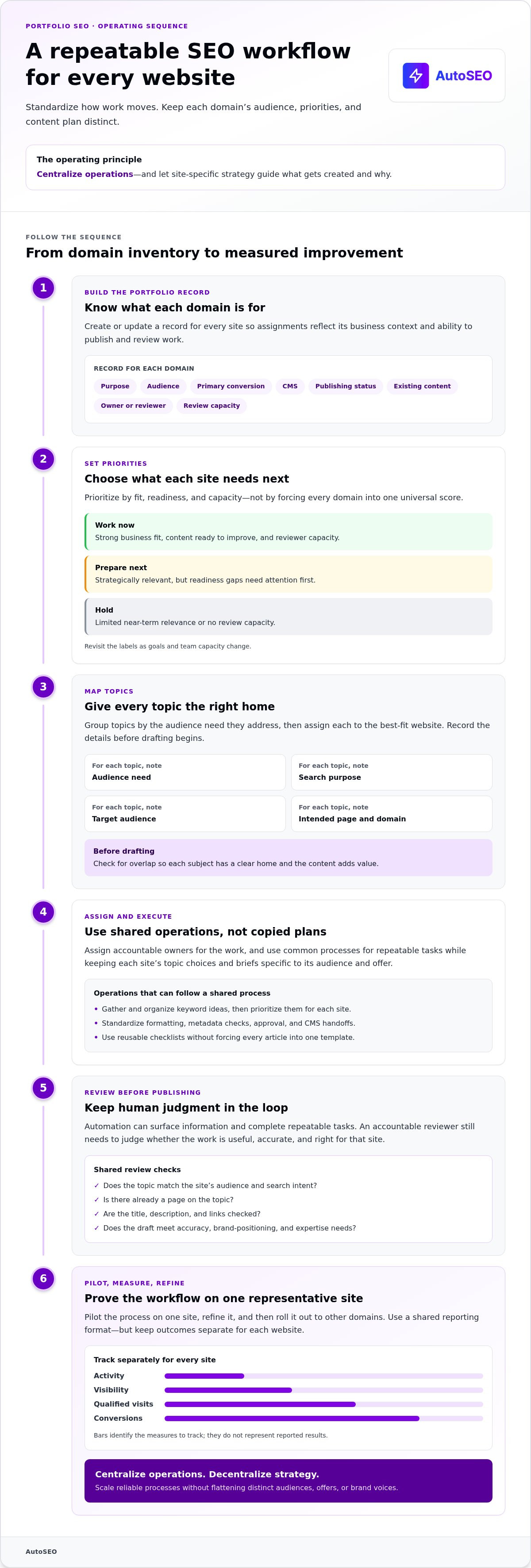
A portfolio workflow needs one operating system, not one copied content plan. Start with a reliable record for every domain, then use it to coordinate priorities, ownership, publishing, and review. This makes the process repeatable while keeping decisions grounded in each website’s business context.
Build a portfolio inventory and priority system
Create a domain record with the site’s purpose, audience, primary conversion, CMS, publishing status, existing content, and responsible owner or reviewer. Add practical notes, such as whether the site has pages ready for updates or needs a clearer topic plan. Keep the record current so assignments reflect what each team can publish and review.
Prioritize sites based on fit, readiness, and capacity rather than forcing every domain into a universal score. A site with a strong business fit, content ready to improve, and reviewer capacity can be marked “work now.” A strategically relevant site with gaps in readiness can be “prepare next.” A site with limited near-term relevance or no review capacity can be “hold.” Revisit these labels as goals and team capacity change.
Map keywords and topics to the right domain
Group topics by the audience need they address, then assign each group to the best-fit website. For every topic, record the intended page, search purpose, target audience, and domain. This gives each subject a clear home and makes overlap easier to catch before drafting begins. Foundational SEO automation workflow guidance can help teams think through where software fits into repeatable execution.
Run the workflow in a shared sequence
Use this sequence across the portfolio. The steps stay consistent, but each site’s plan and content assignments remain distinct:
- Inventory sites. Create or update the domain record, including its owner and review capacity.
- Set priorities. Choose which sites need action now, which need preparation, and which should wait.
- Map topics. Assign each audience need and search purpose to one best-fit domain and intended page.
- Assign execution. Name the owner for research, drafting, publishing, and any required review.
- Review and publish. Check that the content serves the site’s audience, matches its offer, and fits the planned page before it goes live.
- Measure and adjust. Record progress by domain, then use what you learn to update the next planning cycle.
A shared calendar keeps deadlines, owners, and review stages visible across the portfolio. Use common status labels and publishing fields, but give every site its own topic entries, briefs, and priorities. One calendar can coordinate the work without turning separate brands into duplicates. If content and backlink execution are the bottleneck, an automated SEO platform can support that part of the workflow.
How to compare SEO automation options without sacrificing quality
Compare options by the work they cover, the oversight they require, and how clearly they keep each domain’s activity separate. Manual execution gives your team direct control but keeps recurring tasks on its workload. General-purpose tools can support specific steps, though your team still needs to connect the workflow. Managed automation can take on defined execution, but it isn’t a complete SEO strategy.
Use the table as a scope check, not a product ranking. Capabilities vary by tool and configuration, so compare each workflow with your actual requirements. Broader AI for SEO considerations can help frame where automation supports the work and where human decisions remain essential.
| Task | Manual execution | General-purpose tools | Managed automation |
|---|---|---|---|
| Research | Team gathers and organizes insights | May support research or analysis | May cover research tied to its service scope |
| Content production | Team plans and creates content | May assist with briefs or drafts | Can produce content within defined parameters |
| Publishing | Team formats and publishes | May connect steps or CMS workflows | May publish through supported integrations |
| Backlinks | Team handles outreach and tracking | Coverage varies by tool | May include backlink building |
| Technical checks | Team runs audits and investigates issues | Some tools identify technical issues | Coverage depends on the service |
| Reporting | Team compiles performance data | May consolidate selected metrics | Reporting varies by scope |
What should a multi-site SEO automation comparison include?
Check whether workflows support your CMS, preserve separate site records, show activity by domain, and give reviewers control before publication. Separate execution from diagnosis and strategy: a tool may produce content or flag a technical issue, but deciding whether that issue matters, what to fix first, and how it affects business goals still requires judgment. Match the system to the work you need it to perform.
AutoSEO provides expert article production and backlink building, with automated publishing to WordPress. It supports the content and backlink execution layer of a portfolio workflow, rather than replacing technical diagnosis or business-level prioritization. Use an automated SEO platform when content and backlink execution are the gaps you need to address.
How can teams control content quality at scale?
Set a site-specific brief, factual review requirements, tone guidance, and a named approver before production. Then check whether each article answers a distinct audience need and fits the intended page, rather than simply filling a calendar slot. Teams scaling content can use this AI content creation guide to consider how production workflows fit into quality controls.
How to implement SEO automation across a website portfolio
Roll out automation in stages, not across every domain at once. A controlled pilot shows whether your access, planning, review, and publishing steps work together before you scale the process. This is a practical way to learn how to automate seo for a portfolio of websites without multiplying an untested mistake across your portfolio.
How should a portfolio owner run a controlled pilot?
Choose one representative site with a clear audience, a defined business objective, and enough editorial capacity to review the work. Before starting, record current publishing activity and the visibility measures you’ll monitor. As the pilot runs, log delays, errors, approval decisions, and workflow changes. Use those notes to refine the process before introducing it to another domain.
Use this checklist to move from setup to a measured rollout:
- Set up access. Connect only the selected site and confirm that the right people can manage and review its workflow.
- Plan for that site. Define its audience, objective, topics, and intended pages. Don’t import another domain’s plan unchanged.
- Set review ownership. Name the person responsible for checking content and resolving issues before publication.
- Configure publishing. Confirm the destination, formatting expectations, and whether publishing should happen only after approval.
- Monitor the pilot. Compare activity and visibility signals with the baseline, and record anything the workflow misses.
- Refine before expanding. Update instructions, checks, and ownership based on the pilot, then adapt the tested process to each additional site.
AutoSEO automates publishing to WordPress as part of its content workflow. This can reduce manual publishing steps for WordPress sites. Keep access and configuration specific to each domain, and preserve a clear owner who can oversee the process.
What safeguards belong in an automated publishing workflow?
Automation should move approved work forward, not remove accountability. Before publication, check the content’s facts, fit with the site’s audience and offer, overlap with existing pages, and intended destination. An accurate article sent to the wrong site or page is still a workflow failure. These checks protect quality as production scales.
- Verify accuracy: Review claims, names, and details that could mislead readers.
- Check site relevance: Confirm the article belongs on this domain and serves a real audience need.
- Prevent duplication: Compare the draft with existing content and planned topics across the portfolio.
- Confirm the destination: Check the site, page path, formatting, and approval status before publishing.
- Assign intervention: Give a named owner authority to pause, correct, or update content when a review flags an issue.
Once your pilot workflow is defined, Explore SEO on Autopilot to support content and backlink execution within your portfolio process.
How to measure portfolio SEO automation and choose the next step
Measure the workflow and its business contribution separately. A portfolio dashboard can show where production is moving and which sites need attention, but a combined total can hide a domain that is falling behind. Keep reporting comparable across the portfolio while interpreting each site against its own baseline, audience, and business goal.
Which measures help assess portfolio SEO progress?
Use four layers of measurement. They show whether work is happening, whether pages are appearing in search, whether the right visitors are arriving, and whether those visits support a business outcome.
- Workflow activity: Track briefs completed, articles reviewed, content published, and backlink-building activity. These measures show execution, not SEO success by themselves.
- Indexing and visibility: Monitor whether target pages are indexed and how their search impressions and positions change over time. Review this by site and page, not only as a portfolio total.
- Qualified organic visits: Look at organic visits to the pages serving each domain’s intended audience. More visits matter most when they match the site’s topic and purpose.
- Conversions: Connect organic activity to the action that matters for that site, such as a relevant enquiry, sign-up, or purchase.
Portfolio totals show scale; site-level results show whether each website is advancing its own goal. Keep both views. If publishing activity rises but target pages aren’t indexed, investigate indexing and technical conditions rather than simply increasing output. If visibility improves but qualified visits don’t follow, reassess the page’s search intent and presentation. If relevant visits arrive without conversions, review the page experience and the next step it offers. These signals guide investigation; they don’t prove a single cause.
Use the same reporting period and definitions across domains, then annotate meaningful changes such as a new content focus or a paused publishing cycle. That context makes comparisons useful without treating unlike sites as identical.
When does AutoSEO fit a multi-website workflow?
AutoSEO fits when a business needs ongoing expert content production and backlink building as part of a broader portfolio plan. Its subscription provides 1 expert article daily with trust-building backlinks. This execution supports visibility goals across Google, ChatGPT, and Perplexity, but doesn’t guarantee rankings, traffic, or conversions.
Planning still starts at the portfolio level: define each site’s audience, offer, topic priorities, and intended outcomes before scaling production. Then assess performance separately for each domain. A shared workflow can make execution easier to manage, while site-level reporting tells you whether the work fits the audience and purpose.
If content and backlink execution are the next bottlenecks you want to address, See how AutoSEO works and consider how it fits into your portfolio workflow.
Turn your portfolio workflow into your next growth system
The next step is to move from planning to a controlled, measurable rollout. Choose a priority site, define what progress should look like, and build a process you can adapt before extending it across the portfolio. That’s the practical path for how to automate seo for a portfolio of websites while keeping each domain’s goals in view.
Automation can support consistent execution, but the value comes from pairing it with clear priorities and accountable review. A Trustpilot testimonial from Martin Bonauer of Real Estate Switzerland describes acquiring a first customer through a published article. It’s an example of how content can contribute to a business outcome, not a promise that every article will produce the same result.
Ready to streamline content and backlink building across your portfolio? See how AutoSEO puts SEO on Autopilot and identify where it fits into your workflow. Start with one site, learn from the process, and scale with confidence.
Frequently Asked Questions
How do you automate SEO for multiple websites?
Automate SEO for multiple websites by documenting each domain, setting its own objective, and mapping topics to the site best suited to address them. A practical way to approach how to automate seo for a portfolio of websites is to assign owners for research, drafting, approval, and publishing, then track results by domain. For example, a lead-generation site can focus on qualified enquiries, while an online store measures relevant product visits and purchases.
Can one SEO automation workflow work for every website?
One shared workflow can coordinate routine steps, but it shouldn’t dictate every site’s content choices. Standardize how teams handle research requests, review stages, publishing fields, and reports. Then tailor the topic plan and quality criteria to each domain. A specialist service site may need precise, expertise-led explanations, while a software site may prioritize product-use questions. Separate briefs help each website speak to its own audience and conversion goal.
What SEO tasks should not be fully automated?
Keep decisions that require business context and accountability under human oversight. Review how each site is positioned, whether a claim is accurate, and whether a page genuinely fits its audience before publication. For example, a draft describing a regulated or sensitive subject may need careful factual review rather than automatic approval. A person should also investigate unusual changes in visibility or conversions before changing the strategy or scaling production.
Does publishing more articles automatically improve SEO rankings?
No. Publishing more articles alone doesn’t guarantee rankings or business results. Each page needs a clear purpose, accurate information, and a close match to the audience’s search need. Before adding a topic, check whether an existing page already answers it and whether the new article offers a distinct reason to exist. Measure how relevant pages perform after publication, and update or consolidate content when it no longer serves readers.
How can I avoid duplicate content across a portfolio of websites?
Give each topic a clear owner domain and record the intended audience and purpose of its page before drafting. Search existing pages across the portfolio for similar coverage, not just matching titles. For instance, two sites might address the same broad subject but need different angles based on their offers. If the briefs end up with nearly identical audiences, questions, and page goals, reconsider the assignment before production begins.
How do I measure whether SEO automation is working across multiple sites?
Compare each website with its own baseline and goals. Track workflow completion, whether important pages are indexed, search visibility, qualified organic visits, and conversions. A site built to generate enquiries should evaluate relevant leads, while a publication may focus on engaged visits to key coverage. A combined dashboard can make review easier, but portfolio totals may hide a domain with declining visibility or a different business result.
Can SEO automation help a website appear in ChatGPT and Perplexity?
AutoSEO helps businesses build visibility across Google, ChatGPT, and Perplexity through automated SEO content and backlink building. That work can support a broader discovery strategy, but it can’t promise that a platform will cite, recommend, or rank a particular website. Keep content accurate and useful for its intended audience, and assess visibility signals over time without treating any single platform appearance as a guaranteed outcome.


