

The best alternatives to Google Keyword Planner are the ones that fit your budget and the way you research, organize, and target keywords. No single tool is the right choice for every SEO workflow. Compare what each option helps you do before you commit.
A list of keyword ideas is only part of the job. You also need to know whether a tool fits your budget, covers your target markets, and makes keyword lists easy to manage. Comparing these practical needs helps you avoid paying for features you won’t use.
This guide compares keyword research tools by cost, idea generation, international data, and list management. Use the steps to narrow your options and choose a setup that supports your SEO goals, whether you’re starting small or building a more scalable workflow.
Key Takeaways
- Match a tool’s cost and capabilities to the work you actually need it to do.
- Assess how each option helps you uncover and refine relevant keyword ideas.
- Compare coverage for your target countries and search platforms before choosing.
- Use list, export, and filter features to turn research into a manageable workflow.
Choosing a tool based on budget and needs
Start by defining the task. A local bakery planning organic content may need relevant topic ideas and search volume, while an online retailer may need to organize product terms by category. Decide what output you need before comparing subscriptions. That keeps the focus on real SEO work, not an impressive-looking dashboard.
For each option, compare its research, list management, and export features with your workflow. If you plan content in spreadsheets, for example, an export function can reduce manual copying. If you track ranking changes for a specific domain, prioritize features that support that task. Choose the tool that covers your essential steps, not the one with the longest feature list.
When comparing alternatives to Google Keyword Planner, separate organic SEO research from paid search planning. For SEO, prioritize topic discovery, search intent, and signals that help you assess ranking opportunities. For paid search, focus on keyword ideas and estimates for campaign planning, and evaluate those outputs separately from organic research.
Free keyword research tools may have usage limits. A free plan might restrict searches, results, exports, or saved lists, so review its terms before building a workflow around those features. A tool with limited exports may still work for quick topic discovery, but could slow a team that regularly moves keyword lists into spreadsheets.
Set your budget according to the value of the work a tool replaces. If you only need occasional keyword ideas, a limited free option may be enough. If research is part of regular content planning, compare paid features with the time you spend generating ideas, sorting terms, and preparing briefs. Test a representative task and choose a tool that supports your process without charging for capabilities you won’t use.
Finding keyword ideas
Good keyword research turns a seed topic into useful content opportunities. Compare tools by the ideas they generate and how clearly they help you assess relevance and competition.
Alternative Tool Comparisons
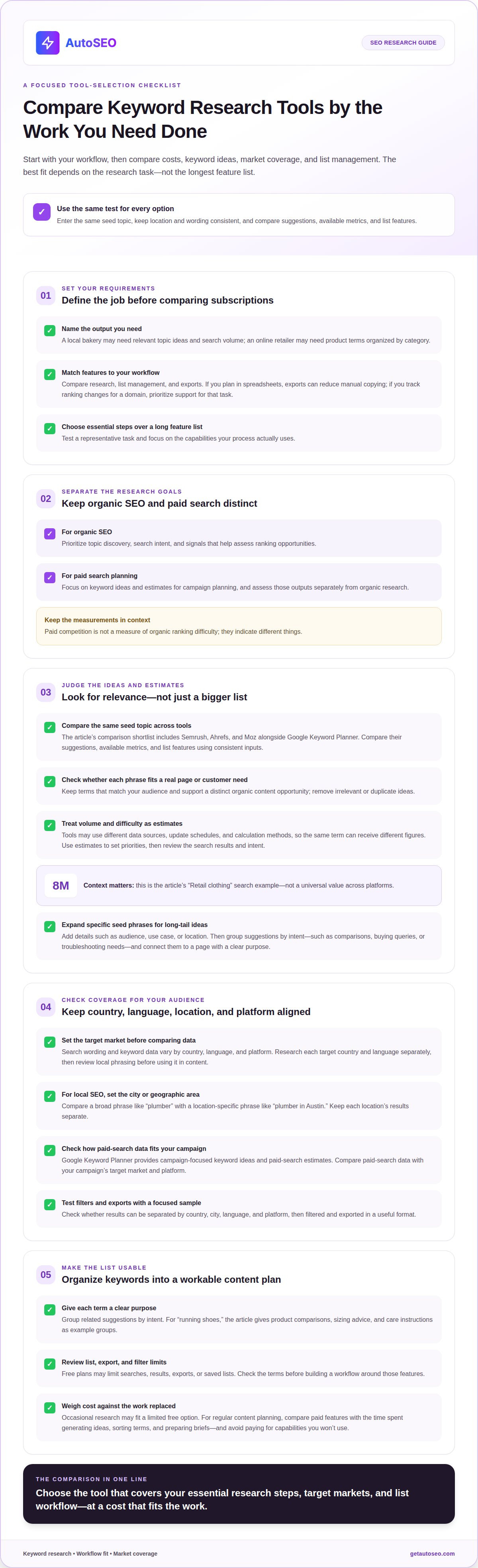
For 2026, shortlist Semrush, Ahrefs, and Moz as alternatives to compare with Google Keyword Planner. There’s no universal best choice; the right fit depends on the research task and your workflow. Enter the same seed topic in each tool, then compare its suggestions, available metrics, and list features. Keep the location and wording consistent so differences reflect the tools’ results.
Check whether each suggestion fits a real page, product, or customer question. A long list adds little value if the terms don’t match your audience. Compare tools using the same criteria, then select keywords that support distinct organic content opportunities.
Search Volume and Difficulty Estimates
Search volume and keyword difficulty are estimates, not interchangeable measurements. Tools can use different data sources, update schedules, and calculation methods, so the same term may receive different figures. A “Retail clothing” search example is illustrated with 8M. Treat that figure as a specific example, not a universal value across platforms.
Use estimates to set priorities, then examine the search results for the topic itself. Check whether the ranking pages address the same intent and whether your site can offer something more useful. Compare a small group of related keywords within each tool before judging their relative opportunities. This ties decisions to both the available data and what users need.
Long-Tail Keyword Discovery
Find long-tail keywords by expanding a specific seed phrase. Start with a product or problem, then add useful details such as audience, use case, or location. For example, turn “running shoes” into a query about shoes for wet-weather trail running. Search suggestions and related questions can reveal wording that broad terms miss.
Next, group ideas by intent. Separate comparison questions from buying queries and troubleshooting needs. Check each phrase against your planned page, then remove duplicates and irrelevant terms. This builds a focused list without relying on Google Keyword Planner and connects keyword ideas to pages with a clear purpose.
International and multi-platform keyword data
Keyword data varies by country, language, and search platform. A customer in the U.S. may use different terms from a customer in the United Kingdom for the same product. Set your target market before comparing suggestions, search volume, or keyword difficulty. Otherwise, a list can mix signals from audiences you don’t serve.
For international research, run the same seed topic separately for each target country and language. Compare the wording and group phrases by market before combining them. A term that fits U.S. shoppers may sound unnatural elsewhere. Review local phrasing before using it in page titles, product copy, or content optimization.
For Google Ads and PPC research, Google Keyword Planner provides campaign-focused keyword ideas and paid-search estimates. Semrush and Ahrefs can also support keyword research workflows; compare their paid-search data with your campaign’s target market and platform. Don’t treat paid competition as a measure of organic ranking difficulty: they indicate different things.
For local SEO in U.S. cities, set the city or geographic area as your research location before collecting suggestions. Compare a broad phrase such as “plumber” with a location-specific one such as “plumber in Austin” to see whether the wording reflects local intent. Keep results for each location separate, so one city’s volume doesn’t shape another city’s page plan.
Before choosing a subscription, test how it separates data by country, city, language, and platform. Check whether you can filter a keyword list using those settings and export the results in a useful format. A focused sample across two markets can reveal gaps in regional coverage and make the comparison practical, without relying on a large set of loosely related terms.
Keyword lists, exports, and filters
A keyword list is useful when each term has a clear purpose. Group “running shoes” suggestions by intent, such as product comparisons, sizing advice, and care instructions. This turns analysis into a content strategy instead of leaving ideas in one long, mixed list. Keep branded terms, product categories, and customer questions separate for easier review.
Filters narrow a list to terms that fit a page or campaign. Sort by search volume, competition, or other available metrics, then remove phrases that don’t relate to the topic. A shop selling trail shoes, for example, can exclude suggestions about formal footwear. Apply location or language filters when targeting a specific market.
Exports matter when research moves from a tool into a spreadsheet, brief, or advertising plan. Before choosing a platform, test whether the export preserves keywords, selected metrics, and your categories. Open the file and confirm that “product comparison” terms remain distinct from informational queries. Clean exports reduce manual sorting and simplify handoffs.
Review each keyword list consistently. First, remove duplicates and irrelevant suggestions. Next, group the remaining phrases by search intent and assign each group to a suitable page. Then compare metrics within each group instead of treating every keyword as a separate opportunity. This helps prevent a broad topic from producing competing pages with nearly identical targets.
For example, a home-improvement site could separate “how to seal a drafty window” from “window weatherstripping.” The first may suit an advice article; the second may fit a product or category page. Note why each term belongs in its group. That context helps with future updates and advertising decisions, especially when several people share the research process.
AutoSEO: Automated SEO Platform Subscription
AutoSEO is an Automated SEO Platform Subscription for businesses ready to turn SEO planning into ongoing execution. It automatically creates and publishes expert articles and builds backlinks to support organic visibility. It’s a natural next step when keyword research is no longer the main bottleneck and you need a consistent way to put content into action.
Use your research to identify relevant topics and build them into a broader content strategy. AutoSEO automates ongoing SEO work, helping you focus on business priorities while content and backlink activity continue. It isn’t a standalone keyword research tool, so choose a dedicated research platform when you need keyword lists, filters, or search data.
If automated SEO is your next step, contact AutoSEO to learn more about the subscription.
Turn keyword research into your next SEO move
Choose a priority topic and decide what action your research should support. You might plan a useful page, improve an existing one, or build a repeatable content process. A clear next step connects keyword analysis to business goals instead of letting a spreadsheet become the end product.
When assessing alternatives to Google Keyword Planner, focus on a workflow you can maintain. Revisit your target topics as your products, audience, and content priorities change. Keep the process simple: choose a focus, act on the insight, and use what you learn to guide your next decision. Consistent execution gives your SEO strategy room to develop.
If you’re ready to move from planning toward ongoing SEO execution, contact AutoSEO about keyword research. Take the next step with a clear direction and build momentum around work that supports your goals.
Frequently Asked Questions
What makes the best keyword research tool?
The best keyword research tool helps you make better decisions, not just collect terms. It should suggest useful keywords, help you compare opportunities, and fit the way you plan content or campaigns. A small business, for example, could test how easily a tool identifies customer questions and turns them into distinct page ideas. Choose according to the task you need to complete.
Which keyword research tools offer free plans or free trials?
Free plans and trials vary by tool, and usage limits may differ. Before relying on one for ongoing research, compare what it allows you to do, such as run searches, save a list, or export results. Treat that as separate from choosing keyword-data software.
How much do popular keyword research tools cost per month?
Monthly costs depend on the plan and included features. Research limits, available metrics, saved lists, and export options can all affect what fits your workflow. Compare the capabilities you’ll actually use instead of choosing the plan with the longest feature list. If you need only occasional topic ideas, a lighter plan may suit you better than a subscription designed for regular team research.
What are the best free keyword research tools for small businesses?
A practical free starting point combines search autocomplete, customer questions, and a spreadsheet. Enter a service such as “roof repair” into search and record the suggested completions, then group them by customer need. Use the spreadsheet to note each phrase’s intended page and content format. This helps a small business build a focused list before adopting paid software.
How do Semrush, Ahrefs, Moz, and Google Keyword Planner compare?
Compare Semrush, Ahrefs, Moz, and Google Keyword Planner using the same seed topic, location, and wording. Assess their suggestions, available metrics, and list features. There’s no universal best option: Google Keyword Planner is useful for campaign-focused keyword ideas and paid-search estimates, while your choice should fit your task, workflow, budget, and needs.


