

Scale local SEO by automating repeatable work, not by treating every branch as identical. The practical answer to how to automate SEO for multiple locations is to build a dedicated page and Google Business Profile for each location, keep its name, address, and phone details consistent, and tailor content and profile information to the local area. Automate routine updates and reporting, then prioritize locations by opportunity and the work each one needs.
Managing multiple locations can turn simple SEO tasks into a constant cycle of edits, checks, and follow-ups. A shared process helps your team work faster, but every location still needs accurate details and locally relevant content.
This guide explains how to organize location data, automate repeatable SEO tasks, and decide where to focus first. Follow the workflow to scale local visibility while keeping quality intact.
Key Takeaways
- Standardize each location’s business details and build a repeatable process for catching inconsistencies across listings.
- Make every location page useful to local customers with area-specific services, information, and content.
- Automate recurring SEO tasks, then prioritize locations by their visibility gaps and growth opportunities.
- Separate performance tracking by location so you can connect search visibility with visits, calls, and conversions.
Maintaining consistent name, address, and phone number information
- Create one master NAP record for every physical location. Store the approved business name, street address, local phone number, and public-facing format together. For example, choose either “Suite 200” or “Ste 200” and use that format consistently. Record location-specific details separately so one branch’s information never replaces another’s.
- Set clear rules for every field before distributing updates. Use the actual name customers see at each location, not extra keywords added for search visibility. Keep address components in a consistent order and assign each branch its correct phone number. A standard format makes inconsistencies easier to spot across Google Business Profiles and directory listings.
- Use the master record as the source for citation updates. Map each field to the corresponding profile or directory field, then review changes before publishing. Automation cuts repeated manual entry, but incorrect source data can spread just as quickly. Test an update on one branch, such as correcting an outdated phone number, and confirm that only the right location changes.
- Audit citations quarterly. Compare each listing with the master record and flag differences in names, addresses, phone numbers, and formatting. Include the location’s website page and Google Business Profile in the review. Track each mismatch by listing, affected field, correction status, and completion date. This creates a clear work queue instead of relying on scattered notes.
- Lock Tier 1 citation profiles against third-party edits wherever the platform allows it. Prioritize listings that display prominently or feed other directories, and assign an owner to review profile alerts. If an address changes, update the master record first, then correct connected profiles and citations. Finish by checking each public listing against the approved location details.
How To Do Local SEO For Multiple Locations?
Create a dedicated page and Google Business Profile for each branch. Tailor the content, structure, and measurement to that location.
-
Tailor Content to Local Services and Audiences
Build each page around the services actually available at that branch and the needs of nearby customers. Name the location, explain how its services meet local needs, and include useful details that distinguish it from other branches. For example, if a location offers weekend appointments, state that clearly. Don’t copy one generic page and simply swap in a city name.
-
Build Location Page Hubs and Add LocalBusiness Schema
Group branch pages under a clear locations hub, with logical, city-specific paths beneath the directory. Give each page its own local address and contact details, then use structured data to identify the branch. Check that the marked-up location matches the page content and corresponding business profile. Keep pages easy to reach from the hub instead of burying them in unrelated navigation.
-
Add Local Keywords and Landmarks
Choose search terms that reflect the services and area each branch serves. Include the city, neighborhood, or relevant service-area wording where it naturally clarifies the page, rather than repeating keywords mechanically. Mention a recognizable local landmark only when it helps customers understand the location or service area. Review each page and remove place names that don’t fit that branch.
-
Track Performance by Location
Give each branch its own reporting row and connect its page and profile to that location. Track local rankings, website visits, calls, and conversions separately, using consistent date ranges and definitions. Compare trends to spot pages attracting visits but few inquiries. Review customer feedback alongside the results, respond to reviews with location-specific information, and keep service descriptions consistent across profiles and pages.
Automation and prioritization across locations
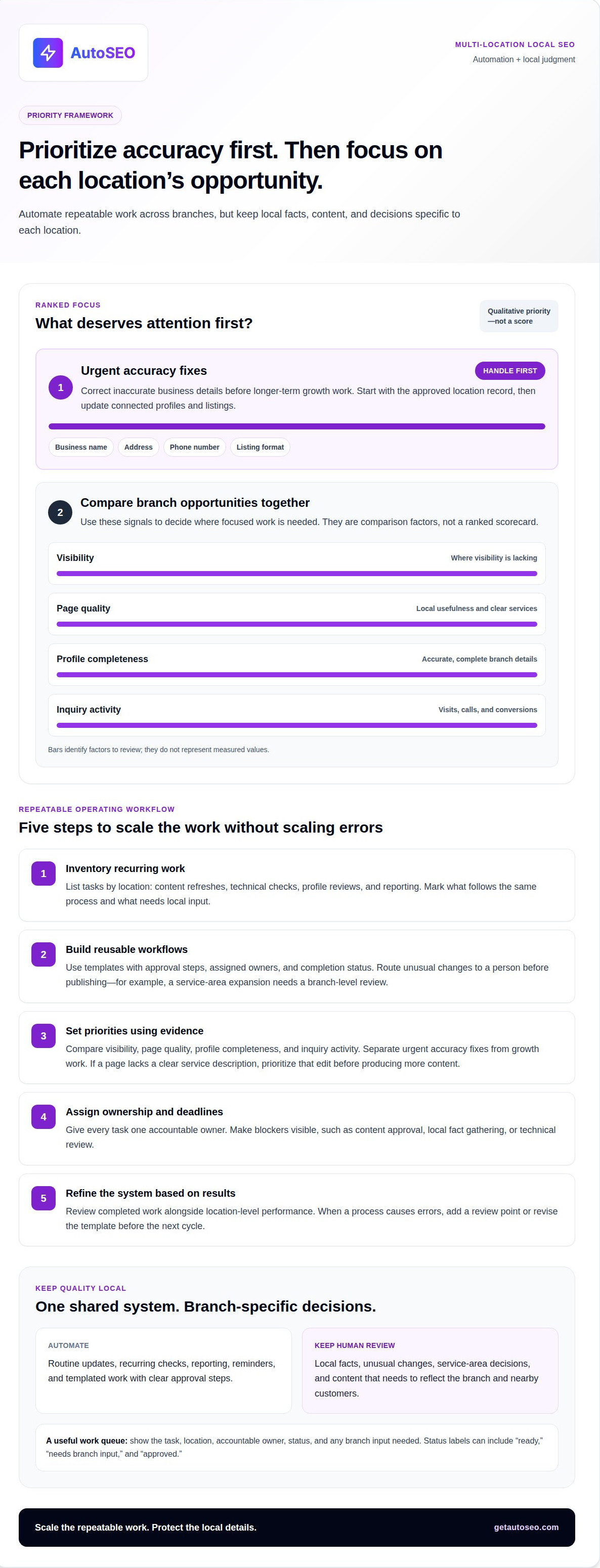
Automate repeatable tasks first, then focus people on decisions that require local knowledge. A clear workflow separates routine production from branch-specific priorities and helps maintain quality as the work scales.
- Inventory recurring work. List each SEO task by location, such as content refreshes, technical checks, profile reviews, and reporting. Mark which steps follow the same process and which require local input. A practical approach to automating SEO for multiple locations starts by identifying repeatable work, not by automating every decision.
- Build reusable workflows. Create templates for routine tasks, with approval steps, assigned owners, and completion status. Set reminders for reviews and route unusual changes to a person before publication. For example, a service-area expansion should trigger a branch-level review, not an automatic update copied across all locations.
- Set priorities using evidence. Compare each branch’s visibility, page quality, profile completeness, and inquiry activity. Separate urgent accuracy fixes from longer-term growth work. If a location page lacks a clear service description, prioritize that edit before producing more content. Record why each task ranks highly so the team can apply the same decision logic next time.
- Assign ownership and deadlines. Give each task one accountable owner, even when several teams contribute. A central queue can show whether content approval, local fact gathering, or technical review is holding up progress. Use status labels such as “ready,” “needs branch input,” and “approved” to keep work moving without repeated follow-ups.
- Refine the system based on results. Review completed work alongside location-level performance, then adjust the next task queue. If a process repeatedly causes errors, add a review point or revise its template. As priorities evolve, use the same framework to decide how to automate SEO for multiple locations, keeping human judgment focused on local differences.
How do you track local rankings, calls, website visits, and conversions by location?
Build a reporting view that connects search visibility to customer actions. To understand how to automate SEO for multiple locations, keep branch results distinct and apply the same measurement rules across them.
- Set a location-level baseline. Create a row for every branch and record its target area, location page, and Google Business Profile. Track rankings for the same relevant search terms and geographic settings in each reporting period. Consistent settings make comparisons more useful than changing the search context between reviews.
- Separate website visits by landing page. Group analytics around each branch’s dedicated page, then review visits, traffic sources, and actions taken. If a visitor lands on the Denver page, attribute that session to Denver’s page performance. Keep page names and reporting labels consistent so location totals are easy to compare.
- Connect calls to the correct branch. Record calls by the location number or profile that generated them, and distinguish calls from other types of inquiries. Use the same method across branches, then compare call activity with page visits and profile engagement. Track qualified inquiries separately when your process allows, rather than counting every call as a new customer.
- Define conversions before comparing results. Choose meaningful actions, such as a completed booking, submitted lead form, or confirmed purchase. Apply the same conversion definition to every location. For example, count a form submission as a lead only after it reaches the relevant branch’s inbox. This prevents duplicate or incomplete actions from distorting totals.
- Review the full path and act on gaps. Compare rankings, visits, calls, and conversions for each branch in one report. Strong rankings with few visits may point to a relevance issue; visits without inquiries may indicate an unclear next step. Decide how to automate SEO for multiple locations by assigning follow-up tasks to the right owner and measuring progress in the next review.
Make location-level reporting repeatable with a workflow that helps you automate SEO tasks across branches.
AutoSEO: Automated SEO Platform Subscription
AutoSEO’s Automated SEO Platform Subscription can support ongoing content production and backlink building as your team manages local SEO across branches. The recurring subscription includes 30 SEO-optimized articles per month and 100 Domain Authority worth of backlinks. Use this ongoing output to support your broader organic search efforts, while keeping location details and local page decisions specific to each branch. Automation works best when repeatable production supports a clear location strategy, rather than replacing accurate local information or performance reviews. If you’re ready to streamline ongoing SEO work, visit AutoSEO to explore the platform.
Put Your Location SEO Workflow Into Motion
Choose one location for your first operational test. Document the workflow, identify where human review matters, and refine the process before applying it to other branches. This gives your team a clear way to scale without letting automation erase meaningful local differences.
Next, decide how much ongoing SEO work you want to manage internally. If you’re considering how to automate SEO for multiple locations, match your approach to your team’s capacity and the consistency your growth plan requires. AutoSEO’s Automated SEO Platform Subscription provides a daily expert-written SEO article with built-in backlinks, helping businesses make recurring SEO content part of their operations.
Define your next priority, then take the step that moves your location strategy forward. Contact AutoSEO to discuss your needs and choose a practical starting point. A focused workflow can give your team a stronger foundation for scaling local visibility.
Frequently Asked Questions
What is a scalable workflow for automating local SEO across multiple locations?
A scalable workflow combines shared standards with clear branch-level ownership. Assign responsibility for content approvals, profile changes, and reporting. Use a central task queue to flag exceptions, such as a service change affecting only one branch. Review completed work before publishing, then use the results to improve templates. This keeps routine tasks moving without treating every location as interchangeable.
Which SEO tools automate listings, rank tracking, reviews, and reporting for multiple locations?
Choose tools based on the tasks they actually handle. Listings platforms can distribute business information, rank trackers can segment visibility by area, and review tools can organize incoming feedback. Reporting tools can bring performance data together. Check whether each tool supports location-level access and exports. Don’t assume one platform handles every workflow: content automation and listing management, for example, are different capabilities.
How much do multi-location local SEO automation tools cost?
Costs vary by tool scope, number of locations managed, user access, reporting depth, and included features. Some platforms price by location or subscription tier, while other services use different models. Compare the workflows included, not just the headline plan. For an AutoSEO subscription, the price depends on the case and is given after a quote request; relevant factors include the work and scope required.
How can you automate local business listings and keep NAP data consistent across directories?
Maintain one approved location record and use a controlled update process. When a branch changes its phone number, log the change, identify affected listings, and assign someone to review the published result. Use duplicate detection to catch multiple profiles for the same branch before submitting updates. Keep a correction log so staff can distinguish a verified change from an unexpected edit.
How do you create unique location pages without generating duplicate or thin content?
Give each page useful information customers can get only from that branch. Include verified service availability, local appointment details, staff expertise, or examples of work relevant to the area. Ask branch teams for specific facts before drafting, then remove generic paragraphs that could appear unchanged on every page. Swapping in a city name alone doesn’t make a page meaningfully distinct.
What are the risks of automating local SEO, including duplicate listings and policy violations?
Automation can spread incorrect details quickly, create duplicate profiles, or publish repetitive, low-value pages. Review source data and the publication queue before changes go live. Require human approval for sensitive updates, such as business identity or service claims. Follow each platform’s profile and review rules, too: fabricated reviews, misleading details, and keyword-stuffed names can damage trust and visibility.


