

The right Clearscope alternative gives you useful keyword reports and difficulty metrics at a cost that fits your workflow. A lower subscription price alone does not show whether each report offers enough insight to guide better content decisions.
It makes sense to compare tools on more than keyword suggestions. Consider what each report includes, how its difficulty metrics help prioritize topics, and whether the cost fits the number of reports you use.
This comparison examines the trade-offs across seven options, including keyword data, difficulty metrics, report costs, and practical value. You’ll see which tools suit teams that need detailed content guidance, which support broader SEO workflows, and what to weigh before choosing. The goal is a clear decision, not another feature checklist: match the reporting depth and workflow to the work you need done, then choose the option that delivers the most useful value per report.
Key Takeaways
- Compare keyword coverage and difficulty metrics to see whether each report supports the content decisions you need to make.
- Identify what’s driving your search for a different tool, such as workflow fit or the level of reporting detail.
- Assess report costs against the work each report helps you complete, not just the subscription price.
- Use the comparison and decision guide to narrow your options to the workflow that best fits your SEO priorities.
Keyword reports and difficulty metrics
How do Clearscope alternatives compare on features and ease of use? They vary in how they organize keyword suggestions, explain ranking difficulty, and turn report data into briefs. A clear workflow matters: writers should be able to move from a target keyword to useful content without copying the same details between tools.
Judge each report by the decisions it supports. A keyword list can reveal related topics, but it needs context to guide a draft. Difficulty metrics can help prioritize opportunities, but their scores are estimates, not ranking guarantees. Check the report’s sources, the search intent it reflects, and whether its recommendations fit the page you plan to create.
Use the same sample keyword in each platform. Compare topic coverage, supporting sources, suggested structure, and how easily you can create a brief. A local service page and an educational guide, for example, should not have identical content priorities. Check whether the tool helps writers distinguish between those needs or simply presents a broad list of terms. Useful recommendations support a coherent page rather than encouraging repetitive keyword use.
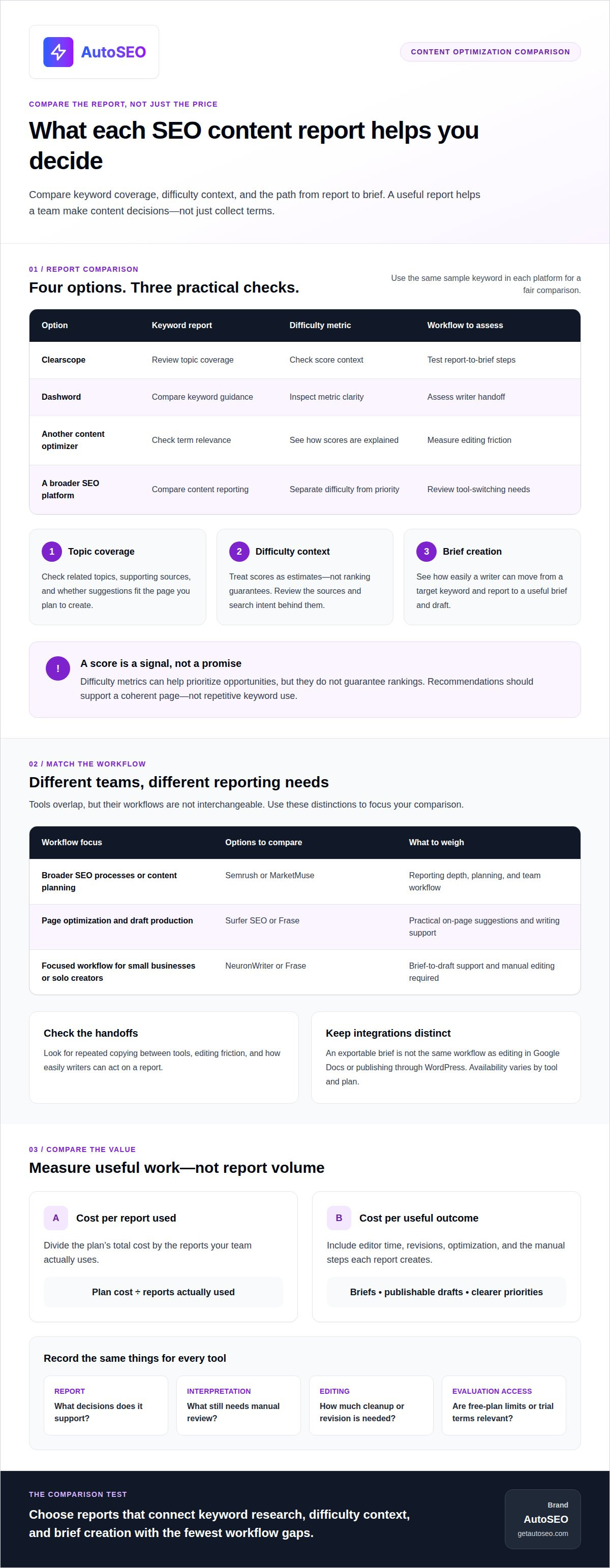
| Option | Keyword report | Difficulty metric | Workflow to assess |
|---|---|---|---|
| Clearscope | Review topic coverage | Check score context | Test report-to-brief steps |
| Dashword | Compare keyword guidance | Inspect metric clarity | Assess writer handoff |
| Another content optimizer | Check term relevance | See how scores are explained | Measure editing friction |
| A broader SEO platform | Compare content reporting | Separate difficulty from priority | Review tool-switching needs |
For a fair comparison, record what each report helps you decide, what requires manual interpretation, and how easily a writer can act on it. A cheaper report may still take more time to use if its guidance needs substantial editing.
Choose the platform whose reports connect keyword research, difficulty context, and brief creation with the fewest gaps in your workflow.
A study reported that adding quotations improved visibility by around 28%. Treat that result as a signal to examine whether quotation use is relevant to a page, not as a universal forecast or a substitute for reviewing a report’s topic coverage and difficulty context. When comparing recommendations, distinguish the reported visibility improvement from a guarantee that any particular keyword or page will rank better.
Reasons to seek a Clearscope alternative
Another platform may make more sense if its features fit your writing process, team size, or content goals. The right choice depends on whether you need optimization suggestions, broader SEO research, or a smoother path from briefs to drafts.
Surfer SEO, Semrush, Frase, MarketMuse, and NeuronWriter support overlapping but distinct workflows. Compare their reporting depth, content planning, and writing support instead of treating every feature as interchangeable. A team starting with topic research may value planning tools, while a writer refining an existing draft may prioritize practical on-page suggestions.
Google Docs and WordPress integrations vary by tool and plan. Treat direct editing and publishing integrations as separate requirements: an exportable brief does not offer the same workflow as editing in Google Docs or publishing through WordPress.
For agencies and enterprise teams, a strong fit supports repeatable briefs, clear collaboration, and consistent reviews across client or department workflows. Semrush or MarketMuse may suit teams focused on broader SEO processes or content planning, while Surfer SEO and Frase may suit teams centered on page optimization and draft production. Match the tool to the workflow, not the company label.
Small businesses and solo creators often benefit from a focused interface that turns a keyword into a useful brief and draft. NeuronWriter or Frase may be worth comparing for that purpose. Consider how much manual editing their suggestions require.
AI-powered optimization can miss audience nuance, repeat common recommendations, or encourage writing that chases a score instead of serving readers. Treat automated suggestions as inputs, then make editorial decisions based on accuracy, usefulness, and the page’s purpose.
Before switching, identify the feature that matters most: reporting, writing guidance, collaboration, or publishing. Test the same topic across shortlisted tools and note how easily each helps create briefs and develop drafts. This reveals workflow friction faster than a feature checklist.
Cost per report and cost per outcome
A subscription’s value depends on how much useful work each report supports. Divide the plan’s total cost by the reports your team actually uses, then account for editor time, revisions, and content optimization. A report that needs extensive cleanup may cost less upfront but take more time to use.
Compare outcomes, not just report volume. One keyword research report, for example, might shape a brief, guide an editor, and help writers revise a draft. Another might provide competitor data but leave the team to build its own process. Track whether reports lead to useful briefs, publishable drafts, or clearer priorities. These outputs show whether the tool supports your actual content work.
Free-plan and trial access varies by platform and plan, so include the terms in your comparison. A free plan may offer ongoing access with limits, while a trial provides a temporary evaluation period. AutoSEO offers a trial, so you can assess its broader SEO workflow.
To compare tools consistently, use the same topic and draft in each available evaluation. Note what the report provides, how long editing takes, and whether its recommendations fit the page’s purpose. Include manual steps, such as moving keyword suggestions into a brief or copying optimization notes into another editor. This reveals the work behind the headline report count.
Then connect tool use to outcomes your team can observe. Consider whether content is published on schedule, revisions become more focused, and organic traffic or rankings change over time. Search results have multiple influences, so don’t credit a content tool alone. Authority, technical issues, and the strength of competing pages also shape performance.
A practical comparison weighs subscription scope, usable reports, editing effort, and the quality of the decisions each report supports. Choose the workflow that turns research into strong content with the least avoidable friction, not simply the lowest apparent cost per report.
What are the best Clearscope alternatives for SEO content optimization?
The best fit depends on the work you need the platform to support. Compare Surfer SEO, Semrush, Frase, MarketMuse, NeuronWriter, Dashword, and Clearscope using the same topic and draft. Focus on the task each tool must handle, not a single overall ranking.
- Surfer SEO: Include it when evaluating a workflow centered on improving individual pages.
- Semrush: Consider it if you want to compare content optimization with a broader SEO workflow.
- Frase: Assess how well its process connects research, briefs, and writing.
- MarketMuse: Compare its approach to planning and prioritizing content topics.
- NeuronWriter: Test whether its recommendations help your writers improve drafts efficiently.
- Dashword: Review its reporting and brief workflow alongside your current process.
- Clearscope: Keep it in the comparison as a benchmark for the features your team already uses.
These are starting points for comparison, not universal rankings. A solo writer may prioritize a simple path from keyword to usable draft. An agency may care more about repeatable briefs and team handoffs. A larger content team may weigh consistency across planning, editing, and review. The strongest choice supports your actual publishing process.
Run a practical evaluation. Choose a topic your team understands, create a brief, then apply the tool’s guidance to an existing draft. Record where the recommendations help, where manual judgment remains essential, and how smoothly work moves between research and editing. Repeat the same steps for each shortlisted option.
Finally, distinguish SEO guidance from editorial quality. A tool can organize suggestions, but writers still need to check accuracy, audience relevance, and whether the page meets its intended need. Choose the platform that makes those decisions easier without turning every draft into a score-chasing exercise.
Evidence can also inform the evaluation: the generative engine optimization study tested content strategies across 10,000 queries, while a 2023 study of generative engine optimization reported that adding statistics improved visibility by around 41%. Treat these findings as prompts to test how a platform supports evidence-rich content, not as guarantees for every topic or search environment. A four-week pilot can help assess whether a content-tool workflow fits, while giving the team time to compare editorial checks and handoffs across options.
AutoSEO
AutoSEO is a natural next step when you need more than keyword reports and want SEO work automated. Its Automated SEO Platform Subscription creates and publishes 30 SEO-optimized articles per month and builds backlinks worth 100 Domain Authority. That broader workflow suits businesses aiming to maintain consistent content production while scaling organic search efforts.
Choose a reporting tool if you prioritize hands-on keyword analysis and brief creation. Turn to AutoSEO when you want an ongoing platform that handles content production and publishing alongside backlink building.
For a direct comparison, distinguish report-level research from ongoing SEO execution. They address different workflow needs. Contact AutoSEO to discuss whether its platform fits your content goals.
Make your next SEO workflow decision
Choose a Clearscope alternative by starting with the work you want to improve, not the longest feature list. Decide whether your next step is sharper editorial planning, more efficient production, or a workflow that keeps content moving consistently. That priority gives your comparison a practical test: does the tool fit how your team creates and publishes?
Then set a clear measure for evaluating the change. It might be less time spent preparing briefs, smoother handoffs, or a more consistent publishing process. Tie the measure to your actual goal and review it as your workflow develops. A tool should support better decisions, not replace them.
If you want to move from comparing reports to automating ongoing SEO work, contact AutoSEO to discuss your options. Take the next step with a focused goal and build a content process that can support quality and scale.


