

A service-area business can target customers in other cities, but website rankings and Google Maps rankings follow different rules. The practical answer to how to get my website to rank in other cities is to create useful, city-specific pages while recognizing that a Google Business Profile has geographic limits in Maps. A page can compete in organic results, but it won’t expand your profile’s reach in Maps.
Listing more service areas doesn’t automatically make your business visible in every nearby city. In Maps, visibility depends on factors such as relevance, distance, prominence, profile optimization, and local competition. There’s no fixed ranking radius. This guide explains how to build Local City Pages with meaningful local details, prioritize worthwhile areas, and understand when a city is beyond your Maps reach. The goal is to expand local visibility without treating every city page as a shortcut into the Map Pack.
Key Takeaways
- Build a strong presence in your home city before expanding your targeting to other locations.
- Use distinct, useful city pages to compete in organic search, while treating Google Maps visibility as a separate challenge.
- Strengthen local pages with genuine job photos and customer reviews that show your connection to the area.
- Focus on locations you can serve meaningfully instead of creating thin pages for every city.
What if the town is completely outside your ranking area?
Build a strong presence in your home city first, then expand city by city with useful local pages. To track rankings and leads separately, give each city its own landing page and compare its search visibility with the inquiries it generates.
-
Research Local Keywords by City
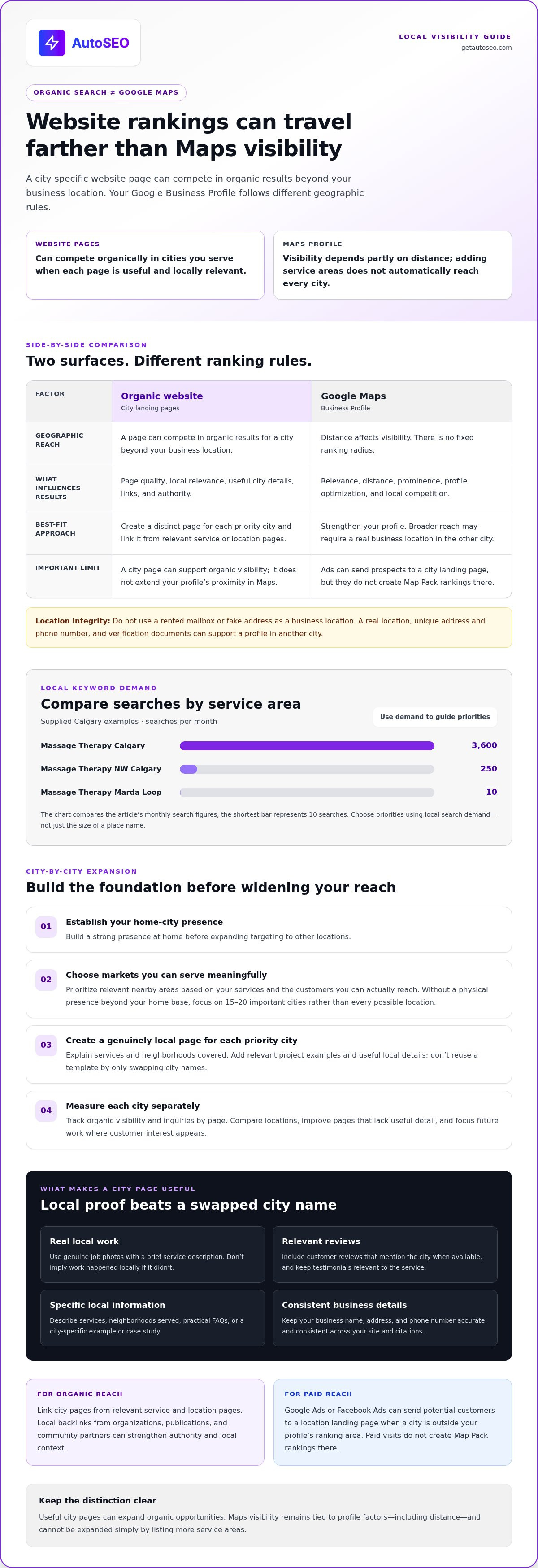
Start with keyword research for each target city and neighborhood. Compare service-and-location searches before choosing priorities. For example, the supplied Calgary figures show “Massage Therapy Calgary” at 3,600 searches per month, “Massage Therapy NW Calgary” at 250, and “Massage Therapy Marda Loop” at 10. Use local search demand to guide optimization, not just the size of a place name.
- Expand only after your home-city presence is established. Then prioritize the most relevant nearby markets, based on the services you provide and customers you can actually reach. When you have no physical presence beyond your home base, focus on 15-20 important cities rather than spreading effort across every possible location.
If a city is outside your profile’s ranking area, Google Ads or Facebook Ads can send potential customers to a landing page for that location. Paid ads can generate targeted visits, but they won’t create Map Pack rankings there.
-
Create Distinct City Landing Pages
Build a dedicated page for each priority city and explain which services you provide there. Include genuinely useful local details, such as relevant project examples, service information, and the neighborhoods you cover. Don’t copy one template and simply swap city names. Thin or duplicate pages give visitors little reason to choose you and offer little value as local search resources.
- Measure each city page separately. Track its organic ranking and the inquiries associated with it, then compare results across locations. Keep pages that attract relevant searches and leads, and improve those that lack useful local details. This city-by-city feedback helps you focus future content and optimization on places with real customer interest.
Can a service area business rank in multiple cities?
Yes, but website rankings and Google Maps visibility work differently. If you’re asking how to get my website to rank in other cities, treat organic search and Maps as separate goals from the outset.
-
Understand Website and Profile Ranking Differences
Separate organic rankings from Maps rankings. A city-specific website page can compete beyond your business location, while a Google Business Profile’s reach depends partly on distance. Google’s local results also weigh relevance and prominence. There’s no fixed radius: profile optimization, age, nearby competitors, and local relevance all influence where the profile appears.
-
Target Other Cities With Website Pages
Create useful pages for the cities you serve, then link to them from relevant service and location pages. Keep your business name, address, and phone number consistent wherever they appear. Internal links help visitors and search engines find the right city page. A page can support organic rankings in that city, but it doesn’t extend your profile’s proximity in Maps. To get my website to rank in other cities, make every page useful to people in the specific location it targets.
-
Build Local Backlinks and Citations
Earn links from relevant local organizations, publications, and community partners. These backlinks can strengthen a city page’s authority and local context. Keep business citations accurate and consistent, especially your name, address, and phone number. Consistent references help search engines connect your business details with the places and services described on your site.
How long it takes to rank varies with competition, page quality, relevance, and authority. Track each city page separately to see where organic visibility and leads develop.
- For broader Maps visibility, establish a real business location in the other city and create a profile with a unique address and phone number. Documents such as a business license, registration certificate, DBA certificate, or utility bill can support verification. Don’t use a rented mailbox or fake address as a business location. It can undermine the profile’s legitimacy and put its standing at risk.
What are Local City Pages?
A Local City Page is a landing page for customers in a specific location. Strengthen each page with local proof, relevant details, and a clear next step.
-
Add Local Proof From Jobs and Reviews
Show genuine work from the target city, pairing each photo with a brief description of the service provided. Add customer reviews that mention the city when available. These details offer concrete evidence of your local connection rather than merely repeating a place name. Keep every image and testimonial relevant to the service on the page, and don’t imply a job took place locally if it didn’t.
-
Include Localized Examples and FAQs
Write a city-specific example or case study that explains the customer’s need, the work completed, and the result without making unsupported claims. Then answer practical questions customers in that location may have about your services. For a storefront page, include directions and local customer testimonials. If you can accurately describe how many customers you serve in the target area, that detail can also make the page more useful and specific.
-
Add Maps and Other Localized Content
Add a map when it helps visitors find a real storefront, and make sure the directions match its location. For a service-area page, clarify the neighborhoods you serve and the work available there, rather than implying you have an address in that city. You can use Google Ads or Facebook Ads to send local prospects to the relevant landing page. Ads can attract visitors, but they don’t create Map Pack rankings in that city.
Before publishing, review each page to confirm its service details, local examples, photos, reviews, and next step all fit the target area. That keeps local SEO useful to customers, rather than optimizing pages around place names alone.
Google Map 3-Pack and geographic ranking limits
Separate Google Map 3-Pack visibility from organic rankings. A city page can target local searches, but it can’t move your business’s physical location closer to searchers.
- Assess your Google Business Profile’s actual reach before setting Maps targets. Google’s local rankings weigh relevance, distance, and prominence, so a profile has no fixed ranking radius. Its optimization, age, and nearby competitors also affect visibility. Search from different locations around your home base, then record where your profile appears and where it drops out.
- Strengthen the real-world signals tied to your primary location. If you operate a physical storefront, display permanent signage with the exact business name and keep staff on site during opening hours. These details support the connection between the profile and the place customers visit. Don’t use a virtual office or mailbox to suggest a location where your business doesn’t operate.
- Choose a separate physical location only when your business genuinely operates there and needs a profile for that market. A genuine business location in another city may help support local visibility there, while a city page alone may not provide the same benefit. A city page can compete in organic results, but it won’t provide the same local profile benefit. Keep these outcomes distinct in your strategy.
- Set realistic geographic targets instead of building pages for hundreds or thousands of cities. Prioritize places where you can provide the service and create specific, useful information for local customers. Track organic page performance separately from Map Pack visibility. If your page attracts city searches but your profile remains outside local results, focus on organic reach rather than trying to force a Maps presence without a real location.
Build a focused expansion plan and plan your next city-page expansion around genuine service coverage.
AutoSEO: Automated SEO Platform Subscription
AutoSEO’s Automated SEO Platform Subscription can support the ongoing content work behind a city-by-city organic search strategy. It generates and publishes 30 SEO-optimized articles per month and builds backlinks with 100 Domain Authority worth of value, helping small businesses maintain a consistent SEO program as they target relevant markets.
An automated platform can help when creating and publishing useful content for multiple service areas takes time away from running your business. Keep each city page specific to the services and local proof you can genuinely provide. Automation can support publishing, but Google Maps visibility still depends on your business’s actual location and local relevance.
For ongoing SEO content and backlink building, explore AutoSEO’s subscription.
Turn Your Expansion Plan Into Consistent Progress
Choose a priority city and make its page genuinely useful to local customers. Then monitor whether it brings relevant search visibility and inquiries. Use those signals to guide your next investment in content and optimization.
A focused approach to how to get my website to rank in other cities depends on consistent work, not publishing place names at scale. If maintaining that work competes with serving customers, AutoSEO’s Automated SEO Platform Subscription automates ongoing SEO content and backlink building. It supports a consistent publishing process while you keep each city page grounded in your actual services and local experience.
Build quality before scale, and keep improving based on what each market responds to. Contact AutoSEO to discuss your local SEO and explore a more efficient way to keep your strategy moving. Your next city can become a clear, achievable part of your growth plan.
Frequently Asked Questions
Can You Rank on Google Maps in Other Cities Where You’re Not Located?
You can appear in nearby city searches if your Google Business Profile ranks within its geographic reach. That reach depends on factors including distance, relevance, prominence, profile optimization, and local competition. Setting a service area doesn’t guarantee visibility in every listed city. For meaningful Maps visibility farther away, a genuine business location there can support a separate profile and local presence.
What Makes a Successful City Landing Page?
A successful city landing page helps someone in that location decide whether your service fits their needs. State which services you provide there, explain how customers can arrange the work, and make the next step easy to find. For example, a home-repair page can describe which repairs you handle in that city and what information customers should include when requesting service.
How does local SEO help a website rank in cities outside its physical location?
Local SEO helps search engines connect a relevant page with searches that name a city or neighborhood. A useful page can attract organic visitors even when your business is based elsewhere. Its value comes from matching the searcher’s needs with clear service information and details that matter in that location. Maps is different: distance between the searcher and your profile can limit visibility.
What are Google's rules for service-area businesses targeting multiple cities?
Represent your real business locations accurately, and don’t create profiles for cities where you have no genuine location. A service-area business can target customers beyond its base, but its profile’s reach in Maps remains geographically limited. To support a separate profile in another city, your business needs a real location with a unique address and phone number. A rented mailbox isn’t a genuine business location.
Should I create separate city landing pages or one service-area page for each city?
Create separate pages when each city supports useful, distinct information, such as different services, customer needs, or relevant project examples. Use a broader service-area page if the information is the same everywhere and you can’t add meaningful city-specific value. For example, don’t create separate pages for neighboring areas if they would contain identical service details and no locally relevant guidance.
How do I create useful city pages without triggering Google's doorway page policy?
Build each page to help visitors, not merely to capture searches containing a city name. Give it a clear purpose, accurate service details, and information that genuinely applies to that location. Avoid publishing batches of near-identical pages that swap place names or send every visitor to the same generic destination. If a page offers no distinct value, combine its useful details with a stronger page.


