
More content won’t fix a new domain that search engines can’t find. If you’re wondering how to get traffic for a brand new domain, start by making sure your site is accessible, useful, and focused on the people you want to reach.
A new site usually has little search visibility, no backlink history, and few signals to show what it’s about. That can make it hard to know whether to publish more, promote existing pages, or troubleshoot indexing first. The answer isn’t to do everything at once. Build relevance before you scale.
This guide gives you a practical, prioritized plan to attract visitors who are more likely to care about what you offer. You’ll learn how to check whether search engines can crawl and index your pages, choose focused topics, create helpful content, and promote it through channels that fit your audience and resources.
You’ll also learn how to track early performance and turn what you learn into a repeatable workflow. There are no traffic shortcuts or ranking promises here, just clear steps to help a new domain earn attention and grow sustainably.
Key Takeaways
- Learn how to get traffic for a brand new domain by establishing relevance before increasing content or promotion volume.
- Use an ordered crawlability and indexing check to spot access issues and understand what Search Console can confirm.
- Build a focused topic plan from customer questions, your expertise, and gaps in competing pages.
- Turn the first 30 days into a practical sequence of actions, then measure visibility, engagement, and relevant referrals without treating the schedule as a ranking promise.
- Scale a repeatable research, publishing, promotion, and review workflow. Use automation for routine tasks and human judgment to protect quality.
How to Get Traffic for a Brand New Domain Starts with the Right Expectations
A website can be live, polished, and ready for customers while attracting almost no visitors. Publishing it doesn’t automatically put it in front of people. If you’re working out how to get traffic for a brand new domain, start by separating the traffic sources and understanding what each one takes.
Organic traffic means visits from unpaid search results. Referral traffic comes from links on other websites, while paid traffic comes from advertising. Email and relevant communities can also bring early visitors, even before your pages earn search visibility. Search engine optimization (SEO) helps make pages easier to discover and more useful to searchers, but it’s one part of a broader traffic plan.
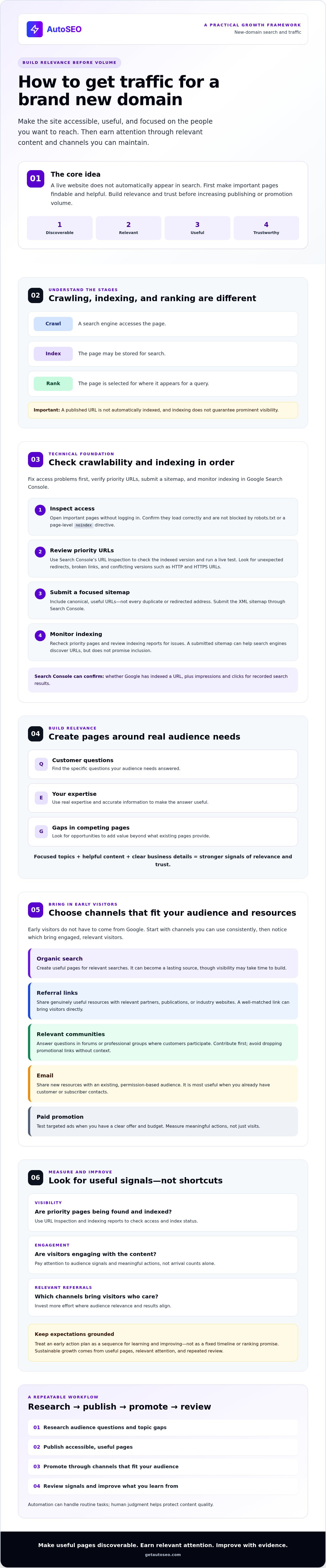
Search visibility grows when four things work together: search engines can discover and crawl a page, the page matches a real need, it provides a useful answer, and the site gives people reasons to trust it. New-domain traffic growth is the steady process of making useful pages discoverable, earning relevant attention, and improving them based on real audience signals. It’s a process, not a fixed timeline.
Why a new domain may have little search visibility
Search engines need to find a page, crawl its content, and assess whether it’s useful for a search. A published URL isn’t automatically indexed, and indexing doesn’t guarantee that the page will appear prominently. Technical barriers, weak internal links, or content that doesn’t add enough value can all limit visibility.
Domain age and page quality are different things. A new domain has less history for search engines and people to assess, but age alone doesn’t determine rankings. Focus first on accessible pages that answer specific customer questions. Then build trust by showing real expertise, accurate information, and clear business details.
Which traffic sources can bring the first visitors?
Choose channels based on where your audience already pays attention and what you can maintain. Early visitors don’t have to come from Google.
- Organic search: Create useful pages for relevant searches. This can become a lasting source, but visibility may take time to build.
- Referral links: Share genuinely useful resources with relevant partners, publications, or industry websites. A well-matched link can bring visitors directly.
- Relevant communities: Answer questions in forums or professional groups where your customers participate. Contribute first, and avoid dropping promotional links without context.
- Email: Share new resources with an existing, permission-based audience. It’s most useful when you already have customer or subscriber contacts.
- Paid promotion: Test targeted ads when you have a clear offer and budget. Track whether visitors take meaningful actions, not just whether they arrive.
Start with the channels you can use consistently. Track which ones bring visitors who engage, then invest more effort where relevance and results align.
Make a Brand New Domain Crawlable, Indexable, and Easy to Understand
Before creating more pages or promoting the site, confirm that search engines can reach the pages that matter. Work through these checks in order: fix access problems first, verify priority URLs, submit a sitemap, and monitor indexing in Google Search Console.
- Inspect access: Open important pages without logging in. Check that they load correctly and aren’t blocked by robots.txt or a page-level
noindexdirective. - Review priority URLs: Use Search Console’s URL Inspection to check the indexed version of key pages and run a live test. Look for unexpected redirects, broken links, or conflicting versions such as HTTP and HTTPS URLs.
- Submit a sitemap: Include canonical, useful URLs, not every duplicate or redirected address. Submit the XML sitemap through Search Console.
- Monitor indexing: Recheck priority pages and review Search Console’s indexing reports for issues. A submitted sitemap helps search engines discover URLs, but doesn’t promise inclusion.
Crawling means a search engine accesses a page; indexing means it may store that page for search; ranking means selecting where it appears for a query. These are separate steps. Search Console can report whether Google has indexed a URL and show impressions and clicks for recorded search results, but it can’t guarantee indexing, rankings, or future visibility. Report labels and platform behavior can change, so verify instructions against current Google documentation.
How to check whether search engines can access your pages
Start with your homepage and essential product or service pages. In URL Inspection, compare Google’s indexed information with the live test. If a page should appear in search, confirm robots.txt allows access and that its HTML or HTTP headers don’t include noindex. Check that redirects lead to the intended destination and that internal links don’t point to broken or duplicate URLs.
Then review the sitemap. It should list canonical versions of useful pages, use the correct domain and protocol, and avoid URLs that redirect or return errors. Submit it in Search Console and monitor the report for processing issues.
Which pages should a new domain publish first?
Make the site easy for people and search engines to understand. Start with a clear homepage, core product or service pages, and accessible contact information. Add supporting pages only when they answer distinct audience needs, rather than publishing near-duplicates to make the site look larger.
Connect these pages with descriptive navigation and contextual internal links. That helps visitors find the next useful detail and gives crawlers paths through the site. Once the technical foundation is in place, you can pair it with actionable traffic-driving tactics. For businesses seeking a more consistent publishing workflow, AutoSEO’s automated SEO platform is another option to explore.
Choose Content and Links That Build Relevance, Not Just Volume
A new domain doesn’t need a large library of interchangeable pages. It needs a clear reason for each page to exist. A focused guide that answers a specific customer question can serve readers better than a high-volume article that repeats what competing results already say. Before publishing, ask: does this page solve a real problem, add useful detail, and connect naturally to what the business offers?
That’s the practical starting point for how to get traffic for a brand new domain. Search demand matters, but volume alone doesn’t tell you whether a topic fits your audience or whether your page can satisfy the intent behind the search.
How to pick topics a new domain can serve well
Build a focused topic plan from three sources: questions customers ask, areas where the business has genuine expertise, and gaps in competing pages. For example, a business that sells project-management software might explore how customers assign responsibilities, compare workflow approaches, or prepare a team to adopt a new process. Choose topics that connect clearly to the offer without turning every article into a pitch.
Check the likely search intent before choosing a format. A search for “how to organize a small team’s tasks” may call for a practical guide, while a product comparison query may need clear criteria and distinctions. Review the pages already appearing for the topic, then decide what useful perspective or detail you can add. Link related pages with descriptive, natural wording instead of repeating the same keyword as anchor text everywhere.
How to earn links without chasing risky shortcuts
Links can help people discover your content and may contribute to how others assess your site’s reputation. They’re most useful when they come from relevant pages and make sense in context. Prioritize audience relevance and editorial context when assessing a potential link. A recommendation from a related publication or partner can be more valuable to your business than a larger number of links placed where your audience is unlikely to look.
Give people something worth referencing: a genuinely useful resource, original expertise, a clear explanation of a complex process, or data your business can share and support. Then pursue appropriate partnerships, expert contributions, or digital PR where the topic fits. Keep the audience in view. A link should make sense to the publisher’s readers even if search engines weren’t part of the conversation.
Avoid buying links in bulk or accepting promises of guaranteed rankings. Raw volume and third-party vanity metrics don’t show whether a link reaches potential customers or appears in a credible editorial setting. Review the source, surrounding content, and likely audience before investing time or money. Scale publishing and outreach only after research shows that the topics and relationships are relevant.
Follow a 30-Day Plan to Launch and Measure New-Domain Traffic
Use the first month to establish a reliable workflow, not to demand a ranking result by a deadline. This 30-day plan helps you check the basics, publish with purpose, and learn which pages and channels are reaching the right people. Search visibility can take longer, so treat the schedule as a planning framework, not a traffic or ranking promise.
What to do during the first two weeks
Days 1-7: Confirm your important pages are accessible and set up Google Search Console. Connect an analytics platform such as Google Analytics 4 (GA4) so you can distinguish search impressions and clicks from visits and on-site behavior. Record a baseline, even if the initial numbers are zero. Choose a focused set of topics based on customer needs and your business offer, then publish or improve your core pages.
Days 8-14: Share useful pages through existing customer or professional networks and relevant industry communities. Keep promotion useful and audience-led. In your tracking notes, record where you shared each page and which sources bring relevant visits. This gives you a reference point for deciding what to repeat.
What to review and improve during weeks three and four
Review Search Console for indexing status, impressions, clicks, and the queries associated with your pages. Use analytics to assess engaged visits and conversions that matter to your business. Check referral sources, too. Early data may be sparse or fluctuate, so look for clues rather than treating a short-term change as a final verdict.
- Indexed, but no impressions: Recheck the page’s topic, relevance, and internal links. Give search engines a clear path to the page and a clear reason it should serve a distinct need.
- Impressions, but few clicks: Compare the page title and search snippet with the query and likely intent. Make the promise specific and accurate, then monitor whether clicks change.
- Clicks, but no qualified visits: Check whether the content matches what the visitor expected. Improve the introduction, clarify the next step, or fill a content gap rather than simply pursuing more clicks.
At the end of the month, identify which topics and referral sources brought the strongest audience signals. Continue promoting useful pages that earn relevant engagement. Revise weak assumptions before increasing publishing volume. If a consistent workflow is difficult to maintain, explore an automated SEO platform to support research and publishing, while keeping human review in the process.
Scale New-Domain SEO with a Consistent Workflow, Not Blind Automation
Growth comes from a repeatable loop: research demand, publish useful pages, distribute them to relevant audiences, measure what happens, and refine the next move. Automation can reduce repetitive work in that loop. It can’t decide on its own whether a claim is accurate, a topic fits your customers, or a page adds value. Use it to support consistent execution, not to replace editorial judgment.
When SEO automation can support a new domain
Automation may help when limited time makes research, publishing, or routine workflow tasks difficult to maintain. Set clear review checks before anything goes live: verify factual claims, confirm the page reflects your brand, check that it matches search intent, and assess whether it offers something useful beyond existing results.
Apply the same discipline to backlink activity. Review the relevance of the linking site, the surrounding content, and whether the link makes sense to its audience. Be cautious of opaque placements or volume-first promises. Automation can help keep processes moving, but quality checks protect your site and reputation.
How AutoSEO fits into a broader traffic plan
AutoSEO is an automated SEO platform subscription, not an agency engagement or standalone manual consulting service. Its AI-powered research looks at a business, its customers, and competitors to inform a content plan and keyword targets. The subscription includes 30 SEO-optimized articles per month and 100 Domain Authority worth of backlinks. It can automatically publish to WordPress after initial setup, with one expert article generated and published daily.
That capacity is useful only when it matches your strategy. A publishing schedule should follow audience demand and relevance, not a target for filling the site. Review pages for accuracy, usefulness, and brand fit; assess backlink activity for relevance and transparency; then use performance signals to refine the plan. No automated workflow can guarantee indexing, rankings, or traffic.
If you’re deciding how to get traffic for a brand new domain, first define the workflow your business can sustain: what you’ll research, who will review content, how you’ll distribute it, and which signals will guide updates. If an automated subscription fits those needs, explore AutoSEO’s SEO workflow and assess whether its research, content, backlink activity, and WordPress publishing align with your goals.
Build a Traffic Workflow You Can Sustain
A new domain earns attention by making useful pages easy to find, giving each page a clear purpose, and sharing it with relevant audiences. Start with crawlability and indexing checks, then build focused content around real customer needs. Measure impressions, clicks, engaged visits, and referrals so you can improve based on evidence instead of publishing for volume alone.
That’s the practical answer to how to get traffic for a brand new domain: keep research, publishing, promotion, and refinement connected. Automation can help maintain that rhythm, but human review still protects accuracy, audience fit, and quality.
AutoSEO’s subscription researches your business, customers, and competitors to inform its content plan, and combines SEO content, backlink activity, and automated WordPress publishing. If that workflow fits your goals and publishing capacity, Explore SEO on Autopilot. No platform can promise rankings or traffic, but a focused, consistent process gives you a stronger foundation to learn and grow. Choose your next useful page, publish with purpose, and keep building momentum.
Frequently Asked Questions
How long does it take for a new domain to get organic traffic?
There’s no fixed timeline for a new domain to earn organic traffic. Search engines need to discover and assess your pages, and visibility depends on factors such as accessibility, relevance, usefulness, and competition. If you’re figuring out how to get traffic for a brand new domain, track indexing, impressions, and clicks without treating early fluctuations as a final verdict. Promote useful pages through relevant channels while search visibility develops.
Can a brand new domain rank on Google?
Yes, a brand new domain can appear in Google Search, but no page is guaranteed a ranking. Make sure search engines can access the page, then give it a clear purpose and useful content that matches what searchers need. A domain’s age alone doesn’t determine whether a page can rank. Review your pages for relevance, accuracy, and distinct value, then use Search Console to monitor impressions and clicks as data becomes available.
How do I get Google to index my new website?
Make important pages accessible, check that robots.txt and page-level noindex settings aren’t blocking them, and link to them from other relevant pages on your site. Submit an XML sitemap containing your preferred, canonical URLs through Google Search Console. Use URL Inspection to check selected pages and request indexing where the option is available. These steps can help Google discover pages, but they don’t guarantee that every URL will be indexed.
Do backlinks help a brand new domain get traffic?
Relevant backlinks can help people discover your pages and may contribute to how others assess your site’s reputation. Prioritize links that fit the topic and appear in useful editorial context, such as a relevant partner resource or industry article. Avoid buying links in bulk or trusting guaranteed ranking claims. A link’s value isn’t measured by volume alone: consider the source, its audience, and whether the link genuinely helps readers.
Should I publish lots of content when my domain is new?
No. Publish useful pages that serve distinct audience needs instead of chasing a high page count. Start with core business information, then choose supporting topics based on customer questions, your expertise, and gaps in existing search results. Before adding a page, ask whether it gives readers a clear answer or perspective they can’t get from your other content. A focused plan is easier to review, improve, and maintain than a library of repetitive articles.
Can social media bring traffic to a new domain?
Yes. Sharing useful pages on social media can bring visitors before your site has established search visibility. Choose platforms where your intended audience already spends time, and adapt the message to the discussion rather than posting the same link everywhere. Track referral visits and whether those visitors engage with the page or take a relevant next step. Social promotion can complement SEO, but it doesn’t guarantee search rankings or replace a useful, accessible website.
Is automated SEO content safe for a new domain?
Automation can support research and a consistent publishing workflow, but it doesn’t make every generated page accurate or useful. Review each draft for factual claims, search intent, brand fit, originality, and real value to readers before publishing. Avoid producing large volumes of pages that repeat existing results or add little information. Treat backlink activity with the same scrutiny: check relevance, transparency, and quality. Automation should help you scale quality, not bypass editorial judgment.


