

Local rankings rarely come from one clever SEO trick. If you’re asking how to get my small business to rank locally, start by strengthening the signals customers and search engines can verify across your business profile, website, and reputation. A single profile update won’t do the whole job, but a focused plan can make the work manageable.
It’s understandable to be unsure what Google prioritizes or how to fit SEO into an already full schedule. Your location affects which searches you can appear in, and no tool can guarantee a particular position. You can still improve relevance and visibility by keeping business details accurate, publishing useful local content, and building a consistent review process.
This guide lays out a practical local SEO plan for 2026. You’ll learn what to update first, how to make your website more useful to nearby searchers, and how to maintain consistent signals across platforms without turning SEO into a daily manual task. You’ll also find ways to track progress and reduce repetitive publishing work with automation.
Key Takeaways
- Learn how relevance, distance, and prominence shape local results, without treating them as a guaranteed ranking formula.
- Use a clear setup checklist to make your Google Business Profile accurate, verified, and properly maintained.
- Match service and location pages to genuine customer searches in the areas you serve.
- Build trust with a consistent, neutral review request process that avoids incentives and selective solicitation.
- Turn how to get my small business to rank locally into a phased plan, from fixing business details to improving pages and tracking progress.
How local search rankings work for small businesses
Local SEO helps a business appear when people search for products or services with a geographic connection. That connection might be stated directly or inferred from what the searcher wants and where they are. To improve how to get my small business to rank locally, make it clear what you offer, where you genuinely serve customers, and why your business is relevant to the search.
Google describes local results through three concepts: relevance, distance, and prominence. These are useful ways to understand what may affect visibility, not a formula that guarantees a ranking. Eligibility, competing businesses, the searcher’s location, and the exact query all shape what appears. Two people searching for the same service can see different results if they’re in different places or phrase their searches differently.
What makes a search local?
Some searches name a place, such as “plumber in Austin.” Others imply nearby intent, such as “plumber near me” or simply “plumber” when the searcher wants a local service. The searcher’s location can help Google interpret the second type of query, even when no city or neighborhood appears in the words.
Local results can appear in more than one format. The local pack highlights a selection of businesses, often alongside a map. Google Maps provides a map-based view of local businesses. Standard organic listings are website results outside those local features. A business may appear in one format and not another because the results serve different purposes and are influenced by different signals.
That distinction matters. A strong website can help a business appear in organic listings, while a complete, eligible business profile can support visibility in local features. Local SEO connects these efforts rather than treating one result type as the whole goal. The overview of Local Search Engine Optimization also explains how local search differs from broader SEO.
Which local ranking signals can a business influence?
Focus first on signals you can keep accurate and useful. Google’s concepts offer a practical way to organize the work:
- Relevance: Make your services, business details, and website pages specific enough to show how they match a search. Use clear descriptions and content grounded in the areas you actually serve.
- Prominence: Build a credible presence through trustworthy business information, useful website content, and a genuine reputation. Reviews help prospective customers assess the experiences others report.
- Distance: This reflects how far the business is from the searcher or the location in the query. You can define your real service area clearly, but you can’t control where a searcher is standing.
In plain English, local visibility depends on how well your business matches the search, how close it is to the searcher, and how established it appears. Treat that as a guide, not a promise. Improve the factors within your control, then assess visibility across relevant searches and locations. Next, build a solid foundation for your business profile and core details.
Set up your Google Business Profile and core business details
Your Google Business Profile is a key source of information about your business in local search. Get the fundamentals right before investing time in ongoing optimization. If you’re figuring out how to get my small business to rank locally, start with a profile that accurately represents your business and gives customers clear, consistent information.
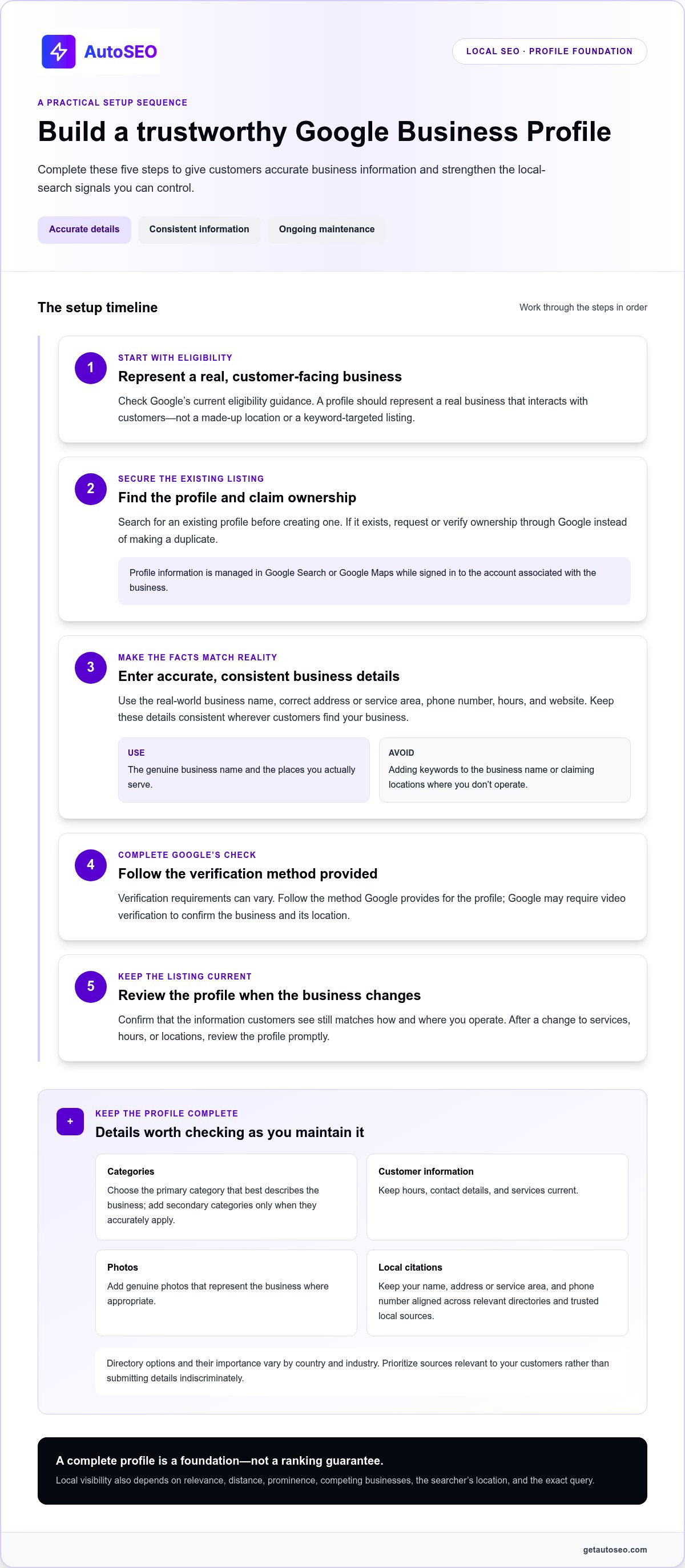
Work through these setup steps in order:
- Check eligibility. Make sure the business meets Google’s current eligibility guidance. A profile should represent a real business that interacts with customers, not a made-up location or keyword-targeted listing.
- Claim ownership. Search for an existing profile before creating one. If it exists, request or verify ownership through Google rather than creating a duplicate. In 2026, owners manage profile information in Google Search or Google Maps while signed in to the account associated with the business.
- Enter accurate details. Use the real-world business name, correct address or service area, phone number, hours, and website. Keep these details consistent wherever customers find the business. Don’t add keywords to the business name or claim locations where you don’t operate.
- Complete verification. Follow the method Google provides for the profile. Verification requirements can vary, and Google may require video verification to confirm the business and its location.
- Maintain the listing. Revisit the profile when business details change. Confirm that the information customers see still matches how and where you operate.
Complete and maintain your Google Business Profile
Select the primary category that best describes the business, then add relevant secondary categories if they accurately apply. Fill in current hours, contact details, and services. Add genuine photos that represent the business where appropriate. After a change to services, hours, or locations, review the profile promptly so customers don’t rely on outdated details.
Keep local citations consistent
Citations are mentions of your business details in online directories and trusted local sources. Focus on making your name, address or service area, and phone number match across the places that matter to your customers. Directory options and their importance vary by country and industry, so prioritize relevant sources instead of submitting your details indiscriminately.
Consistency doesn’t mean forcing every business into the same address format. It means presenting clear, accurate information that points to the same real business. If you serve customers at their locations and don’t receive them at a storefront, don’t publish an address as if it were a customer-facing location. Use profile settings that reflect how your business operates.
Accurate profile information is foundational, while ongoing website content supports visibility beyond the listing itself. An automated SEO platform can reduce repetitive research and publishing work, but it doesn’t replace keeping your profile details correct.
Make your website relevant to nearby customer searches
Your website should make it easy for nearby customers and search engines to understand what you offer and where you offer it. Give each important page a clear purpose: describe a real service, answer customer questions, and name only the locations you genuinely serve. If you’re learning how to get my small business to rank locally, don’t treat city names as keywords to insert everywhere. Useful, specific pages do more than repeated location mentions.
Choose the page type that fits the information. A homepage, service-area page, and location page shouldn’t compete by repeating the same copy.
| Page type | Best purpose | Useful details |
|---|---|---|
| Homepage | Introduce the business and its main offer | Core services, primary coverage area, and a clear next step |
| Service-area page | Explain where a business travels to serve customers | Coverage boundaries, service options, and how to arrange service |
| Location page | Help customers find a genuine business location | Location-specific services, access or parking details, hours, and contact information |
Build useful service and location pages
Create a separate page when it can provide meaningful information that another page doesn’t. A service page should explain what the service involves and answer common customer questions. A location page should describe the actual location and relevant access details. Use place names naturally, and link related service and location pages so visitors can move easily between them.
Don’t publish batches of near-identical pages that swap one city name for another. These thin doorway pages offer little value and can confuse visitors about where you truly operate. If you can’t add useful local details, strengthen a broader service-area page instead.
Strengthen on-page and technical foundations
Write a distinct page title and main heading for each important page. Make both accurately describe the service and, where relevant, its genuine location. Put contact options where visitors can find them quickly, and test key pages on a phone. Customers should be able to read, navigate, and take the next step without pinching, zooming, or hunting through menus.
LocalBusiness structured data can help search engines interpret information on a page, such as the business’s name, contact details, and location. Keep it aligned with visible page content and accurate business information. Structured data clarifies details, but it doesn’t guarantee enhanced search display or higher rankings.
Build pages for people first, then keep them accurate as services and coverage change. A consistent publishing workflow can help you expand useful content over time, but automation works best when each page is grounded in the real services and places your business serves.
Earn trust and measure local SEO progress
Local SEO needs two feedback loops: listen to customers and check whether your visibility is creating meaningful business activity. Genuine reviews help prospective customers understand others’ experiences and can reveal questions or concerns you should address. A consistent process makes feedback more dependable than asking only when you expect a positive response.
Build a reliable review process
Ask real customers for honest feedback as part of a routine follow-up. Use the same neutral invitation for everyone, and never offer incentives, discourage negative feedback, or selectively ask only satisfied customers. Respond professionally to reviews, including critical ones. Keep replies calm and useful, and don’t disclose private customer information in a public response.
Look for patterns in what customers praise, question, or find confusing. If people repeatedly ask about service coverage, explain it clearly on the relevant website page. If feedback points to a recurring experience issue, address it in your operations. Reviews aren’t just reputation signals. They’re practical input for improving the customer journey.
Measure progress without fixating on one ranking
Choose a regular reporting interval and compare like with like. Track profile impressions and interactions, website impressions and clicks in Google Search Console, and outcomes such as calls, direction requests, qualified leads, and completed bookings where you can measure them. Keep a simple record of changes so you can interpret movement instead of guessing what caused it.
Available profile performance data can show how people find and interact with your listing. Search Console helps you review how your website appears in Google Search. Check each platform’s metric definitions before drawing conclusions, since reporting labels and definitions can change. A rise in impressions may mean more people saw your business, but it doesn’t prove that more became customers.
Visibility metrics show whether people can find you; business outcomes show whether that visibility leads to valuable action. Review both. A page may earn clicks but few qualified inquiries, which could signal a mismatch between its promise and the information visitors need. Calls and direction requests may also vary with seasonality or changes in customer demand, so interpret them alongside the broader trend.
Don’t treat a single search position as a complete performance report. Results can vary by searcher location, device, query, and competition. Compare consistent time periods and look for patterns across searches and outcomes. That gives you a more useful basis for deciding what to improve next than checking one ranking from one location.
For ongoing content work that supports organic visibility, put SEO content publishing on autopilot while continuing to measure the customer actions that matter to your business.
Turn local SEO into a repeatable growth system
Local SEO gets easier to manage when you separate the foundation from the ongoing work. First, make sure customers can find accurate business information. Then strengthen the website, build trust, and review whether your effort is bringing relevant visitors and inquiries. That sequence offers a practical answer to how to get my small business to rank locally without trying to do everything at once.
Use this phased checklist to keep the work focused:
- Fix the foundation: Check that your business profile and core contact details are accurate and consistent.
- Improve essential pages: Make sure your homepage and key service or location pages explain what you do and where you serve customers.
- Build trust: Request honest customer feedback through a neutral, repeatable process, and respond professionally.
- Review performance: Compare visibility with meaningful actions such as calls, qualified leads, and website visits, then choose the next improvement.
Profile accuracy and eligibility are foundational tasks. Website content and backlink activity provide ongoing support. Keep the distinction clear: consistent publishing can help build organic visibility, but it can’t replace accurate local business information or guarantee a particular local ranking.
Prioritize the first month of local SEO work
Start with profile details and the essential pages customers need before expanding your content plan. Set a manageable rhythm: update important business information when it changes, invite customers to leave honest reviews as part of your normal follow-up, and review performance on a regular schedule. This small business SEO guide offers broader context for building a sustainable plan.
Scale consistent website content without adding manual workload
Once core pages are useful and accurate, researched articles can address related customer needs and build topical depth over time. AutoSEO automates SEO research, article generation and publishing, and backlink building to support ongoing website SEO. Its AI research analyzes your business, customers, and competitors to inform a content plan and identify relevant keywords. The platform publishes one SEO-optimized article daily and builds 100 Domain Authority worth of backlinks each month. Automated publishing to WordPress is designed to run on autopilot after initial setup. Learn more about the role of SEO automation while keeping each piece relevant to your audience and service area.
Automation can reduce repetitive publishing and link-building work, but local visibility still depends on factors such as accurate business details and the search context. Use performance data to guide what you improve next. If you’re ready to streamline ongoing SEO execution, put SEO on Autopilot.
Make your next local SEO move count
You don’t need to solve every visibility challenge at once. Choose one practical improvement, put it in motion, then use what you learn from customer responses and performance data to decide what comes next. That steady cycle is more useful than chasing a single position or quick fix when figuring out how to get my small business to rank locally.
When ongoing website work competes with running your business, automation can keep execution moving. AutoSEO uses AI research on your business, customers, and competitors to shape a content plan, then supports ongoing SEO with daily article publishing and backlink building. After initial setup, automated publishing to WordPress helps reduce repetitive work. These activities support organic visibility, but they can’t guarantee a particular local ranking or replace accurate business information.
Build your foundation, keep improving, and let a repeatable process do the heavy lifting. Put SEO on Autopilot and make consistent SEO execution part of your growth plan.
Frequently Asked Questions
How long does it take for a small business to rank locally?
There’s no fixed timeline for local rankings to change. Competition, location, eligibility, website quality, reputation, and the consistency of your business information all affect progress. Instead of expecting an immediate position, record a baseline and compare relevant impressions, calls, website visits, and qualified leads over time. Note when you make changes, too. That makes it easier to connect a shift in results with an update rather than guess.
Is a Google Business Profile enough to rank locally?
No. A profile is an important part of local visibility, but it can’t do the whole job if a customer clicks through to a confusing or incomplete website. If the profile features a particular service, for example, make sure the linked page explains that service clearly and gives visitors a sensible next step. Review profile interactions and website behavior together, then improve the gaps customers encounter.
Can a service-area business rank without showing its address?
Some eligible service-area businesses can configure a profile without displaying a customer-facing address, if that setup follows Google’s current guidelines. The profile must represent a real operation, and the service area should reflect where the business genuinely works. Don’t use a virtual location or create listings to target places you don’t serve. Review Google’s latest rules before changing address visibility or service-area settings.
Do online reviews improve local rankings?
Reviews can help prospective customers assess a business and may contribute to prominence, but no particular rating or review count guarantees a local position. Make feedback requests part of a consistent customer follow-up, and invite honest opinions rather than steering people toward a positive review. For example, use the same neutral request after different types of completed work. Follow platform policies, and never filter out customers who may leave critical feedback.
Do I need a separate page for every city I serve?
No. A separate city page makes sense only if it gives people in that area distinct, useful information. If your service and process are the same across several nearby communities, one clear coverage page may serve customers better than multiple pages with swapped place names. Create separate pages when local logistics, service details, or customer needs genuinely differ. Make each page useful enough to stand on its own.
Can AI-generated content help a small business rank locally?
It can support local visibility when it gives customers accurate, original answers to relevant questions. AI can help with research and drafting, but publishing more pages alone doesn’t ensure rankings. Review every article for factual accuracy, useful detail, and a real connection to your audience. For instance, replace generic advice with details based on the questions customers actually ask. Keep profile and business information accurate separately.
How can I check whether my local SEO is working?
Track search visibility alongside actions that matter to the business. Compare relevant impressions and clicks in Google Search Console with available profile interactions, calls, direction requests, and qualified leads. Use consistent reporting periods and note meaningful changes, such as launching a page or changing hours. If possible, use call tracking or form analytics to understand which visits lead to inquiries. Don’t judge progress from a single search result, since results vary by location, device, and query.


