

Backlinks aren’t the only path to Google visibility. A website can rank without them when its pages target specific, low-competition searches and clearly meet search intent, though progress may take longer. Learning how to rank a website with no backlinks starts with understanding what links signal and where focused content can compete.
It’s reasonable to think that sites with more backlinks have an advantage. Backlinks are links from other websites that can help search engines assess a page’s authority, but they aren’t essential for every ranking. The opportunity is to target a specific keyword with a page that gives searchers a clear, useful answer. This article explains how to find those opportunities, create content that can earn visibility, and connect related pages with internal links. It also covers when foundational backlinks can help a new site and how to account for backlinks in a practical SEO strategy.
Key Takeaways
- Focus on specific searches with clear intent, then shape each page around the answer people need.
- Weigh the time required to build useful content against the effort of earning links; either route depends on relevance and quality.
- Build a relevant foundation of links for a new site, and avoid spammy links that can undermine SEO.
- Treat backlinks as one ranking signal, not the whole strategy; focused content and strong connections between related pages can also help.
Targeting low-competition, specific-intent keywords
Focus on searches where a precise, useful page can meet a clear need. For a new website, learning how to rank a website with no backlinks starts with finding relevant queries that few competing pages answer well.
Finding Low-Competition Keywords
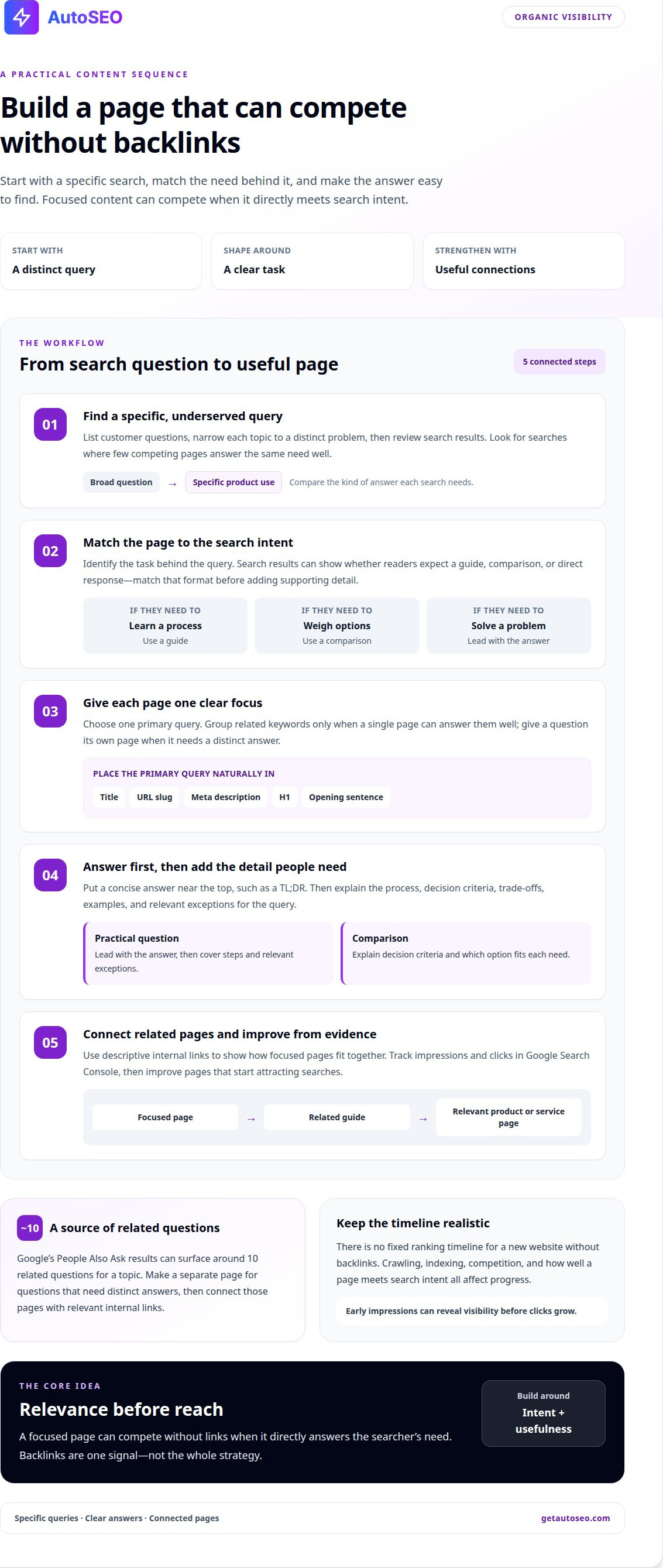
Low-competition keywords are specific searches with few pages that match the same need. Find them by listing customer questions, narrowing each topic to a distinct problem, and reviewing the search results. For example, a niche retailer like Adorb Custom Tees can target specific queries around themed anniversary clothing rather than competing for broad, high-volume apparel terms. Comparing pages answering a broad question with those addressing a specific product use reveals gaps where a focused site can offer a more complete answer.
Targeting Specific Search Intent
Specific search intent means shaping a page around the task behind a query, such as comparing options or solving a defined problem. Group related low-competition keywords only if one page can answer them well. Give a question its own page when it needs a distinct answer. This focus helps visitors find relevant information instead of broad content that misses their purpose.
Choose one primary query for each page and place it naturally in the title, URL slug, meta description, H1, and opening sentence. Put a concise answer near the top, such as a TL;DR. Search results also show whether readers expect a guide, comparison, or direct response. Match that format before adding supporting detail.
Connect related pages with descriptive internal links. A page targeting an easier query can link to one covering a more competitive topic, helping crawlers understand how the content fits together. For example, a focused product guide can point to a broader comparison when that next step is useful to the reader.
A practical way to rank a website with no backlinks is to answer the query more usefully than generic pages do. For a comparison, explain decision criteria and trade-offs. For a practical question, lead with the answer, then cover the steps and relevant exceptions. Focused content can compete without links when it directly meets the searcher’s need.
Time and resource tradeoffs between content and backlinks
Google Search Console shows search impressions and clicks, while reviewing search results can reveal content gaps. Ranking time depends on crawling, indexing, competition, and usefulness. Bought or irrelevant links can harm SEO.
Balancing Content and Backlink Resources
Balance your resources by deciding how much effort to put into useful pages versus earning relevant links. A new site can target specific searches with content instead of waiting for other sites to link to it. Progress may take longer, so prioritize questions with clear intent and manageable competition. Track impressions and clicks in Google Search Console, then improve pages that start attracting searches.
Google’s People Also Ask results can surface around 10 related questions for a topic. Turn questions that need distinct answers into separate pages, then connect them with relevant internal links. Share each new guide through social media channels where its intended readers are active. Social promotion can put content in front of people, but it doesn’t replace a useful page or guarantee backlinks.
Improving Content Quality and Helpfulness
Helpful content solves the searcher’s specific problem with a direct answer and enough detail to act. For a “how to” query, lead with the key step, explain the process, and address likely obstacles. For a comparison, clarify trade-offs and show which option fits each need. A page that answers the question thoroughly gives readers a reason to stay and use its guidance.
Build FAQ content around real questions, not repeated keyword variations. Give each question its own page when it needs a separate, complete answer; group closely related questions when one page can address them clearly. Include examples, concise explanations, and relevant internal links. If a page grows longer, put a short summary near the top so readers can find its main answer quickly.
Ranking Timelines and Link Scheme Risks
A new website with no backlinks has no fixed ranking timeline. Crawling, indexing, competition, and how well each page meets search intent all affect progress. Google Search Console can show when pages start receiving impressions, revealing early visibility even before clicks grow.
Free options include Google Search Console for search performance and manual Google searches to compare results. Avoid buying backlinks or using schemes to manipulate links. Spam-site links and links from irrelevant industries can harm SEO. Instead, earn links through relevant content and genuine mentions.
Building foundational backlinks for new sites
A new website can pursue focused rankings without a large backlink profile, but it still needs some foundational backlinks. These external links help establish routes into the site, while internal links connect pages once visitors and crawlers arrive.
Start with existing relationships. A supplier can link to a customer story, a trade association can list its members, and a local business directory can include a genuine company profile. Each link should point to a relevant page and help its audience find useful information. A link from a related site makes more sense than a placement chosen only to increase backlink counts.
Build links gradually through useful resources and genuine outreach. For example, publish an original guide answering a recurring customer question, then share it with partners who serve the same audience. A partner might reference the guide on a resource page or in a relevant article. The link should fit the page’s subject, not appear as an unrelated insert. This creates a credible entry point for readers and search crawlers.
Once external links lead to the site, use internal links to clarify how its pages relate. Link an article about a specific question to the broader guide it supports. Then connect the guide to relevant service or product pages. Descriptive anchor text tells readers what they’ll find, while a logical structure makes important pages easier to discover. Keep links useful rather than adding them just to fill a page.
Quality matters more than collecting links from every available source. Spam sites and websites in irrelevant industries can harm SEO, so avoid automated link blasts and unrelated placements. Assess each opportunity by asking whether its audience would genuinely benefit from the destination page. A small foundation of relevant links supports the site’s structure without replacing focused content or creating a link profile full of noise.
How backlinks relate to Google rankings
Backlinks can support rankings, but they aren’t the only path to visibility. Understand what links signal and where a page can compete without them.
A backlink is a link from another website to your page. It can help search engines discover content and assess its authority. A December 2020 Moz article described a positive correlation between authoritative links and rankings. Correlation doesn’t prove that links alone caused higher rankings, or that every page needs them.
Many SEOs have considered high-quality backlinks a top-three Google ranking factor in past years. Google’s November 2022 SEO Office Hours discussion described backlinks as less significant ranking signals than before. The practical takeaway: treat links as one signal among several, not a substitute for pages that satisfy search intent. A clear answer to a narrow question can compete even when a page has few external links.
Technical SEO helps Google access, crawl, and understand a site. Site speed and Core Web Vitals affect page experience, and a fast, usable page makes it easier for visitors to engage with its content. These factors can support visibility but don’t guarantee a particular position. Fix crawl barriers and broken navigation before polishing minor performance details.
Local SEO can help a nearby business appear in location-based searches without relying only on backlinks. A complete Google Business Profile can show its services, location, and contact details in local results. Keep those details consistent with the business’s website, and publish pages that answer local customers’ specific questions.
Avoid chasing link counts. A sudden jump from two backlinks to 50 may raise suspicion of link buying or other manipulative activity. Focus on relevant links earned through useful resources, and strengthen your site’s internal structure. Build a consistent SEO workflow to keep content and links aligned.
AutoSEO
AutoSEO helps make this strategy a consistent SEO workflow. Its Automated SEO Platform Subscription delivers one expert article daily and builds backlinks, supporting focused content and link growth. This can suit businesses that want to improve organic visibility without managing every publishing task manually. It doesn’t replace useful, relevant pages or guarantee rankings, but it helps maintain the work behind an ongoing SEO effort.
Contact AutoSEO to discuss your next step.
Make your next SEO move measurable
Treat how to rank a website with no backlinks as an ongoing operating decision, not a one-time fix. Choose a business outcome your search presence should support, then make each publishing decision serve that outcome. This keeps SEO connected to customer needs instead of turning it into a race for activity or vanity metrics.
Build a repeatable rhythm: publish with a clear purpose, observe how visitors respond, and use what the site reveals to guide your next decision. This learning loop gives a small team a practical way to scale while staying relevant. Progress comes from making each next action more informed than the last, not from chasing every available tactic.
If you want a more consistent system for carrying that work forward, speak with AutoSEO about your SEO goals. Take the next step with a clear priority and keep building from there.
Frequently Asked Questions
What are backlinks?
Backlinks are links on other websites that lead to a page on your site. A local organization might link to a business’s event page, or a publication might reference a useful guide. Search engines can use these links to discover pages and assess their relevance and authority. Context matters: a relevant editorial reference is more useful than an unrelated link placed solely to manipulate rankings.
Ranking High Without Backlinks: How Are These Cases Possible?
A page can rank highly without backlinks when it closely matches searchers’ needs and competing pages offer weaker answers. For example, a specialist business may explain a niche process more clearly than broad sites that cover it briefly. Google can also use the page’s content and site context to understand its relevance. A strong match gives the page a chance to compete, especially for a specific query.
Why would your site rank lower than a site with fewer links?
Link quantity alone doesn’t determine which page ranks higher. A competitor with fewer links may answer the query more directly, cover the topic more accurately, or offer a page that’s easier to use. For example, a fast-loading comparison with clear criteria may better serve shoppers than a link-rich page with outdated recommendations. Compare usefulness and intent match, not just backlink totals.
Can a website rank on Google with no backlinks?
Yes, a website can rank on Google without backlinks, particularly when its pages address specific searches with little direct competition. A new site can create a focused page answering a question its audience asks, then make that answer easy to find and understand. Rankings depend on how well the page fits the query and competing results, so having no backlinks doesn’t automatically prevent visibility.
How does Google rank websites without backlinks?
Google can evaluate a page using signals beyond external links, including its content, relevance to the query, and accessibility to search systems. For instance, a clearly titled page explaining a product feature can match a precise search even without links from other sites. Google compares available pages for each query, so a focused answer may outperform broader pages that don’t address the same need.
What on-page SEO steps improve rankings without backlinks?
Make each page easy to understand and use. Write a distinct title and heading that reflect its subject, answer the main question near the top, and organize supporting details under descriptive subheadings. Add image descriptions when images convey information, and link to related pages with clear anchor text. For example, a troubleshooting page can link directly to the relevant setup instructions, helping readers continue without searching again.


