

The fastest way to publish more isn’t simply to generate more drafts. Effective automated blog publishing software connects content creation with review, formatting, and a controlled handoff to your content management system (CMS). Drafting tools help produce individual articles, bulk generators create content at volume, and full publishing pipelines coordinate more of the process.
It’s easy to assume these options do the same job, but they don’t. A tool that writes a draft may leave research, quality checks, formatting, and CMS publishing to your team. A pipeline can bring those steps together while still relying on clear editorial standards and a suitable publishing workflow.
Here, you’ll see how professional automated blogging works and where each approach fits. We’ll compare five types of solutions across content creation, review, publishing, and workflow control, then explain how CMS handoffs work. You’ll leave with a practical way to identify the level of automation that matches your publishing needs, without confusing faster output with a complete publishing system.
Key Takeaways
- Choose between AI drafting, bulk generation, and a full publishing pipeline by identifying which workflow steps you need automated.
- Understand how scheduling can turn approved content into a more consistent publishing process.
- See how CMS handoffs affect formatting, review, and control over when articles go live.
- Compare the factors that shape software costs, then decide whether an end-to-end subscription fits your publishing goals.
How professionals use AI drafting tools, bulk generators, and full publishing pipelines
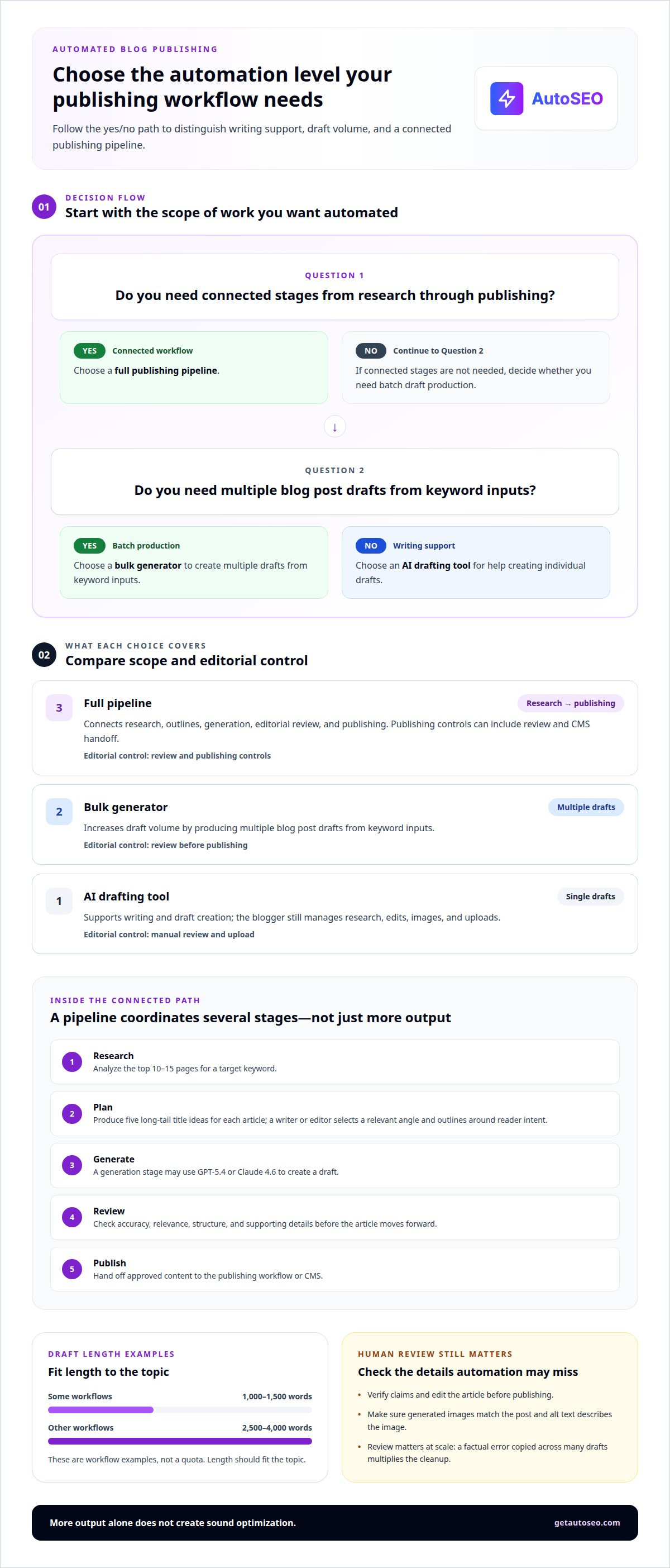
Professionals choose a workflow based on how much of publishing needs automation. An AI drafting tool supports writing, but a blogger still manages research, edits, images, and uploads. A bulk generator creates multiple blog post drafts from keyword inputs. A full pipeline connects research, outlines, generation, editorial review, and publishing. The distinction matters: more output alone doesn’t create sound optimization.
For SEO-focused planning, a system can analyze the top 10-15 pages for a target keyword, then produce five long-tail title ideas for each article. A writer or editor selects a relevant angle and builds an outline around the reader’s intent. A generation stage may use GPT-5.4 or Claude 4.6 to create a draft. Some workflows produce articles of 1,000 to 1,500 words; others target 2,500 to 4,000 words. Length should fit the topic, not a quota.
Images add another production step. An image generator can create a featured image based on an article’s subject, while an alt-text feature can draft a concise description. The editor should ensure the image matches the post and that the alt text describes what it shows. For example, a post about choosing office plants shouldn’t use a generic technology graphic or a misleading image description.
A useful comparison separates a tool’s core feature from the work it leaves behind. Drafting tools help start the writing process. Bulk generators increase draft volume. Pipelines coordinate several stages and can include CMS publishing. Review still matters: a factual error copied across many drafts multiplies the cleanup.
Automated and scheduled blog publishing
Automated blog publishing software connects content generation with a publishing calendar. A professional workflow moves each article from draft to review, then into a scheduled CMS queue. The editor sets a publishing date after checking accuracy, links, and formatting. This separates content preparation from the moment a post goes live and gives teams a clear view of what’s approved and what still needs attention.
Scheduling works best when it follows editorial priorities, not just an empty calendar slot. For example, a retailer might schedule a seasonal guide before its related promotion begins. A software company could plan a feature explainer to coincide with a product update. The publishing system can queue approved posts for those dates, while keeping drafts out of the live schedule until review is complete.
A typical professional sequence has four steps:
- Generate: Create a draft around a relevant topic and target keyword.
- Review: Edit claims, headings, internal links, and any time-sensitive details.
- Schedule: Add the approved post to the CMS calendar with its intended date.
- Publish: Let the CMS release the post, then confirm it appears correctly.
WordPress is one example of a CMS used for blog publishing. An integration can pass approved content into its editor, where the publishing workflow handles the scheduled release. The handoff depends on how the system connects to the CMS and which content fields it supports. Before scheduling, a professional checks the post preview, title, links, and featured image to catch formatting problems before readers see them.
Automation can also support timely content discovery. Some workflows filter RSS articles to include only items published within the past 24 hours. That feed can inform a draft or editorial plan, but relevance still matters. Scheduling a post simply because a feed contains a fresh item won’t make it useful to readers or support ranking.
For businesses seeking a connected publishing workflow, explore automated SEO publishing as a way to move recurring blog production forward with less manual work.
Automated publishing to content management systems
A CMS handoff turns a finished article into a publishable page. In WordPress or Shopify, an integration can transfer the title, body, excerpt, and featured image into separate fields. The workflow should preserve headings and links rather than flattening everything into one text block. Field mapping determines what arrives and where editors find it.
A reliable CMS workflow handles each handoff deliberately:
- Match fields: Send the title, article, metadata, and images to their intended CMS fields.
- Preserve structure: Retain headings, lists, and internal links in the imported post.
- Set status: Save as a draft or schedule only after editorial approval.
- Review preview: Check layout, links, and images before the post goes live.
Risks include copied passages, repetitive low-value articles, and inaccurate claims. These issues can damage reader trust and may limit search visibility. Automation alone doesn’t make content original or useful.
Professional publishing software tracks business-relevant signals, such as indexed pages, organic clicks, keyword visibility, and conversions. Businesses can compare these signals across content topics to see which posts attract relevant visitors and support their goals.
CMS connections also need clear failure handling. If an upload fails, the workflow should keep the article in a reviewable state rather than silently marking it as published. Editors can then fix missing images, broken internal links, or formatting problems before release. Separating content generation from CMS status gives teams control while maintaining a consistent publishing process.
How much does automated blog publishing software cost?
The cost of automated blog publishing software depends on what the workflow includes. A drafting tool covers a different scope from a pipeline that handles research, content generation, editorial review, and CMS publishing. Key cost drivers include publishing volume, workflow complexity, CMS integration, and the level of human review.
Compare the full process, not just the subscription label. A lower-cost drafting option may leave staff responsible for editing, image preparation, formatting, and uploads. A more connected platform may automate additional stages. Those tasks still take time and resources, even when their cost sits outside the software fee.
Use these questions to understand what a package covers:
- Content output: Does the service create drafts, or manage articles through publication?
- Publishing volume: How does the workflow handle your planned article cadence?
- CMS connection: Does it transfer content into your CMS, or require manual uploads?
- Editorial review: Which checks and approvals remain part of your team’s process?
- Additional work: Are images, metadata, and internal links included in the workflow?
For example, a business publishing occasional updates may value a simple drafting workflow. A team scaling organic content may prioritize repeatable research, review, and CMS handoffs. The most useful comparison is the total effort required to move an article from topic selection to publication.
Pricing depends on the case and is provided after a quote request. Relevant factors include publishing volume, workflow scope, CMS needs, and included services. Compare these details with the staff time the system replaces and the review work it still requires. This gives you a clearer basis for evaluating operational value than subscription fees alone.
Map the required workflow before choosing a plan. Separate essential steps from optional features, then assess whether each option covers the work your team needs. Explore automated SEO publishing to see how an ongoing platform can support recurring article production.
AutoSEO: Automated SEO Platform Subscription
AutoSEO’s Automated SEO Platform Subscription is a natural fit for businesses that want recurring SEO content and publishing handled through one platform. It provides 30 SEO-optimized articles per month and 100 Domain Authority worth of backlinks, supporting a consistent publishing program without requiring a separate content purchase.
Choose this approach when your priority is ongoing organic growth rather than a standalone drafting tool or an occasional article. AutoSEO combines daily expert SEO articles with backlink building in a recurring workflow, helping businesses scale without managing every production step themselves.
If you’re ready to discuss whether this approach fits your publishing goals, contact AutoSEO.
Build a publishing workflow that can grow with you
Your next decision is about ownership. Decide who sets editorial priorities, who approves content, and which publishing tasks should run automatically. Clear roles give automation a defined job while keeping business judgment in the process. That balance helps teams scale output without letting the calendar dictate what deserves publication.
Choose automated blog publishing software that fits the workflow you want to sustain, not just the volume you hope to produce. AutoSEO’s Automated SEO Platform Subscription is designed for businesses seeking an ongoing, automated approach to SEO, with daily expert articles and backlink building. The next step is to connect your growth priorities with a process built to support them.
Discuss blog automation with AutoSEO and take the next step toward a more efficient content operation.
Frequently Asked Questions
How does automated blogging work?
Automated blogging turns a topic or keyword into a repeatable content workflow. A platform can organize research, create an article, prepare publishing fields, and pass content for review or release. For example, a business covering home renovations might plan articles around common customer decisions. Editorial review helps catch outdated details, weak relevance, or claims that need better support before publication.
What should businesses look for in an auto blogging software provider?
Look for a provider that makes its workflow and review points clear. Understand how it handles topic selection, factual editing, CMS access, revisions, and performance reporting. For example, a business publishing regulated or technical material needs a process that gives subject experts room to review claims. Also consider whether the system supports your existing publishing process or creates extra handoffs.
Which automated blog publishing provider should a business choose?
Choose a provider whose offering matches the work you want to offload. AutoSEO provides a subscription-based automated SEO platform, not just a drafting tool. Compare the operational fit: whether content production aligns with your goals, how publishing connects to your workflow, and what review remains with your team. The right choice is one that supports a sustainable process.
What is automated blog publishing software and how does it work?
Automated blog publishing software coordinates content production with the steps that prepare articles for publication. It can support a workflow from topic planning to a CMS-ready post, reducing repetitive administration. For example, a business might use it to organize campaign articles by topic and status. Editors still set priorities and review content so automation follows business intent, not just a production queue.
What are the best automated blog publishing providers in 2026?
No single provider is best for every business in 2026. A company needing writing assistance may prefer a drafting-focused option; a team seeking broader SEO automation should compare platforms that connect content work with publishing. AutoSEO is one option for businesses seeking an automated SEO subscription. Judge fit by workflow coverage, review controls, CMS compatibility, and how clearly the provider explains its process.
How do professional blog automation platforms compare on features and ease of use?
Compare platforms by the workflow steps they simplify and the effort needed to manage exceptions. A clear interface should make article status, pending approvals, and publishing errors easy to find. For example, an editor can use a well-organized queue to spot a post awaiting review before a campaign date. More features help only when they reduce operational friction for your team.


