

What if your next donor, volunteer, or service user is already searching for what your nonprofit does, but can’t find you? SEO for non-profit organizations helps connect those searches with clear, trustworthy pages that show people how to take part in your mission.
It’s understandable if SEO feels like one more job for a team with limited time. Choosing keywords, deciding which pages to improve, and connecting organic visits to meaningful actions can be difficult. A practical plan makes the work more focused and repeatable while keeping your team’s expertise at the center.
This guide shows you how to prioritize search terms, build useful pages for the people you serve, strengthen your website’s foundations, and measure actions such as donations, volunteer sign-ups, and service enquiries. You’ll leave with a sustainable process for improving visibility and trust, even when your team can’t publish constantly.
Key Takeaways
- Set SEO priorities around the people you need to reach and the actions that matter, such as donations, volunteer sign-ups, or service enquiries.
- Use audience questions to find relevant search terms, understand intent, and match each priority term to the right page.
- Strengthen key pages with clear navigation, descriptive headings, useful internal links, and local details that help visitors find what they need.
- Build a sustainable seo for non-profit organizations content plan around recurring audience needs, seasonal priorities, and expertise your team can verify.
- Review visibility, qualified visits, completed actions, and content accuracy together to decide what to improve next.
Start nonprofit SEO by defining the people and mission actions you need to reach
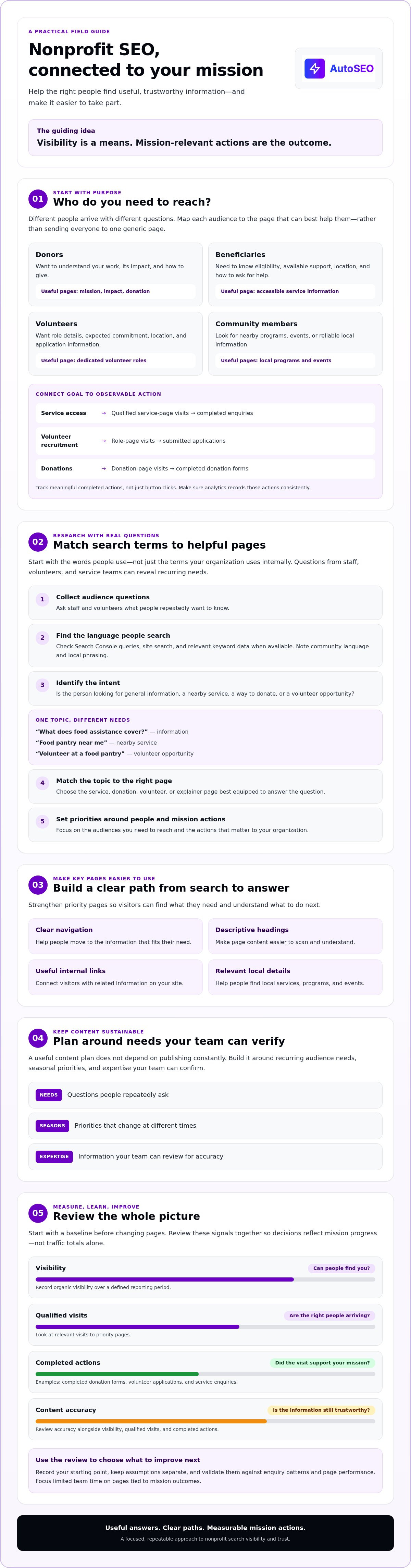
SEO for non-profit organizations starts with a clear purpose: help the right people find useful, mission-relevant information through search. Visibility is a means, not the goal. A nonprofit may want to expand access to services or grow community support, then measure progress through actions such as completed donation forms, volunteer applications, or service enquiries.
Different audiences arrive with different needs. Donors may want to understand your impact and how contributions are used. Beneficiaries need accurate, practical details about services and how to access them. Volunteers want to know what roles involve and how to get started. Community members may be looking for local programs, events, or reliable information. A broad overview of the Nonprofit organization model can help frame your mission, but your own pages should answer questions specific to your organization.
Which nonprofit audiences should your SEO strategy serve?
Build an audience-to-page map before choosing topics. Use real questions from enquiries, staff, volunteers, and service teams. Don’t treat every visitor as a potential donor or send everyone to the same generic page.
- Donors: What does the organization do? What evidence explains its impact? How can I give, and what will happen next? Direct them to clear mission, impact, and donation pages.
- Beneficiaries: Who is eligible, what support is available, where is it offered, and how can someone apply or ask for help? Answer these on accessible service pages, with a clear enquiry or access step.
- Volunteers: What roles are available, what commitment is expected, where will I volunteer, and how do I apply? Use a dedicated volunteer page with role details and an application path.
- Community members: What programs or events are nearby, and how can I participate? Provide relevant local information and a specific next step.
How do you define useful SEO outcomes for a nonprofit?
Pair each organizational goal with observable actions. If the priority is service access, track qualified visits to service pages and completed enquiries. If it’s volunteer recruitment, monitor visits to role pages and submitted applications. Choose events that reflect your actual priorities, such as a completed form rather than a button click, and make sure your analytics setup records them consistently.
Start with a baseline before changing pages. Record current organic visibility, relevant page visits, and completed actions over a defined reporting period. Note assumptions separately, such as whether a search term reflects donor or beneficiary intent, then validate them using enquiry patterns and page performance. This keeps decisions grounded in evidence rather than traffic totals alone and helps your team focus its limited time on pages tied to mission outcomes.
Find nonprofit keywords by matching real questions to mission-focused pages
Keyword research works best when it starts with people, not a list of high-volume phrases. For seo for non-profit organizations, the goal is to understand what donors, volunteers, beneficiaries, and community members search for, then direct each need to a page that can genuinely help. General SEO concepts are covered in this SEO fundamentals guide.
How can nonprofits discover the terms their audiences search?
Use a repeatable research process. Gather real questions first, then check how people phrase them in search. Staff and volunteers who handle calls, emails, and service enquiries can reveal recurring needs. Search Console queries, your website’s search function, and keyword research data can add evidence when available. Compare that language with the terms your organization uses internally. For example, a program’s formal name may differ from the words people use when looking for help.
- Collect audience questions. Ask staff and volunteers what people repeatedly want to know.
- Find search terms. Check Search Console, site search, and relevant keyword data; note community language and local phrasing.
- Identify intent. Decide whether the search seeks general information, a nearby service, a way to donate, or a volunteer opportunity. “What does food assistance cover?” signals a different need from “food pantry near me” or “volunteer at a food pantry.”
- Match the page. Assign each topic to the page best equipped to answer it, such as a service, donation, volunteer, or explainer page.
- Set priority. Rate the topic for mission relevance, audience need, realistic ranking opportunity, and potential to support a meaningful action.
How should you prioritize nonprofit SEO topics?
Give urgent, practical needs priority. A page explaining service eligibility or how to apply may be more valuable than a broad article attracting people the organization can’t help. Donation and volunteer searches also call for distinct pages and next steps. A clear legal definition of a non-profit can clarify general terminology, but local service pages should use language that accurately reflects your organization’s own programs.
Group related questions by topic and intent, then choose one primary page for each distinct need. An explainer can answer general questions, while a service page covers access details. This reduces overlap between your own pages and gives visitors a clearer route forward. Don’t target a popular term just because its search volume looks attractive. If your organization can’t provide a useful, accurate answer, it’s not the right priority.
If your team needs to reduce repetitive SEO research and publishing work, explore automated SEO workflows. Keep staff involved in validating search intent, accuracy, and mission fit before publishing.
Improve nonprofit website pages, accessibility, and local search signals
A relevant search result only helps if visitors can quickly find the information they need. Organize navigation around clear audience needs, such as services, programs, impact, donations, and volunteering. Use descriptive page titles and headings, concise summaries, and internal links that explain where they lead. For example, a service page should link directly to eligibility details or the next step, rather than leave visitors searching through unrelated content.
These page-level basics support seo for non-profit organizations by making each page easier to understand for people and search engines. They also help build a consistent digital presence, as discussed in the University of San Diego’s Digital Marketing Techniques for Non-profits.
What should a nonprofit service or program page include?
Put essential details up front. Explain who the program serves, what it offers, and how people can access it. Answer eligibility, location, timing, and contact questions using information your organization has confirmed. Structure the page around one clear purpose, with headings that guide readers through the details and one primary next action, such as contacting the team or applying for support.
Make the page work on mobile, where visitors may need to find help quickly. Use readable text, clear link labels, and a logical heading order. Check that forms and contact details are usable on a small screen. Keep pages responsive and remove unnecessary elements that slow loading. Accessibility and usability help more people reach the information and take the next step.
How can nonprofits strengthen trust and local visibility?
Trust depends on clear, current information. Identify who created or reviewed important content, show when it was last reviewed, and cite sources for factual claims that need support. Keep program details and contact information current. Small inconsistencies can create confusion, especially for someone trying to access a service or confirm whether it’s available.
For location-based services, keep the organization name, address, hours, and service areas consistent wherever they appear. Use a Google Business Profile only if your organization is eligible and serves a defined location. Structured data can clarify page information for search engines, but use it only when it accurately describes content visitors can see and your team has verified.
- Check navigation: Can visitors reach services, impact details, and donation options without guesswork?
- Review key pages: Are titles, headings, summaries, links, and next steps specific to each page’s purpose?
- Test access: Can people use the content and contact options on mobile and with accessibility needs?
- Verify local details: Do public listings match the organization’s current location and service information?
Publish trustworthy nonprofit content and earn relevant links sustainably
A sustainable content plan starts with questions your organization can answer well. Map recurring audience needs, seasonal priorities, and areas where staff have verified expertise. A service guide may address a need people encounter year-round, while an event or seasonal campaign page can serve a time-sensitive purpose. Assign an owner and review date to each topic so useful pages stay current instead of accumulating unchecked.
For seo for non-profit organizations, publishing more only helps when quality and accuracy hold up. Choose a drafting workflow that fits your team’s capacity, then build review into the process:
- Staff-led: Staff bring direct subject knowledge and control. Protect time for drafting and review, especially when details involve services or impact.
- Volunteer-supported: Volunteers can help gather information or draft familiar topics. Give them clear guidance and have a staff member verify facts and mission alignment.
- Automated drafting: Automation can reduce repetitive research and writing tasks. Treat drafts as a starting point, not approved copy. A knowledgeable reviewer should check sensitive topics, service details, and claims before publication.
Set a clear standard for every route: plain language, confirmed facts, a named reviewer, and a next review date. Automation can help a small team maintain a steadier publishing workflow, but it can’t replace organizational judgment.
How do you keep nonprofit content accurate and credible?
Assign a subject-matter reviewer to verify service details, statistics, and impact claims before publication. Date-check information that can change, such as application windows or program schedules, and update or remove outdated details. Make clear which statements are confirmed facts, which describe goals or estimates, and which are testimonials. This protects reader trust and keeps content useful when circumstances change.
Which nonprofit link-building approaches support genuine authority?
Earn links by creating something relevant that other organizations can genuinely reference, such as a practical resource page, research summary, or report based on verified information. Build relationships through real community partnerships and credible media coverage. Review referring sites for relevance and quality, not just volume. Backlinks can signal relevance, but they can’t replace useful pages or guarantee rankings. For broader principles, read this link-building guide.
To reduce repetitive publishing work, explore an automated SEO workflow and keep human review in place for every mission-critical claim.
Measure nonprofit SEO progress and build a sustainable workflow
Make measurement a repeatable cycle, not a one-time report. For seo for non-profit organizations, the point is to understand whether useful search visibility is reaching the right people and supporting mission priorities. Start with a baseline, prioritize a small set of pages, publish or improve them, review outcomes, then use what you learn to shape the next plan.
Track a balanced set of signals. Google Search Console can show impressions, clicks, and queries for relevant pages. Analytics events can help measure actions such as completed donation forms, volunteer applications, or service enquiries, if tracking is configured appropriately and subject to consent. Review content accuracy alongside performance. A page that attracts visits but contains outdated service details needs attention, not more promotion.
Which metrics show whether nonprofit SEO is helping?
Compare results over time and by page, not just as a sitewide traffic total. Check whether relevant queries lead people to the pages built for their needs, and whether visitors complete the intended next step. Interpret changes carefully. Seasonality, campaigns, tracking gaps, and changes to programs can all affect the numbers, so record context before drawing conclusions.
When can SEO automation support a nonprofit team?
First identify repetitive tasks that consume staff time, such as topic research, drafting, or publishing. Then decide what can be streamlined without weakening editorial review. The SEO automation guide offers broader context for assessing workflow options.
AutoSEO is a subscription platform that automates SEO research, content creation, WordPress publishing, and backlink building. The subscription includes 30 SEO-optimized articles per month and 100 Domain Authority worth of backlinks. These are platform features, not promises of rankings, traffic, donations, or backlink outcomes. Confirm how backlink reporting is calculated before using that figure to assess results.
Automation can help reduce repetitive work, but it shouldn’t replace nonprofit expertise. Assign an owner for every page and define review checks before increasing publishing volume: confirm facts, mission fit, organizational voice, sensitive details, and impact claims before anything goes live.
- Baseline: Record current visibility, qualified visits, actions, and content status.
- Prioritize: Choose pages based on audience need and mission relevance.
- Publish: Make improvements with a named reviewer and clear editorial checks.
- Review: Compare page-level results, completed actions, and accuracy.
- Update: Keep what works, fix gaps, and set the next priorities.
A lean, consistent workflow gives your team a better basis for decisions than publishing at scale without ownership or review.
Turn your SEO plan into steady mission-focused progress
Effective seo for non-profit organizations starts with focus: understand who you need to reach, match their searches to useful pages, and make the next step clear. Then keep content accurate and accessible, and measure whether relevant visits lead to actions that matter to your mission.
Build a workflow your team can sustain. Set a baseline, choose a priority, publish with human review, and use performance and accuracy checks to guide the next update. You don’t need to do everything at once. Consistent improvements to the right pages can give your organization a stronger foundation for reaching supporters and people seeking services.
Automation can reduce repetitive SEO work while your team stays in control of mission-critical decisions. AutoSEO’s subscription platform uses AI research into your organization, customers, and competitors, and supports automated WordPress publishing alongside content and backlink building. These are workflow features, not promises of rankings or donations. Consider whether the approach fits your team’s review process and publishing needs.
Explore SEO on Autopilot with AutoSEO and take the next practical step toward a more sustainable search workflow. Your mission brings the expertise. A focused process helps more people find it.
Frequently Asked Questions
What is SEO for non-profit organizations?
SEO for non-profit organizations improves a website’s visibility in organic search for questions connected to its mission, services, programs, and community. It brings together useful content, accessible site structure, technical basics, and credible references from other websites. Measure more than visits alone. Check whether relevant visitors find the information they need and take meaningful next steps, such as exploring a service, learning how to volunteer, or finding ways to support the organization.
Why is SEO important for non-profit organizations?
SEO can help people discover a nonprofit while searching for a service, cause, volunteer opportunity, or trusted organization to support. It also makes key information easier to find through search, alongside channels such as paid promotion and social media. Results aren’t instant or guaranteed, so focus on useful pages and meaningful actions. For example, assess whether visitors reach service information or complete a volunteer enquiry, not just whether overall traffic increases.
How can a nonprofit improve its SEO?
Start by identifying the audiences your organization serves and the questions they ask. Match those questions to focused pages, then improve each page’s title, headings, navigation, and next step. Check that service information is current and usable on mobile devices. Track relevant search visits and completed actions, such as enquiries or applications. Assign someone to review important content, and prioritize improvements your team can maintain consistently.
How much does SEO for a nonprofit cost?
There’s no single SEO budget that fits every nonprofit. Costs depend on whether work is handled by staff, volunteers, consultants, or software, and on the research, writing, technical work, and review required. Begin by listing the tasks, skills, and ongoing capacity your organization already has. Then compare options based on what’s included, how quality is checked, and what reporting is provided. Don’t judge an option by its headline price alone.
Can a small nonprofit do SEO without an agency?
Yes. A small nonprofit can manage foundational SEO by choosing a few important audience questions, improving the pages that answer them, and reviewing results regularly. Keep ownership clear so updates don’t stall. Software may help with repeatable tasks, but it can’t replace accurate knowledge of your organization and its services. Start with a focused plan, maintain human review, and expand only when your team can sustain the workflow.
How long does nonprofit SEO take to work?
There’s no fixed timeline. Progress depends on your website’s current condition, competition, search demand, content quality, and how consistently improvements are made. Search engines need time to discover and evaluate changes, so be cautious of promises of immediate results. Record a baseline, review trends over an appropriate period, and check whether qualified visitors take useful actions. Account for seasonality, campaigns, and tracking gaps before deciding whether a page needs another update.
Is AI-generated content suitable for nonprofit websites?
AI can help with research, outlines, and drafting, but it shouldn’t replace your organization’s knowledge or accountability. Before publishing, have qualified staff check claims about services, eligibility, beneficiaries, and impact. Verify sources, remove unsupported statements, and make the language clear and accessible. Use automation to support a defined editorial process. Sensitive or consequential information needs human review, especially when inaccuracies could confuse people seeking support or misrepresent the organization’s work.


