

More automated content doesn’t automatically mean better local visibility. The right automated local seo software can reduce repetitive work, but it can’t replace accurate business details, genuine local knowledge, or sound decisions about what to publish. That distinction matters when SEO tasks compete with the customer-facing work that keeps your business running.
It’s worth checking whether a platform offers useful automation or simply generates generic AI copy. Effective automation should take repeatable tasks off your plate while giving you ways to check quality and maintain local relevance. It shouldn’t create pages just for the sake of scale.
This guide explains which local SEO tasks software can automate, where human oversight still matters, and how to evaluate platforms against your business’s needs. You’ll learn what to check for in local relevance, publishing control, and performance measurement, so you can choose a practical workflow that saves time without putting accuracy on autopilot.
Key Takeaways
- Use automated local seo software to streamline repeatable work, but don’t treat automation as a guarantee of stronger local visibility.
- Check whether a platform connects accurate business research to relevant topics, content creation, publishing, and measurement.
- Compare content, backlinks, listings, citations, reviews, and reporting separately. Confirm which capabilities are included, integrated, or unavailable.
- Set a human review process before scaling publication to catch inaccurate details and generic content before they go live.
- Assess AutoSEO for recurring SEO content and backlink work, and verify other local SEO capabilities separately before choosing your workflow.
What automated local SEO software does, and where local relevance begins
Automated local SEO software streamlines repeatable search optimization tasks for businesses serving a defined geographic area, while people remain responsible for local accuracy and strategic decisions. Software can speed up execution, but it can’t guarantee rankings or verify that every business detail, service area, and customer need is represented correctly.
Local SEO differs from general SEO because search results can reflect a searcher’s location, the business’s proximity, and the local intent behind a query. Someone searching for “emergency plumber” may need nearby help, not a broad article about plumbing. Local search engine optimization offers a useful foundation for understanding how geographic relevance shapes search visibility.
Which local SEO tasks can software help streamline?
Platforms may automate separate parts of the workflow, but their feature sets vary. Check each capability rather than assuming one subscription covers every local SEO need.
- Keyword research and content planning: Find search topics and organize them into a publishing plan.
- Content and publishing: Draft articles and, where supported, publish them to a connected site.
- Backlink workflows and reporting: Support link acquisition tasks or track selected performance data.
These functions aren’t the same as managing business listings or citations. Confirm separately whether a platform updates directory information, supports Google Business Profile management, or monitors reviews. Don’t assume those features are included just because a product focuses on local SEO.
Why local businesses need more than generic SEO automation
Useful local content reflects what a business actually does, where it serves customers, and what people in those places want to know. A roofer might explain how its inspection process works in a particular service area. Simply swapping a city name into a generic page adds little local value.
Google Business Profile and Google Maps also help people discover nearby businesses and assess practical details, such as location and services. Keep those details accurate and check whether your chosen platform supports the profile or listing tasks you need. Content automation can help scale publishing, but a person should verify local claims and remove pages that repeat the same information without meaningful differences.
How automated local SEO software works across content, links, and local signals
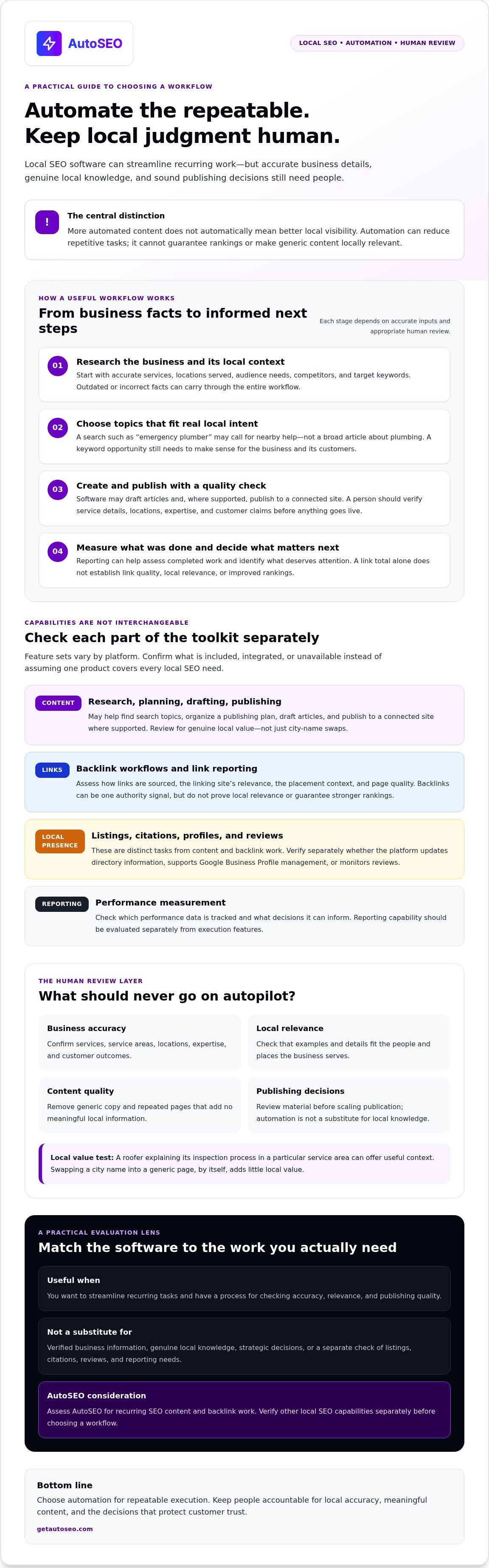
Useful local automation connects verified business facts to relevant search tasks, then leaves people responsible for decisions that require local judgment. A practical workflow starts with business and competitor research, moves into keyword selection and content planning, then produces and publishes material for review. Reporting helps you assess what was completed and what deserves attention next. Each step depends on accurate inputs: outdated services, incorrect locations, or unsupported claims can turn efficient automation into a fast way to publish mistakes.
From business research to locally relevant content
A platform may use information about your business, audience, competitors, and target keywords to shape article topics. Before publication, check every claim about service availability, locations served, expertise, and customer outcomes. A topic that looks relevant in a keyword list may still be wrong for your business or too generic to answer a local customer’s question.
For a deeper look at content workflows, see AI Content Creation: Your 24/7 SEO Writing Team on Autopilot. Treat generated material as something to verify, not as a substitute for local knowledge. Check whether examples fit your customers and whether location-specific details add genuine value.
What backlink automation does, and what it cannot prove
Backlinks can be one signal of a site’s authority, but their presence doesn’t prove that a business is locally relevant or guarantee stronger rankings. Ask how links are sourced and reported. Check the linking site’s relevance, the context around the placement, and the quality of the page. A link total alone isn’t enough to judge value.
What Is Link Building? The Autopilot Guide to Winning in 2026 explores link building further. Evaluate that work separately from local listings and citations, review management, and local performance reporting. Those are distinct functions, and a platform that automates content or backlinks may not support them. Confirm each capability before relying on it.
AutoSEO’s confirmed workflow covers business and competitor research, content planning, SEO article creation and publishing, and backlink work. Automated publishing to WordPress is included, but verify that the publishing controls and setup fit your review process. Google Business Profile management, citation building, review management, and local rank tracking aren’t confirmed capabilities. Don’t assume they’re included.
If recurring content and backlink tasks are part of your workflow, review AutoSEO’s platform and compare its confirmed functions with your local requirements.
How to compare automated local SEO software without buying the wrong fit
Compare automated local SEO software by what it actually does, not by how many features appear on a sales page. Separate functions included in the subscription from integrations, paid add-ons, and capabilities you can’t confirm. Then match those functions to the work your business needs to handle.
| Capability | What to verify |
|---|---|
| Content | Does it research your business and local keywords, plan topics, and produce useful, accurate drafts? |
| Publishing | Which website platforms are supported? Can you review or approve content before it goes live? |
| Backlinks | How are links sourced, assessed for relevance, and reported? |
| Listings | Can it manage your Google Business Profile or other business profiles? Confirm the exact tasks covered. |
| Citations | Does it update directory information and help keep business details consistent? |
| Reviews | Can it monitor or support review responses? Check what requires your input. |
| Reporting | Does it show content activity and performance by location, or only general site metrics? |
Which local SEO capabilities should a small business check?
Start with the work that matters for your locations. Check for local keyword research, service-area content support, citation consistency, and location-level reporting. For Google Business Profile tasks, ask precisely what the platform can do rather than relying on a broad “local SEO” label. List any gaps. You may need a separate platform or an internal process for listings, citations, reviews, or local performance checks.
AutoSEO’s confirmed functions include business and competitor research, content planning, SEO article generation and publishing, and backlink work. Google Business Profile management, citation building, review management, and local rank tracking aren’t confirmed. Treat these capabilities as unconfirmed unless the provider verifies them.
How to assess content and backlink quality before scaling
Request sample content and check whether it’s accurate, original, useful, and specific to your business and service area. Confirm that publishing controls fit your approval process before automating at scale. For backlinks, ask for clear reporting on sources, placement context, and relevance. A link count alone doesn’t establish quality or prove local impact.
For more on balancing automation with oversight, see SEO Automation: Your Unfair Advantage to Dominate Google in 2026. Compare vendor pricing and terms against the tasks included, publishing controls, reporting, and any separate tools you’d still need. Choose a workflow that saves effort without hiding what’s being done.
How to implement local SEO automation while protecting accuracy and trust
Automation works best when it follows a controlled process. Set the rules before increasing publishing volume. That keeps time-saving workflows from multiplying outdated facts or low-value pages.
Set up a reliable local SEO workflow
- Set goals. Decide what you want to improve, such as qualified visits from a service area, calls, direction requests, or conversions. Choose indicators that connect to business outcomes.
- Verify business data. Record the correct business name, address, phone number, services, and service areas. Assign someone to update these facts when the business changes.
- Configure topics. Prioritize real customer questions and services you actually provide. Avoid targeting a location just because it appears in a keyword list.
- Review output. Assign a person to check drafts for accurate claims, useful answers, and meaningful local details. Establish this approval step before enabling publishing at scale.
- Publish deliberately. Confirm each page is ready and that the publishing setup works as intended. Make clear who is responsible for correcting published content.
- Measure and adjust. Review qualified local visits, calls, direction requests, and conversions where data is available. Check the reporting source and what it measures before drawing conclusions.
Automated local SEO software can make recurring execution easier, but approval should remain part of the process. If a draft claims you serve a neighborhood you don’t cover, or describes a service you don’t offer, pause publication and correct both the source information and the draft.
Monitor results and correct weak automation
Assess performance over time. A single ranking change doesn’t prove that a workflow succeeded or failed. Compare trends against the goal you set, and note whether the platform reports organic visits, map interactions, or another measure. Reporting access and metrics vary, so verify where the data comes from and whether it covers each location you care about.
Review published pages for outdated details, near-duplicate copy, thin location content, and unsupported claims. Refresh pages with useful information, and remove or revise content that adds a place name without helping local customers. For more small-business SEO guidance, see Small Business SEO: The Autopilot Guide to Getting Customers in 2026.
If recurring content and backlink work are part of your plan, evaluate AutoSEO’s subscription platform alongside your review and measurement requirements.
When AutoSEO fits a local business, and how to evaluate the next step
AutoSEO may suit a small business that needs a consistent content plan and help handling recurring SEO publishing and backlink work. Its subscription includes 30 SEO-optimized articles per month, automated publishing to WordPress, and initial research into the business and its competitors to inform content topics and keyword targets. That can reduce repetitive work, but it doesn’t guarantee rankings or replace your knowledge of customers and service areas.
Think of it as a content and backlink workflow, not a complete local listings platform. Google Business Profile management, citation building, review management, and local rank tracking aren’t confirmed capabilities. If those functions are central to your local SEO plan, verify them separately before choosing a platform.
Who may benefit from AutoSEO's content and backlink automation?
Businesses that struggle to publish consistently may value a researched content plan and recurring article production. For example, a local contractor could use customer questions and business research to guide useful service-related topics, then check each draft for accurate service details and local context before it goes live. Research can help shape the plan, but it doesn’t replace human review or promise search outcomes.
If your priority is updating directory listings or monitoring reviews, confirm how you’ll handle that work. Don’t assume that a platform automating content and backlinks also manages local profiles.
What to confirm before choosing an SEO subscription
Check how the workflow fits your publishing process. Ask whether you can review drafts before publication, which WordPress configurations are supported, and what publishing controls are available. For backlinks, clarify how sources and placements are reported, how relevance is assessed, and what any measurement represents.
Then compare your checklist with the provider’s confirmed scope. Mark each requirement as included, available through an integration, or outside the subscription. This makes gaps visible before they become extra work. The right automated local seo software should fit the tasks you need to scale while leaving local facts and business decisions under your control.
See how AutoSEO automates recurring SEO work and assess whether its content and backlink workflow matches your needs.
Choose automation that keeps local accuracy in your hands
The right automated local seo software should reduce repetitive work without weakening the local relevance customers rely on. Compare specific capabilities, check how results are measured, and keep a human approval step for business facts and content. Automation can support consistent execution, but your oversight keeps it accurate.
AutoSEO is designed for recurring SEO content and backlink work. Its subscription includes 30 SEO-optimized articles per month, automated WordPress publishing, and initial AI research to inform a business-specific content plan and keyword targets. These capabilities don’t confirm support for listings, citations, reviews, or local rank tracking, so verify those needs separately before choosing a platform.
If that content workflow fits your priorities, see how AutoSEO automates recurring SEO work. Build a process that scales quality while keeping local decisions grounded in what your business actually offers.
Frequently Asked Questions
What is automated local SEO software?
Automated local SEO software streamlines selected SEO tasks for businesses serving a particular geographic area. Depending on the platform, it may help with keyword research, content planning, publishing, backlinks, or reporting. These functions support execution, but they don’t replace accurate business information or human judgment about local customers. Check each feature separately, especially listings and citations, which are distinct from content and backlink automation.
Can automated local SEO software improve local rankings?
It can support work that contributes to search visibility, but no platform can guarantee better local rankings. Results depend on factors including whether your business information is accurate, whether content genuinely serves local needs, and how your site performs over time. Use software to streamline repeatable tasks, then measure relevant outcomes such as qualified local visits, calls, or conversions where data is available.
Does automated SEO software manage Google Business Profile?
Some platforms may support Google Business Profile tasks, but exact features vary. Confirm whether a product can update profile details, publish posts, or provide performance reporting, and check whether those functions are included or require an integration. AutoSEO’s available information doesn’t confirm Google Business Profile management. If profile updates are essential to your workflow, verify that capability separately before subscribing.
How do I choose software for local SEO?
Start by listing the tasks you need to automate, then confirm each platform’s scope. Check local keyword research, service-area content, publishing approval, backlinks, listings, citations, reviews, and reporting separately. Ask for sample content and verify its accuracy and local usefulness. Also confirm integrations, supported website platforms, and what data informs reports. Choose based on your actual workflow, not a broad “all-in-one” label.
Is AI-generated content suitable for local SEO?
AI-generated content can support local SEO when it’s accurate, useful, and grounded in real business details. Review every draft for correct services, locations, expertise, and claims before publishing. For example, a page about a service area should explain relevant customer needs, not just insert a town name into generic copy. Keep a human approval step, especially before increasing publishing volume.
How much content does AutoSEO publish?
AutoSEO’s subscription includes 30 SEO-optimized articles per month, with automated publishing to WordPress. Initial AI research into the business and its competitors informs a content plan and keyword targets. Confirm that the publishing setup and available controls suit your WordPress configuration and review process. Article volume alone doesn’t establish content quality or local relevance, so maintain oversight of business facts and location-specific details.
Can automated local SEO software replace an SEO agency?
Not in every situation. Software can automate defined, repeatable tasks, but it doesn’t automatically replace strategic decisions, local knowledge, or hands-on management your business may need. Assess which work you can handle internally and which tasks require human expertise. AutoSEO is a subscription platform for recurring content and backlink work, not a traditional SEO agency. Its local listing, citation, review, and local rank-tracking capabilities aren’t confirmed.


