

Fully automated SEO for small business can reduce repetitive work, but rank changes alone don’t show whether you’re attracting the right visitors or generating results. Faster reporting is useful only when it helps you make better decisions about the business.
If you’re checking rankings by hand, you know the routine: snapshots can vary, trends are hard to spot, and a small team has limited time to research, publish, and monitor consistently. Automation can take some of that execution off your plate. It can’t replace human judgment about what your customers need or whether SEO is moving the business forward.
This guide shows you how to build a repeatable keyword monitoring workflow, choose signals that connect search visibility to business outcomes, and set a practical review schedule. You’ll also learn where automation can help, where human review still matters, and how to assess whether an automated SEO subscription fits your goals and workload. The aim isn’t to put every decision on autopilot. It’s to automate useful recurring tasks, then use clear evidence to decide what to do next.
Key Takeaways
- Separate rank tracking from work that changes your site, such as content publishing, technical fixes, and link building.
- Build a focused keyword list around valuable searches, then connect each query to the page intended to serve it.
- Compare manual checks, tracking tools, and fully automated SEO for small business by setup effort, data visibility, and required oversight.
- Use a simple tracking log to record queries, target pages, dates, and trends, then turn findings into clear next steps.
- Automation can make recurring SEO work more consistent, but it can’t promise rankings or replace decisions grounded in business results.
What fully automated SEO for small business means
SEO automation means software handles repeatable research, publishing, and monitoring tasks. It doesn’t promise automatic rankings or sales. That distinction matters when assessing fully automated SEO for small business. Search engine optimization brings together activities that help a site become more visible in search. Search engine optimization offers an overview of the fundamentals. Automation can make parts of the work more consistent, but results still depend on relevance, quality, competition, and customer needs.
Keyword tracking is one part of SEO, not a synonym for automation. Tracking records how selected queries perform. Content research and publishing create or update pages. Technical work addresses site issues, while link building aims to earn links from other sites. Since different systems automate different parts of this workflow, check what a subscription actually handles before assuming it covers every task.
Which SEO tasks can a small business automate?
Software can streamline recurring research, generate content drafts, schedule or publish articles, support backlink activity, and collect routine performance data. AutoSEO researches a business, its customers, and competitors, then creates SEO articles, publishes them to WordPress, and builds backlinks. These are examples of execution support, not evidence that the platform is a dedicated keyword rank tracking dashboard.
Use automation to reduce repetitive work, but keep people responsible for decisions that need business context: which services to prioritize, whether a draft reflects real expertise, and whether a page is accurate and useful. Review content before or after publishing according to your process. Investigate performance instead of treating software output as a strategy.
What keyword tracking can, and cannot, tell you
A ranking is a snapshot, not a fixed position. Results can vary by query, location, device, and measurement method. Compare like with like, and look for patterns across repeated observations rather than reacting to one movement. Tracking tools can standardize checks, but the data only reflects the queries and settings you choose to monitor.
Visibility indicators, such as impressions and ranking movement, differ from visits, enquiries, and sales. A query can gain visibility without bringing qualified visitors. Traffic can rise without generating business. Pair keyword observations with site visits and meaningful outcomes to judge whether the work is helping.
Tracking reveals trends, not guaranteed causes or future rankings. A position change alone doesn’t prove which SEO action caused it, and no monitoring workflow can promise where a page will rank next. Use the data to decide what deserves investigation, then apply human judgment before changing priorities.
How to automate keyword tracking without losing context
Effective tracking starts with a business question, not a giant keyword list. The aim is to spot changes that could affect qualified traffic and customer actions, then decide whether they deserve investigation. For teams considering fully automated SEO for small business, a consistent workflow matters more than constant alerts. Ahrefs’ overview of how SEO automation works can help frame which recurring tasks software can support.
Build a keyword set around real customer needs
Group searches by service or product, customer question, and intent. A local electrician, for example, might separate service searches from questions about repairs, then connect each relevant query to a page that answers it. Prioritize terms that align with business goals and an appropriate landing page. Remove duplicates and unrelated searches before monitoring begins.
Choose data sources and a review cadence
Google Search Console provides impressions, clicks, and the queries that surfaced your site. It helps reveal how pages perform in Google Search, but it isn’t the same as a dedicated rank tracker. Rank tracking software may add position monitoring, so confirm which search engines, locations, devices, and reporting options a tool supports before choosing one.
Set a repeatable review schedule. A monthly review is a practical starting point for a lean team. Compare equivalent date ranges and keep the same query settings. Keyword tracking needs a consistent comparison period because changing the dates or measurement settings can make normal variation look like progress or decline.
Turn alerts into decisions
Use notifications to flag changes for review, not to trigger an automatic rewrite. A single position shift may not matter. Investigate sustained movement, then check which landing page appeared, whether it matches the search intent, and how impressions and clicks changed. A visibility increase without clicks may call for a closer look at the result shown to searchers. A click increase without enquiries may point to a mismatch later in the customer journey.
Use this five-step setup to keep the process focused:
- Define the business goal, such as attracting relevant service enquiries.
- Choose a focused set of customer searches tied to that goal.
- Map each query to its intended landing page.
- Collect Search Console data and, if needed, rank tracker observations using consistent settings.
- Review on schedule, investigate meaningful trends, and record the next action.
For a broader view of repeatable SEO workflows, read SEO automation fundamentals. If you’re assessing software for recurring SEO execution beyond monitoring, explore AutoSEO’s automated SEO subscription and check that its scope fits your workflow.
Manual checks, tracking tools, or fully automated SEO?
Choose based on the work slowing your team down. Manual checks can be enough for a small, stable keyword set. A tracking tool can make rank monitoring more consistent. Broader SEO automation may reduce execution work, such as research and publishing. These options solve different problems, and none guarantees better rankings.
| Approach | Setup | Recurring effort | Data visibility | Human oversight |
|---|---|---|---|---|
| Manual checks | Low | Higher as the keyword list grows | Depends on how you record results | High |
| Specialist tracking tool | Choose queries and settings | Lower for repeated monitoring | Focused on the features the tool reports | Needed to interpret changes |
| Broader SEO automation | Depends on scope and access | Can reduce recurring execution work | Varies; confirm what’s included | Needed for quality and business decisions |
When a simple tracking setup is enough
If you monitor a focused set of queries and can review them periodically without disrupting other work, keep it simple. Record the query, target page, date, and observed trend in a spreadsheet. Consider a tracking tool when repeated checks take time away from higher-priority tasks, records become inconsistent, or the keyword set grows beyond what your team can review reliably. Add complexity only when it helps you make a better decision.
When broader SEO automation may fit
First identify the bottleneck. If your main gap is knowing where queries rank, a rank tracking tool may be more relevant. If research, consistent content production, and publishing are consuming capacity, broader automation may be a better fit. AutoSEO’s subscription covers research into a business, its customers, and competitors, as well as SEO article creation, publishing to WordPress, and backlink activity. Direct keyword rank tracking isn’t confirmed as part of the service, so keep keyword measurement separate unless a provider verifies that capability.
When comparing options, focus on which recurring tasks your team needs help with and what information you need to review. For more on choosing an approach, see this guide to small business SEO guidance.
Questions to ask before choosing a solution
Get specific before committing. Ask what tasks are automated, what requires your approval, and what performance data you’ll receive. Confirm what access is needed to publish, how backlink activity is explained, and who reviews content for accuracy, expertise, and brand fit. For AI-related considerations, explore these AI for SEO strategies.
The right choice for fully automated SEO for small business is the one that removes a real bottleneck while keeping data and decisions visible. Start with the simplest setup that supports your goals, then expand only when your workflow shows a clear need.
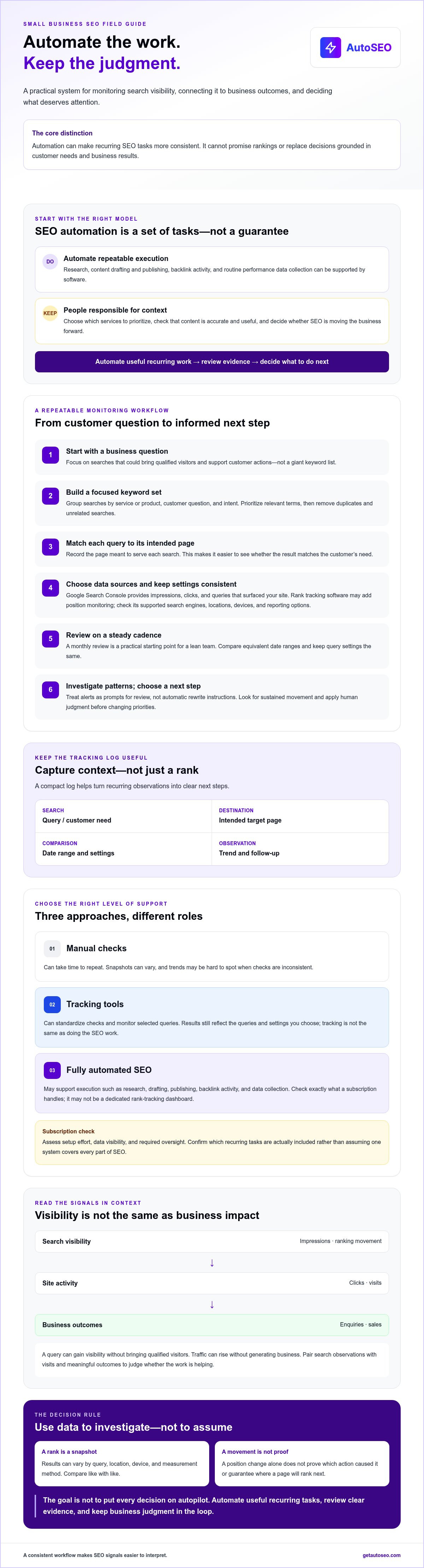
A practical keyword tracking workflow for a lean team
A useful tracking cycle turns search data into a recorded decision: select queries, map each to a page, collect comparable data, review performance, and choose an action. Keep the process small enough to repeat. A focused workflow gives a lean team more value than a long list of keywords no one has time to interpret.
Set up a lightweight keyword tracking sheet
Create one row for each priority query. Include the search intent, target landing page, data source, review date, and notes on the observed trend. Add impressions and clicks from Google Search Console where available. If you also check rankings, record the location, device, and tracking method so later observations use comparable conditions.
Choose searches that connect to business priorities and relevant pages. Remove duplicates and unrelated queries. A sheet might show a service query, its intended service page, the date checked, and whether impressions or clicks moved compared with the previous equivalent period. Keep notes brief and consistent.
Review performance and decide what to change
During each review, look for pages earning relevant impressions but few clicks. Treat that as a prompt to investigate, not an automatic instruction to rewrite. Check whether the page answers the searcher’s intent and whether its title and description accurately reflect the content. Then compare clicks with meaningful actions, such as calls, enquiry submissions, bookings, or purchases, where you can measure them.
A ranking is a visibility signal, not proof of a business result. Record the action you take, the date, and why. That context helps the next review distinguish a considered change from ordinary fluctuation.
Keep automation accountable
Assign a person to review data, content, and unexpected changes. Confirm published pages accurately represent the business, its audience, and its brand. If software supports publishing or backlink activity, check what went live and how backlink sources are explained. Treat source transparency and link quality as review points, not assumed outcomes.
For a team evaluating fully automated SEO for small business, this workflow creates a clear boundary: automate repeatable collection and execution, then keep a human responsible for interpretation and follow-up. It also makes it easier to see whether automation is saving time without losing control of quality.
To reduce recurring SEO execution work, explore AutoSEO’s automated SEO subscription and compare its scope with the tasks your team wants to delegate.
How fully automated SEO can support small-business growth
Automation can help a small team keep recurring SEO work moving. Research, content production, publishing, and backlink activity may be handled more consistently when software takes on repeatable execution. That can improve operational coverage, but it doesn’t guarantee rankings, organic traffic, leads, or sales. Results still depend on the quality and relevance of the work, the site, and the market.
Before choosing a subscription, identify the work your team can’t sustain and what you need to monitor yourself. Fully automated SEO for small business should mean less repetitive execution, not less attention to content quality or business outcomes.
What to expect from an automated SEO subscription
AutoSEO’s subscription includes research into a business, its customers, and competitors, along with 30 SEO-optimized articles per month, automated publishing to WordPress, and backlink activity described by the business as “100 Domain Authority worth.” That description isn’t self-explanatory. Ask how the backlink quantity or value is measured and what sources are involved before interpreting the metric.
Rank tracking is a separate consideration. AutoSEO is a broader SEO automation option, but direct keyword ranking tracking isn’t confirmed. Plan to review search performance through a data source suited to that task.
Who may benefit, and who should keep more control
A subscription may suit a small team that struggles to sustain research and publishing while still having someone available to check the work. Keep business details accurate, review content for factual errors and brand fit, and monitor performance after publication. Automation can support quality at scale only when the output is relevant and checked.
If your business requires close control over every editorial decision, or you don’t have capacity to review automated output, assess that workload before delegating. Software can execute recurring tasks. It can’t replace your knowledge of customers, decide which offer matters most, or guarantee search results.
Choose your next step
Compare your recurring workload with the subscription’s scope. Decide whether research, publishing, or backlink activity addresses a real bottleneck, and keep keyword measurement and business outcome reviews in your process. Before signing up, verify current subscription terms and whether the $1 trial is available, including its conditions.
If the scope fits, explore AutoSEO for small-business SEO. Use automation to reduce repetitive work, then review the evidence and make the decisions that move your business forward.
Build a repeatable SEO system that keeps you in control
Small businesses don’t need to automate every decision to make SEO more manageable. Automate recurring tasks where they save time, track a focused set of relevant queries, and review search data alongside visits and customer actions. Consistent measurement helps reveal trends, but rankings alone don’t prove business growth or guarantee what happens next.
That’s the practical balance behind fully automated SEO for small business: let software handle repeatable execution while people protect accuracy, relevance, and quality. AutoSEO’s subscription starts with research into your business, customers, and competitors. It includes 30 SEO-optimized articles per month and automated publishing to WordPress. Review the current scope and terms to confirm they fit your team’s workload and goals.
Ready to see whether broader SEO automation could reduce repetitive work for your business? Explore AutoSEO for small-business SEO. Start with a clear process, keep the right human checks in place, and build a consistent foundation for growth.
Frequently Asked Questions
How do I automate keyword tracking for a small business?
Start with a focused list of customer searches tied to your business goals, then map each query to the page meant to answer it. Use Google Search Console to review impressions, clicks, and queries, and consider rank tracking software if you need position data. Record the source, settings, and date, then review comparable periods on a set schedule. Investigate sustained changes instead of reacting to every daily fluctuation.
Can SEO be fully automated for a small business?
Software can automate repeatable SEO tasks, but a fully automated process shouldn’t mean removing people from every decision. Tools can support research, content drafting, publishing, and routine monitoring. A person still needs to check that business details are accurate, content is useful and on-brand, and performance connects to real goals. Think of fully automated SEO for small business as a way to reduce execution work, not a promise of automatic growth.
What is the difference between SEO automation and keyword tracking?
Keyword tracking monitors how selected searches perform, such as their impressions, clicks, or rankings. SEO automation is broader: software may also support research, content creation, publishing, or other recurring tasks. A platform that automates publishing may not track rankings, and a rank tracker may not create or publish content. Check each tool’s scope so you know which work it handles and what your team still needs to do.
How often should a small business check keyword rankings?
For a small team, a monthly review is a practical starting point. Compare equivalent date ranges and keep the location, device, and measurement method consistent if you’re tracking positions. Review impressions and clicks alongside rankings, then check business actions such as enquiries or bookings where measurable. Check more often only if a specific decision requires it. A steady review schedule makes trends easier to interpret than frequent checks of isolated changes.
Do I need a separate rank-tracking tool if I use SEO automation?
Only if your current setup doesn’t provide the ranking data you need. SEO automation can focus on execution, such as research and publishing, while a specialist tracker focuses on keyword positions. Google Search Console provides query, impression, and click data, but it isn’t identical to a dedicated rank tracker. Confirm which metrics your platform reports. AutoSEO’s direct keyword rank tracking isn’t confirmed, so verify that capability before relying on it.
Does automated SEO guarantee higher Google rankings?
No. Automation can make recurring work more consistent, but it can’t guarantee rankings, traffic, enquiries, or sales. Search performance depends on factors beyond whether tasks are automated, including how well pages serve searchers and how they compare with competing results. Track trends over consistent periods, check relevant business outcomes, and use the evidence to guide decisions. Treat ranking movement as a signal to investigate, not proof of success or a promise of future results.
Can AI-generated articles help a small business rank?
AI-generated articles may support a business’s content workflow when they address relevant customer needs and provide accurate, useful information. A human should review each article for factual accuracy, business-specific insight, audience fit, and brand voice before or after publication. Publishing more content alone doesn’t guarantee better rankings. Focus on whether each page serves a clear purpose, then monitor search visibility and meaningful actions to assess its contribution.


