

The more SEO you automate, the more important human judgment becomes. If you’re weighing automated seo software vs manual tools, start by identifying which tasks need to happen regularly and which decisions depend on your business expertise. Manual research and publishing offer close control, but they also require someone to keep each step moving.
Automation can handle repeatable work, from organizing keyword research to preparing and publishing content. But speed alone doesn’t ensure accuracy, originality, or a strong fit for your audience. Human review helps keep the strategy grounded and the work useful as your SEO activity grows.
This comparison explains what automated software and manual tools do best, where each approach can fall short, and how to combine them in a practical workflow. You’ll learn what to automate, what to review, and how to build a consistent process without relying on unsupported ranking promises.
Key Takeaways
- In the automated seo software vs manual tools comparison, distinguish automated execution from human-led decisions.
- Automate repeatable tasks, but keep people involved in strategy, accuracy checks, and decisions that affect content quality.
- Compare workflows by setup, ongoing effort, control, scalability, and oversight to see what fits your business.
- Set clear review points before content is published or backlinks are built.
- AutoSEO’s subscription handles recurring SEO execution, including 30 SEO-optimized articles monthly and 100 Domain Authority worth of backlinks.
Automated SEO Software vs. Manual Tools: What Is the Difference?
Automated SEO software carries out defined tasks through a recurring workflow. Manual SEO tools give a person data and functions to work with while they make decisions and complete tasks. For example, using a keyword research tool to review ideas, choose target terms, and write a brief is manual tool use, not an automated SEO workflow.
In short: automated SEO software runs configured SEO tasks; manually operated SEO tools help people investigate, decide, and act. Both can support research, content production, publishing, link building, and measurement. The difference is how much execution software handles and where human judgment is needed.
SEO covers techniques for improving a site’s visibility in search engines. The overview of Search Engine Optimization (SEO) provides helpful context. This comparison focuses on the workflow behind those techniques: whether a person completes each step or software carries out recurring tasks.
What counts as automated SEO software?
Automation connects tasks into a repeatable process. Depending on the platform, software may conduct recurring research, prepare content, publish to a connected website, build backlinks, or produce reports. These capabilities vary. A tool that tracks rankings, for example, doesn’t necessarily create or publish content.
Automation handles execution, not the entire strategy. People still need to choose an audience, set priorities, define positioning, and judge whether a topic is useful and accurate. A workflow can follow those decisions consistently, but it can’t make every business-specific call on its own.
What do manual SEO tools help you do?
Manually operated tools help people investigate and take action. A business owner might review keyword ideas, check a page for technical issues, compare search performance over time, then decide what to change. The tool supplies information; the person interprets it and completes the next step.
This approach gives users direct control over each decision, but the work depends on someone returning to the tool, evaluating results, and acting on them. A dashboard can flag an issue without fixing it or publishing an update.
Consider a content brief. In a manual process, a marketer researches a topic, reviews search results, selects target terms, outlines the article, and hands the brief to a writer. In an automated workflow, configured software may research targets, generate or prepare content, and publish on a schedule. Human review can still happen before publication. The distinction isn’t “tool versus no tool.” It’s who moves the work forward at each stage.
Use these questions to compare workflows:
- Research: Does software gather and organize keyword or audience insights, or does a person do it?
- Content: Does the workflow produce drafts, or does a person create and edit each piece?
- Publishing: Does software publish recurring content, or must someone upload and schedule it?
- Link building: Does the platform support recurring link-building activity, and what review happens before it does?
- Measurement: Does it report performance automatically while leaving interpretation and next steps to a person?
That is the practical lens for automated seo software vs manual tools: identify which steps are automated, which still require hands-on work, and which decisions need human oversight. A feature list alone won’t show how much work your SEO process will require.
Which SEO Tasks Should You Automate, and Which Need Human Judgment?
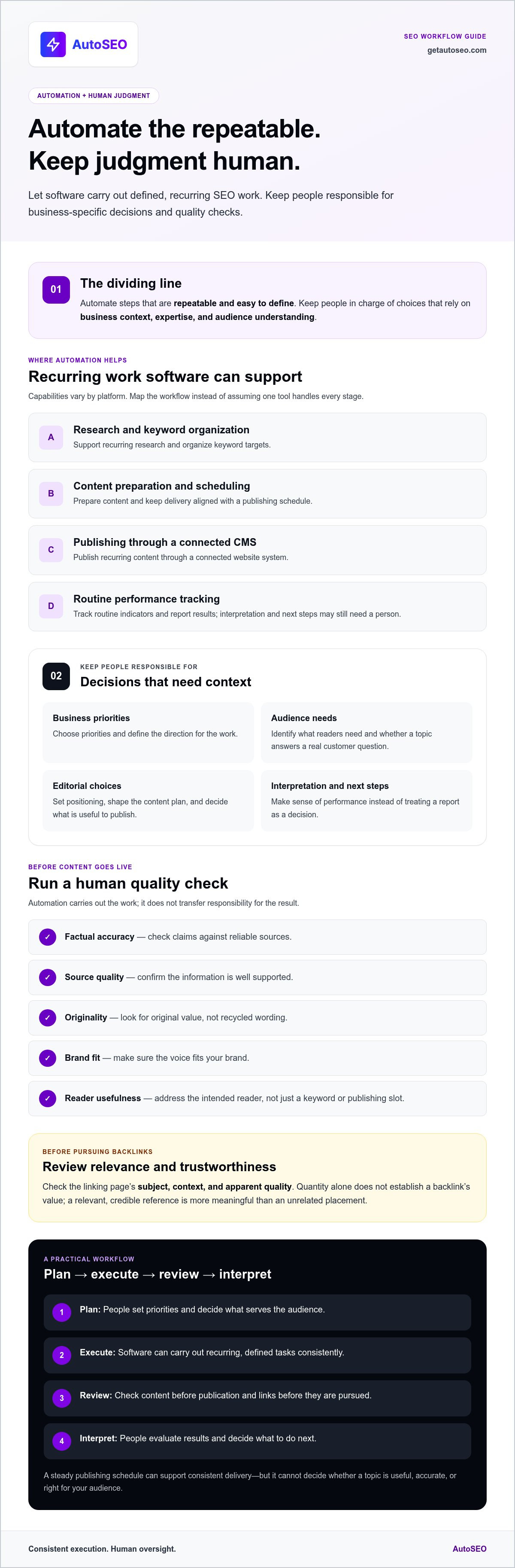
Automate steps that are repeatable and easy to define. Keep people responsible for decisions that depend on business context, expertise, and audience understanding. This division helps a small team maintain a steady SEO routine without treating more output as proof of better work.
Automating a task doesn’t transfer responsibility for the quality of its result. Set review checkpoints before publishing content or pursuing backlinks. Check factual claims against reliable sources, look for original value rather than recycled wording, make sure the voice fits your brand, and assess whether a backlink source is relevant and trustworthy.
Where automation can reduce repetitive SEO work
Software can support recurring research, organize keyword targets, schedule content, publish through a connected CMS, and track routine performance indicators. These tasks follow repeatable steps, so consistent execution can help a lean team keep work moving without restarting the process manually. Map the workflow before assuming a system handles every stage. This is the practical value of SEO automation: reduce operational friction while preserving oversight.
Use automation to carry out a content plan, not as a substitute for one. A publishing schedule can make delivery consistent, but it can’t determine whether a topic answers a real customer question. Small businesses can use practical guidance such as SEO Strategies for Small Businesses to set priorities, then configure recurring tasks around the needs of their audience.
Where people should retain oversight
People should set business priorities, identify audience needs, and make editorial decisions. Before content goes live, review it for factual accuracy, source quality, originality, brand fit, and usefulness. Check that it addresses the intended reader instead of simply repeating a keyword or filling a publishing slot.
Apply the same discipline to links. Quantity alone doesn’t establish a backlink’s value. Review the linking page’s subject, context, and apparent quality. A relevant, credible reference is more meaningful than an unrelated placement. Set an approval point before links are built, just as you would before content is published.
- Automate: recurring research, scheduling, CMS publishing, and routine monitoring.
- Review: claims, sources, originality, brand voice, audience fit, and backlink relevance.
- Decide: which topics support business goals and which opportunities deserve priority.
That balance makes automated seo software vs manual tools a workflow decision, not a contest between speed and care. If recurring execution is the bottleneck, an automated SEO subscription can put ongoing work on autopilot while human review helps protect quality.
Automated SEO Software vs. Manual Tools: Compare Control, Scale, and Quality
There’s no universal winner. The right choice depends on how much SEO expertise and time your team can commit, how often tasks need to happen, and how much control you want over each step. Compare the actual workflow, not just the feature list. A tool may provide research and recommendations while leaving you to interpret the data, create content, and publish it yourself.
| Factor | Manually operated SEO tools | Automated SEO software or service |
|---|---|---|
| Setup | Choose tools, configure projects, and learn how to interpret their data. | Configure the workflow and any needed integrations. Setup varies by platform. |
| Recurring effort | A person returns to the tools to analyze findings and complete tasks. | Configured tasks run on a recurring basis, depending on what the platform supports. |
| Control | Hands-on choices at each step offer granular control. | Rules and workflow settings guide execution. Oversight depends on available review points. |
| Scalability | More projects often require more staff time to research and act. | Repeatable workflows can support more consistent execution, within platform capabilities. |
| Oversight | The user interprets results and checks each action. | People still need to assess strategy, accuracy, relevance, and quality. |
One distinction matters: software capability is not the same as service delivery. A standalone tool may show keyword data or flag page issues, but the user still has to turn those findings into a plan and carry out the work. An ongoing automated SEO service can connect recurring tasks, such as research, content production, publishing, or link building, into a continuous workflow. The scope depends on the service.
When manually operated SEO tools make sense
Manual tools suit teams with SEO experience, available time, and a need to control individual decisions. An in-house specialist can inspect a page, weigh competing keyword opportunities, and choose a tailored action. That precision requires recurring work: someone must review the data, prioritize tasks, implement changes, and track what happens next.
When an automated SEO service may fit better
Recurring execution can be a better fit when a small team struggles to maintain a consistent publishing and optimization routine. AutoSEO is a subscription-based service, not simply a tool the customer operates or a one-off content order. Its workflow includes initial research, ongoing content production, WordPress publishing, and backlink building. For context on AI-assisted drafting and publishing workflows, see this AI content creation guide.
Judge quality and outcomes using evidence, not assumed speed or promised returns. Review published pages for accuracy, originality, clear audience value, and alignment with your brand. Track relevant indicators, such as indexed pages, organic clicks, impressions, and conversions, against a baseline over time. These measures can help identify what to maintain or improve, but they don’t guarantee a particular result.
The practical choice in automated seo software vs manual tools is the workflow your team can run consistently while keeping meaningful oversight. Choose manual operation for granular control backed by available expertise. Choose recurring automation when execution is the bottleneck, and set clear checks to protect quality as the work scales.
How to Build a Practical SEO Workflow for a Small Business
A useful workflow starts with business priorities, not a software feature list. Decide what SEO should support, automate repeatable tasks where it makes sense, and reserve time for review. This gives a small team a process it can sustain and a way to judge whether the work is relevant.
Set priorities before choosing tools or automation
Start with the pages that matter to the business, the questions customers ask, and the search themes connected to your offer. Choose a publishing cadence your team can realistically review, rather than creating more drafts than you can check. A small business SEO guide can help frame those priorities before you select tools or automate execution.
Use this sequence to turn those priorities into a working routine:
- Define the goal. Decide whether SEO should support awareness, product or service discovery, or qualified inquiries. Choose a primary goal to keep the team focused.
- Research your audience. List customer questions, relevant search themes, and the pages that should answer them. Keep the plan tied to what your business can genuinely address.
- Set the cadence and owners. Choose a realistic schedule and assign responsibility for research, content review, publishing, and performance checks. Automate steps that are repeatable and clearly defined.
- Establish approval points. Before publication, review claims, sources, usefulness, and brand fit. Before building or approving links, check that the source and context are relevant to your business.
- Publish and record a baseline. Keep a simple record of what went live, its target topic, and relevant performance data. That creates a reference point for later reviews.
Measure whether the workflow is working
Before changing the process, record the data available from analytics and search performance tools. Track relevant impressions and clicks for the pages you’re working on, then monitor qualified actions such as inquiries or purchases where measurement is available. Review the same indicators at consistent intervals to spot patterns without overreacting to a single fluctuation.
Numbers need context. Check whether published content answers its intended question and supports a meaningful next step. If impressions rise but clicks or qualified actions don’t, review the page’s relevance, presentation, and call to action. If content isn’t being published consistently, adjust the cadence or automate a suitable recurring task. Don’t assume automation caused every gain or decline; seasonality, site changes, and other factors may also matter.
That’s a practical way to assess automated seo software vs manual tools: choose a workflow your team can execute, review, and measure. If recurring execution is the gap, explore AutoSEO’s automated SEO subscription for ongoing work.
How AutoSEO Puts Recurring SEO Work on Autopilot
For a small business that needs ongoing SEO execution but can’t keep every task moving in-house, AutoSEO brings recurring work into one subscription-based workflow. After setup, the service is designed to run on autopilot, connecting research, content creation, publishing, and backlink building. It’s for businesses that want a continuing process rather than a standalone tool to operate or a one-off content order.
What the AutoSEO subscription handles
Initial AI research examines the business, its customers, competitors, and relevant keyword targets to inform a content plan. That foundation helps shape the topics for ongoing SEO-focused articles. The subscription includes 30 SEO-optimized articles per month, automated publishing to WordPress, and 100 Domain Authority worth of backlinks.
These deliverables create a recurring execution rhythm. Research helps guide the topics, automated WordPress publishing handles the publishing step, and backlink building supports ongoing off-page activity. For small businesses, the operational benefit is having these tasks handled as a connected service instead of assembling separate tools and managing each handoff.
Backlinks still need to make sense in context. Understanding the purpose of link building can help businesses assess how this activity fits into a broader SEO plan. AutoSEO’s link-building guide explains the practice and its role in a recurring workflow.
Who may benefit from SEO on autopilot?
This model can suit owners who know consistent SEO work matters but have limited time or internal capacity to research topics, produce content, publish regularly, and maintain link-building activity. It’s especially relevant when the alternative is an irregular process that stalls whenever other business priorities take over.
A recurring service differs from buying standalone software that leaves execution to the user. It also differs from a one-time content order: the workflow is designed to continue, with ongoing article creation and backlink building as subscription deliverables. That structure can make execution more consistent, while business goals and quality expectations remain important. Review content for accuracy, usefulness, and audience fit, and evaluate backlinks for relevance. Automation supports the process; it doesn’t guarantee rankings, traffic gains, or a particular timeline.
In the automated seo software vs manual tools decision, AutoSEO suits businesses looking for recurring execution after setup, rather than another tool to operate task by task. The subscription provides a defined cadence of content and link-building work without promising a specific search outcome.
Explore SEO on autopilot to see how AutoSEO’s ongoing subscription can fit into your business’s SEO workflow.
Turn Your SEO Plan Into a Repeatable Workflow
Your next step doesn’t need to be a full-scale overhaul. Choose one recurring SEO task that currently slips, define what a good result looks like, and decide who or what will carry it forward. Then set a simple review point. This lets you test whether the process is sustainable before expanding it.
Use that test to make the automated seo software vs manual tools decision: if your team has the time and expertise to act on tool insights, hands-on control may suit you. If consistent execution is the constraint, an ongoing automated workflow may be more practical. Set clear standards, track meaningful outcomes, and adjust based on evidence rather than assumptions.
Ready to move recurring SEO work forward? Explore SEO on autopilot and see how AutoSEO fits the way your business wants to work. Build a workflow that supports quality and consistency, then improve it with evidence.
Frequently Asked Questions
Is automated SEO software better than manual SEO tools?
Neither is automatically better; the right fit depends on your workload and capacity. In the automated seo software vs manual tools decision, compare the time it takes to complete recurring tasks with the time your team can realistically spend reviewing results. A skilled marketer may prefer hands-on keyword research for a new service page, while a small team may want recurring reports without repeating the setup. Choose based on how the work gets done.
Can automated SEO software create content that ranks?
Software can support research, drafting, and publishing, but it can’t guarantee rankings. A page needs to meet the searcher’s needs with accurate, useful information. Before publishing, check whether it answers the question clearly, distinguishes your business from alternatives, and avoids unsupported claims. Also check whether another page on your site already targets the same topic. Use performance data to decide what to improve instead of treating publishing volume as proof of success.
Do I still need manual SEO tools if I automate SEO?
You may, especially for investigations that require context. For example, a report might show that a page lost clicks, but a person needs to examine the page, query, and recent site changes to decide what to do. Keep tools that help answer important questions or verify outcomes. Remove overlapping tools that produce data no one has time to review or use. Automation can reduce repetitive work, but it doesn’t make analysis unnecessary.
Is automated SEO safe for a small business website?
Automation isn’t inherently safe or unsafe; the workflow and its safeguards matter. Limit publishing access to the people or systems that need it, keep a record of content changes, and regularly review a sample of pages for accuracy and brand fit. Make sure someone can identify and correct an automated change that affects an important page. Treat backlink activity with the same care: relevance and quality matter more than volume alone.
How long does automated SEO take to show results?
There’s no dependable timeline for SEO results. Search engines need to discover and process pages, and performance can depend on competition, site health, and how well content meets search needs. Before starting, record a baseline and note significant changes to the site or publishing process. Review impressions, clicks, and qualified actions over time rather than drawing conclusions from a brief fluctuation. Be cautious of fixed-date ranking or traffic promises.
What is the difference between SEO software and an SEO service?
SEO software provides capabilities that a user operates, while an SEO service delivers recurring work as part of a subscription or other arrangement. The distinction depends on what the offering does: a dashboard may report issues, while a service may carry out defined tasks. AutoSEO is a subscription service for ongoing SEO work, not a standalone tool. Before choosing a workflow, understand what gets executed and what still needs your review.
Can SEO automation build backlinks automatically?
Yes, some automated SEO services include backlink building as part of recurring work. Automation can handle execution, but it doesn’t prove that a link is relevant or valuable. Review the context of linking pages and whether they relate naturally to your business and content. Don’t judge a backlink profile by a count or authority metric alone. AutoSEO’s subscription includes backlink work, which should be considered alongside your site’s wider content and SEO priorities.


