

More posts won't fix a page aimed at the wrong search. To understand how to get my blog to rank higher, match each page to one specific keyword phrase and give readers the most relevant, useful answer. Then make the page easy to navigate, fast to load, and supported by quality backlinks from relevant, trusted websites.
It’s frustrating to publish consistently and still see little organic traffic. The issue often isn’t how much you write, but whether your content matches search intent and earns enough trust to stand out. This guide explains how search engines assess pages and how to improve the factors you can control. Learn to choose keywords, build focused content, strengthen internal links and site structure, and pursue backlinks that support credibility. You’ll also see how mobile usability and page speed fit in. Use these steps to serve readers first and give search engines clear reasons to surface your blog.
Key Takeaways
- Choose a keyword that matches what readers want, then build a focused page around it.
- Use clear URLs and descriptive image text, and keep image files light to support a smoother experience.
- Connect related posts with useful internal links so readers and search engines can navigate your topic coverage.
- Prioritize backlinks from relevant, trusted websites over links that are unrelated or spammy.
- Improve mobile usability and page speed to make your content easier to access across devices.
Keyword research and search intent
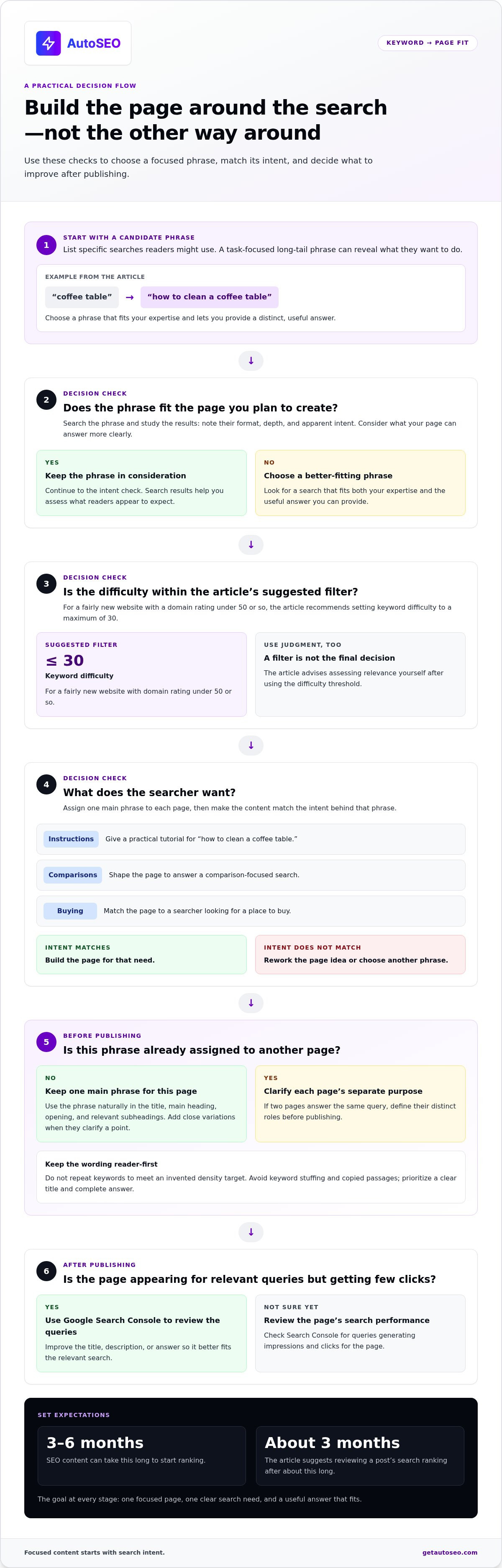
To get your blog to rank higher, start by matching each page to one specific keyword phrase. Check what readers expect before drafting, then build the page around that intent.
-
Research Long-Tail Keywords
List specific phrases readers might search, such as “how to clean a coffee table” instead of “coffee table.” Compare each phrase with the page you plan to create. Long-tail keywords often reveal a clear task or question. Choose a phrase that fits your expertise and lets you provide a distinct, useful answer.
-
Assess Keyword Competition
Search each candidate phrase in Google and study the pages in the search results. Note their format, depth, and apparent intent. Then identify what your page can answer more clearly. For fairly new websites with a domain rating under 50 or so, set keyword difficulty to a maximum of 30. Use that threshold as a filter, then assess relevance yourself.
- Target one main phrase per page, then confirm the search intent. Are readers looking for instructions, comparisons, or a place to buy? A page about “how to clean a coffee table” should offer a practical tutorial, not a product category. Avoid assigning the same main phrase to several pages. If two pages answer the same query, clarify their separate purposes before publishing.
- Place the chosen phrase where it helps readers understand the page. Use it naturally in the title, main heading, opening, and relevant subheadings. Add close variations when they clarify a point. Don’t repeat keywords to meet an invented density target. A clear title and complete answer are more useful than awkward repetition.
- Use Google Search Console to review queries that generate impressions and clicks for each blog page. Find relevant searches where the page appears but earns few clicks. Improve its title, description, or answer to better fit the query. SEO content can take 3-6 months to start ranking; review a post’s search ranking after about 3 months.
If you’re still wondering how to get your blog to rank higher, avoid keyword stuffing, copied passages, and pages that miss their target query. For a blog targeting one U.S. city, local details can help answer location-specific searches. A post about Seattle coffee shops, for example, should include useful information about Seattle, not just repeat the city name in generic copy.
Image file size and URL structure
Optimize images and URLs before publishing. Clear file names, accessible descriptions, and concise addresses help search engines interpret each page.
-
Optimize Image File Size
Compress each image before uploading it to your blog. Keep blog post image files under 100 KB where possible, ideally as JPG files. Smaller files can reduce the data a page must load, especially when several images appear together. Check the finished image on a phone screen, too. Compression should reduce file size without making important details difficult to see.
-
Structure URLs
Write a short URL that describes the page’s main subject. For a guide to pruning roses, use a path like “/prune-roses” rather than a string of dates and unrelated terms. Use lowercase words and hyphens between them. Avoid repeating a word three or more times in one URL. A clear address is easier to scan, remember, and navigate.
- Describe each meaningful image with concise alt text. Explain what it shows and why it belongs on the page. For example, “red roses pruned above an outward-facing bud” communicates more than “rose image.” Screen readers use alt text to convey image information, while search engines can use it to understand context. Don’t stuff keywords into descriptions or repeat the caption word for word.
- Match each image to the surrounding content. A diagram showing rose-pruning cuts belongs beside instructions about those cuts, not in an unrelated section. Use clear file names, such as “rose-pruning-cuts.jpg,” before uploading. Then check that the image displays correctly on both phone and desktop screens. Relevant images can clarify a process; oversized or confusing visuals can distract from it.
- Add schema markup that accurately describes the page type, such as an article or product. Keep it consistent with visible content: structured data should describe the page, not make unsupported claims. Pair article markup with a clear title and author information. Use product markup only when the page actually presents a product. This gives search engines organized context beyond the visible text.
- Review image and URL optimization before publishing. Open the page on a mobile screen, test that images load, and confirm that the URL matches the article’s subject. Check for broken image paths after changing a file name. Keep established URLs stable when possible; if a necessary change breaks an old address, create a redirect. These practical steps support navigation and keep page signals consistent.
Internal linking and topic clusters
Build clear paths between related blog posts. A focused cluster helps readers explore a subject and shows how your pages connect.
- Choose one central topic, then map supporting posts around it. For a home gardening blog, a guide to growing tomatoes could link to posts about soil, watering, and pest control. Keep the cluster focused. A blog with 20 well-optimized posts on one topic will typically outperform one with 200 scattered, thin posts.
-
Build Topic Clusters
Create a central guide to a broad topic, then link it to useful supporting posts. For example, a tomato-growing guide can connect to a post about pruning tomato plants. Link each supporting article back to the central guide, too. Check that every post adds original information instead of repeating the same advice under a slightly different title.
- Add links that help readers take a logical next step. In a post about choosing running shoes, link to a related guide about shoe fit or trail-running gear. Place each link beside the relevant passage, not in an unrelated list at the bottom. Readers who click should find the promised details without having to search the page again.
-
Add Descriptive Links
Write anchor text that tells readers what the destination covers. Use “how to prune tomato plants” instead of “click here” when linking to that tutorial. Apply the same rule to external links, directing readers to a relevant, trustworthy source that supports your explanation. Avoid vague anchors, repeated keyword-heavy links, and destinations unrelated to the paragraph.
- Connect every new post to older content. Add a link to each new article from 3 or 4 older related posts, using anchors that describe the new page. Then add links from the new post to 2-5 other relevant blog posts or pages on your site. This two-way structure helps readers navigate between connected topics and gives each page a clear place in your site.
- Review your cluster whenever you update an article. Open the central guide and supporting posts, then check for broken links, outdated details, and missing connections. For example, a revised guide to tomato varieties should link to current planting advice. Add relevant links where readers need more detail, not simply to increase clicks or fill a link quota.
Backlinks and link quality
Evaluate each backlink for relevance, trust, and value to readers. A relevant editorial link is more useful than a pile of unrelated placements.
- Prioritize backlinks from websites covering topics related to yours. A link from a gardening publication to your tomato-growing guide makes contextual sense. A link from an unrelated directory does not. Relevance helps readers understand why the destination belongs there. Review the linking page itself, not just its domain name, before treating a backlink as valuable.
- Assess the site’s authority alongside its actual audience and content. When evaluating potential ranking opportunities, look for websites with a domain rating under 40. Treat that metric as one screening signal, not a quality verdict. A lower-rated site with useful, trusted coverage may offer better context than a higher-rated site unrelated to your subject.
- Check the page surrounding each link. Does it offer original information, clear headings, and a useful explanation? For example, a detailed article about composting can naturally reference your guide to soil amendments. A thin page built mainly to sell links offers little value to readers or topical context. Avoid placements that exist only to pass a link.
- Create material that gives another publisher a clear reason to cite you. An original checklist, practical tutorial, or well-explained resource can support a relevant reference. For example, a gardening blog could publish a seasonal planting calendar. Make the resource accurate and useful before outreach. Keyword research can reveal questions where readers need a stronger answer.
- Use targeted outreach to introduce a specific resource to relevant editors. Name the article or section it could support, and briefly explain the connection. For example, offer a soil-testing guide to a writer discussing garden preparation. Don’t send generic requests to unrelated websites. A focused pitch respects the editor’s time and keeps your link targeting relevant.
- Audit backlinks by looking at patterns, not isolated metrics. Group links by topic, referring page, and placement type. A sudden cluster of unrelated links from link-selling sites deserves attention. Compare those patterns with links from trusted publications that reference your useful content naturally. Keep records so you can distinguish legitimate editorial mentions from suspicious placements.
- Make every earned backlink useful to readers. Confirm that the destination delivers on the promise made by its anchor text. A link labeled “tomato pruning guide” should lead to practical pruning instructions, not a generic homepage. Strong alignment supports a useful experience and gives the linking page a clear reason to reference your content.
How do page speed, mobile usability, and Core Web Vitals affect rankings?
A fast, usable page helps visitors reach your content without friction. Improve the mobile experience first, then address the specific performance problems slowing each page.
- Test your blog on a phone, not just a desktop screen. Over 60% of people visiting websites use phones or tablets. Check that text stays readable, buttons remain easy to tap, and menus work without horizontal scrolling. A mobile-responsive layout helps readers access the same article across screen sizes.
- Measure page speed, then identify what delays the main content. Large media files, unused scripts, and slow server responses can all add waiting time. Optimize images and other media to load faster on mobile devices. After each change, reload the page and compare its behavior on a phone.
- Review Core Web Vitals as distinct user-experience signals. Largest Contentful Paint reflects how quickly the main content appears. Interaction to Next Paint focuses on response to user input. Cumulative Layout Shift tracks unexpected movement during loading. Use these measures to find specific sources of friction, such as a late-loading article title or shifting buttons.
- Fix layout shifts that interrupt reading. If an advertisement or embedded element appears above a paragraph after loading begins, the text can jump. Reserve space for elements that load later, then test the result by scrolling through the article. Stable headings and controls make it easier for readers to follow instructions.
- Reduce delays during common actions. Test a table of contents, menu, and search field on a phone. If a navigation button feels unresponsive when tapped, review scripts and interactive components. Keep essential controls simple, and remove features that add loading work without helping visitors complete a task.
- Prioritize fixes that affect real reading tasks. Start with pages that attract organic visitors, then test their mobile layout, media loading, and interactive elements. Recheck each page after making changes. A faster homepage won’t resolve delays on a slow tutorial, so evaluate important URLs individually.
- Make performance reviews part of your publishing routine. Before publishing an article, preview it on a phone and check its media, headings, and navigation. For a systematic approach to ongoing SEO work, explore automated SEO as a way to support publishing and optimization.
Performance work is easier to prioritize when each page has a clear search purpose. The page recommends targeting one specific keyword phrase for each authoritative content page and creating a separate webpage for each keyword phrase a website targets. In its coffee-table research example, the keyword list narrows to 1,734 terms, then to 74 keywords after applying a keyword-difficulty filter. The example also identifies a website with a domain rating of 26 and 157.6K visitors per month.
Content planning can keep informational and commercial goals in balance: the page recommends an approximate content mix of 70% informational posts and 30% commercial posts. Pairing that focus with page-level performance checks helps ensure visitors arriving for a relevant phrase can read and use the page without avoidable friction.
AutoSEO: Automated SEO Platform Subscription
AutoSEO automates ongoing content publishing and backlink building through its Automated SEO Platform Subscription. The service publishes 30 SEO-optimized articles per month and builds backlinks worth 100 Domain Authority. It can fit bloggers who understand the fundamentals but need a repeatable way to maintain content production and link building.
Treat an SEO platform as an execution option, not a substitute for choosing topics that serve your audience. Review articles for accuracy, relevance, and fit with your site before publishing.
Visit AutoSEO to learn more.
Turn Your Next SEO Move Into a Repeatable Process
The question of how to get your blog to rank higher becomes more useful when it leads to a clear next action. Choose a page that matters to your audience, identify what would make it more helpful, and set a review habit you can sustain. Consistent execution helps you learn which improvements strengthen your content and where to focus next.
If producing and publishing SEO content takes time away from running your business, AutoSEO’s Automated SEO Platform Subscription is an option for ongoing execution. Use it to support a more consistent approach while keeping your audience, expertise, and editorial judgment central to what you publish.
Take the next step at a pace that fits your goals. Contact AutoSEO to discuss your SEO and explore whether an automated workflow suits your blog. Your next useful improvement can start with one focused page.
Frequently Asked Questions
How Does Google (and AI) Rank Pages Today?
Google search systems and AI search experiences surface pages that help answer a specific request. Traditional results present ranked pages, while AI tools may select passages to summarize or cite. Make each page easy to interpret with a clear title, defined terms, and answers in crawlable text. For example, a recipe page should explain the dish and method directly, rather than hiding essential instructions inside an image.
How does Google determine blog search rankings?
Google evaluates how well a page matches a search, alongside signals that help assess its usefulness and credibility. To understand how to get your blog to rank higher, compare a page’s purpose with the query it serves. A hiking-boot comparison may fit a buying query but miss a search for boot-care advice. Make the page’s value clear to readers.
How to find keywords and search intent for blog posts?
Start with a reader’s task, then compare the phrases they might search. Review the result formats for each phrase: tutorials often signal informational intent, while category pages suggest shopping intent. For example, “how to repot a fiddle-leaf fig” calls for practical instructions, not a general houseplant overview. Use related questions to identify useful subtopics, then choose the phrase that best matches the article you can create.
How to optimize blog titles, headings, URLs, and meta descriptions for SEO?
Make each page element describe the same subject accurately. A title about beginner sourdough feeding should lead to content about feeding a starter, not general bread baking. Use headings to organize instructions, and keep the URL readable when shared in a message. Write a distinct meta description that previews the article’s actual value. Avoid promising answers that readers won’t find on the page.
How to improve blog content quality and topical authority?
To get your blog to rank higher, make each article genuinely useful and distinct. Add details that generic summaries miss, such as how soil texture affects watering in a gardening guide. Explain specialized terms, support important points with clear reasoning, and update advice when circumstances change. Build related coverage around a subject, but ensure each post serves a different reader need instead of repeating existing content.
How to build backlinks to a blog safely?
Publish resources that relevant websites have a clear reason to cite, such as an original checklist or expert explanation. Review the linking page’s topic and usefulness before pursuing a backlink. Avoid link schemes, paid placements designed to manipulate rankings, and automated link blasts. Monitor new links for suspicious patterns. Focus on genuine editorial references that make sense for the linking site’s readers, not link volume alone.


