

The best semrush alternative for small business may not be another all-in-one dashboard. If research isn’t your bottleneck, more data won’t solve the problem. You may already know you need better keywords, stronger content, or more backlinks, but lack the time to keep the work moving.
Start by identifying the SEO tasks that need attention. This guide compares research tools such as SE Ranking, Ahrefs, Mangools, and Ubersuggest, then distinguishes them from execution-focused options. You’ll see what each approach can handle, where a lean toolset may be enough, and when automated content and backlink building could better match your team’s capacity.
AutoSEO takes the execution route, delivering “1 expert article daily” and building backlinks to help businesses that are “2.5 years behind competitors.” It isn’t a replica of Semrush’s software suite. It’s an option for businesses that need consistent SEO work, not another dashboard to manage. By the end, you’ll have a clearer way to compare capabilities, workload, and the approach your business can sustain.
Key Takeaways
- Choose a semrush alternative for small business by matching it to the SEO work you need done, not by counting features.
- Compare options by task coverage, useful data, workflow effort, reporting, and room to scale.
- Decide whether your priority is research software, recurring SEO execution, or a combination of both.
- Use your team’s capacity and business stage to narrow the options, then review current plan limits and features before choosing.
- AutoSEO delivers “1 expert article daily” and builds backlinks for businesses that are “2.5 years behind competitors.”
What a Small Business Needs from a Semrush Alternative
Comparing Semrush alternatives makes sense if you’re paying for capabilities your team doesn’t use or don’t have time to operate. But a small business doesn’t automatically need another full SEO suite. The right choice depends on what work needs doing and who will do it.
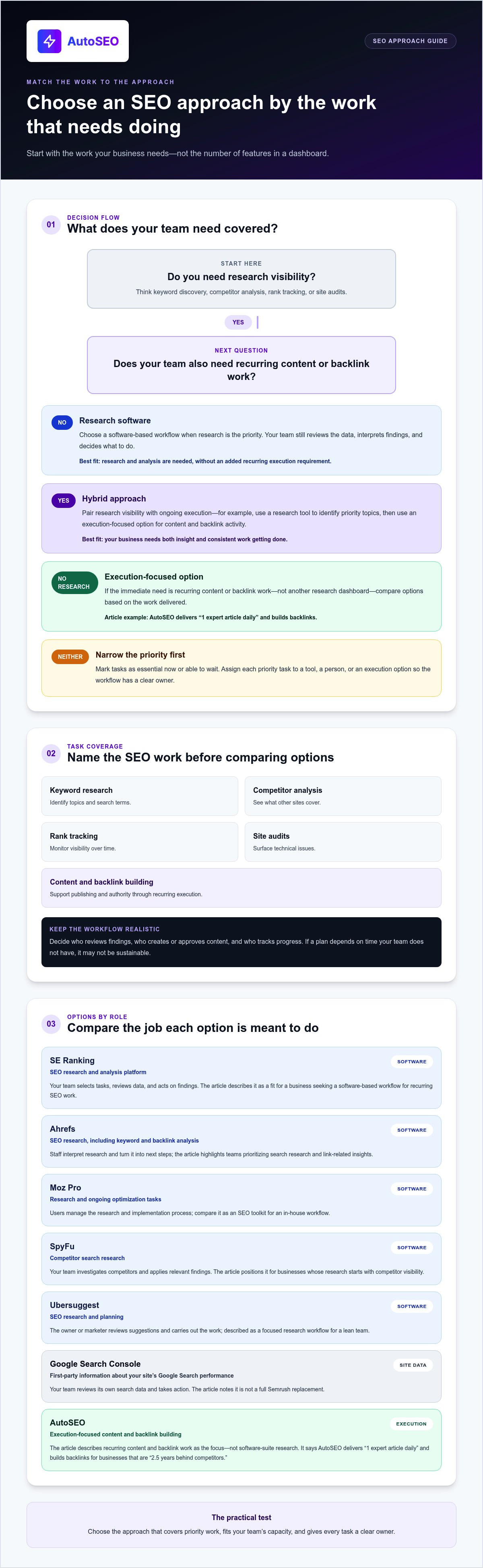
Start with the central decision: buy research software, arrange recurring execution, or combine both. Software gives your team data and tools to act on. Execution-focused options address ongoing work such as publishing content and building backlinks. A hybrid approach can provide research visibility while keeping essential work moving.
A practical Semrush alternative helps your business complete the SEO work it needs, with a manageable workflow and a clear owner for each task.
Which SEO tasks does your business need covered?
Break SEO into specific jobs before comparing options. Keyword research identifies topics and search terms. Competitor analysis shows what other sites cover. Rank tracking monitors visibility over time. Site audits surface technical issues. Content and backlink building support publishing and authority. These capabilities are related, but they don’t all solve the same problem. For background on how these activities fit within organic search, review search engine optimization fundamentals.
Mark each task as essential now or something that can wait. A solo owner might need a shortlist of promising topics and a straightforward way to monitor key pages. An in-house marketer may need repeatable research, reporting, audits, content production, and link-building workflows across the business. Prioritize based on available time, not an idealized SEO plan.
Software, services, and hybrid approaches are not the same
SEO software is a toolset your business operates. It can reveal data, track performance, or identify issues, but your team still needs to interpret the findings and decide what to do. An execution-focused option is judged by the work delivered, not by whether it recreates every dashboard or report in a software suite.
Choose a hybrid setup when you need both research visibility and consistent execution. For example, a business might use a research tool to identify priority topics, then rely on an execution-focused approach for ongoing content and backlink activity. AutoSEO delivers “1 expert article daily” and builds backlinks for businesses that are “2.5 years behind competitors.” That makes it an option to assess for execution needs, not a feature-for-feature Semrush software replacement.
Before choosing, map each priority task to a tool, a person, or an execution option. Then walk through the weekly workflow: who reviews findings, who creates or approves content, and who tracks progress? If a plan depends on time your team doesn’t have, it won’t be sustainable. The best fit covers priority work without leaving a hidden execution gap.
Semrush Alternatives for Small Business: Tools and Approaches to Compare
There’s no single best replacement for every team. A semrush alternative for small business should match the work you need covered, whether that means gathering search data, managing research in-house, or keeping recurring SEO execution moving. The options below serve different roles. Use them as a starting point for comparison, not as proof that one is better than another.
Use the workload column to identify what still requires your team’s time. Software can support research, but your business must interpret the findings and decide what to do. Google’s SEO Starter Guide offers a useful reference for assessing recommendations against foundational search practices.
| Category | Main job | Workload | Best-fit business situation |
|---|---|---|---|
| SE Ranking | SEO research and analysis platform | Your team selects tasks, reviews data, and acts on findings | A business seeking a software-based workflow for recurring SEO work |
| Ahrefs | SEO research, including keyword and backlink analysis | Staff interpret research and turn it into next steps | A team prioritizing search research and link-related insights |
| Moz Pro | SEO software for research and ongoing optimization tasks | Users manage the research and implementation process | A business comparing SEO toolkits for its in-house workflow |
| SpyFu | Competitor search research | Your team investigates competitors and applies relevant findings | A business whose research starts with competitor visibility |
| Ubersuggest | SEO research and planning | The owner or marketer reviews suggestions and carries out the work | A lean team looking for a focused research workflow |
| Google Search Console | First-party information about your site’s performance in Google Search | Your team reviews its own search data and takes action | Any business needing a direct view of its Google Search performance, not a full Semrush replacement |
| AutoSEO | Execution-focused content and backlink building | Recurring content and backlink work is the focus, not software-suite research | A business seeking consistent execution rather than another research dashboard |
SEO software options for research and analysis
SE Ranking, Ahrefs, Moz Pro, SpyFu, and Ubersuggest are options to compare, but they aren’t interchangeable by default. Start with the task you need: competitor research, keyword discovery, backlink analysis, or a broader SEO workflow. Then assess whether the tool’s current capabilities support that task and whether your team can act on its output. Compare the features you’ll use, not the longest feature list.
Google Search Console is different. It provides first-party information about your own site in Google Search, but it isn’t a complete suite for competitor research or every SEO task. It can complement a paid tool or execution approach by helping your team monitor its own search performance.
Execution-focused alternatives for small teams
Tools provide information for your team to act on. Execution-focused options center on recurring work. AutoSEO delivers “1 expert article daily” and builds backlinks for businesses that are “2.5 years behind competitors.” It is not a feature-for-feature Semrush software replacement. For context on automation’s role in a workflow, explore this guide to SEO automation.
A hybrid setup can pair a research tool or Search Console with ongoing content and backlink activity. Choose that route when your team needs data to guide priorities but lacks capacity to handle every recurring task. If you’re assessing an execution-focused approach, explore AutoSEO’s automated SEO platform.
How to Compare Semrush Alternatives Beyond Feature Counts
A long feature list can hide the question that matters: can your team turn the tool’s information into useful SEO work? The broadest feature set is not automatically the best small-business fit. Choose the option your team can use consistently to support its goals.
Build a simple scorecard. Rate each option against the criteria below using the same scale, such as 1 to 5. Add a short note explaining each rating so the decision reflects your actual workflow, not marketing claims.
- Task coverage: Does it support the SEO work you need now, or would important tasks require another tool or process?
- Usable data: Does the information match your industry, audience, and priority search markets? Consider whether it answers a real business question.
- Workflow effort: How many people, handoffs, and review steps are needed to act on the output?
- Reporting: Can you see progress in a way that helps the team decide what to do next?
- Scalability: Can the setup support additional content, locations, team members, or SEO priorities as the business changes?
Keep data quality separate from implementation capacity. A platform can provide useful research, but that doesn’t tell you whether anyone has time to write, publish, fix site issues, monitor results, or build links. Assess a semrush alternative for small business on both the quality of its information and the work required to put it to use.
Assess the workload behind each option
Map the process from start to finish. Identify who researches topics, creates and approves content, publishes pages, monitors performance, and builds links. Estimate the recurring time each task takes in your current workflow, then compare that commitment with your team’s skills and available capacity.
Look for handoffs that can stall progress. Research may sit in a spreadsheet awaiting review; a draft may wait for subject-matter input; performance data may go unchecked because no one owns reporting. These are execution risks, not shortcomings in a tool’s dataset. Record who owns each step before you commit to a setup.
Check fit, flexibility, and evidence before deciding
Start with your customer journey. A local service business may prioritize location-specific searches, while an online retailer may focus on product discovery and category pages. Define the markets and customer questions that matter, then test whether each option supports those priorities. The SBA marketing and sales guidance can also help frame SEO within your wider marketing and sales planning.
Review current plan limits and features in each provider’s official materials before choosing. Similar feature labels don’t necessarily mean identical coverage or data. Separate product claims from evidence: a customer testimonial describes an individual experience, not a guaranteed result for your business. AutoSEO delivers “1 expert article daily” and builds backlinks for businesses that are “2.5 years behind competitors.” These describe the work and positioning, not guaranteed rankings, traffic, or recommendations.
Choose the Right Semrush Alternative for Your Business Stage
Choose a setup that matches the SEO work your business can sustain now. A solo owner may need a narrow research workflow. A small marketing team may benefit from broader software it can operate regularly. A business short on execution capacity may need consistent content and backlink building more than another dashboard. For wider planning context, use this small business SEO guide alongside the steps below.
- Identify priority tasks. Name the work that matters most, such as keyword research, competitor analysis, audits, content publishing, or backlink building. Separate immediate needs from future goals.
- Assess capacity. Decide who will use research, implement recommendations, publish content, and review performance. Be realistic about the time and skills available each week.
- Shortlist categories. Consider a specialist research platform for a focused task, a broader suite for several recurring in-house workflows, or an execution-focused option for ongoing delivery.
- Validate fit. Review current features and plan limits, then test whether the workflow fits your priorities and team. A longer feature list doesn’t necessarily mean a better match.
- Review the setup. After a practical evaluation period, check whether priority work is getting done and whether the approach still suits your business. Adjust the mix as needs and capacity change.
When self-managed SEO software makes sense
Software is a strong fit when someone on your team has the time and expertise to interpret data and implement recommendations. A solo owner might choose a specialist tool to answer a recurring research question, while using Google Search Console to review their own Google Search performance. Search Console can support that workflow, but it isn’t a complete software-suite substitute.
A small marketing team with clear owners for research, content, technical work, and reporting may get more value from a broader suite. In either case, shortlist around tasks you’ll repeat. Don’t let unused advanced features decide for you.
When an execution-focused approach makes sense
If research is available but content and backlink activity keep slipping, the limiting factor may be execution, not data. An execution-focused approach shifts emphasis away from operating a broad SEO dashboard and toward recurring delivery. AutoSEO delivers “1 expert article daily” and builds backlinks for businesses that are “2.5 years behind competitors.” This is a different kind of alternative, not a like-for-like research software replacement.
Explore this guide to done-for-you SEO to understand the execution model. If consistent content and backlink building are your priority, explore AutoSEO’s automated SEO platform.
AutoSEO: An Execution-Focused Semrush Alternative for Small Business
AutoSEO is an execution-focused semrush alternative for small business owners who need recurring SEO work, not another research dashboard to operate. It is not a feature-for-feature Semrush software replacement. The distinction matters: analytics software helps users investigate search data, while AutoSEO focuses on consistent content and backlink building. Choose based on the gap in your workflow, not on the assumption that every alternative does the same job.
The fit is clearest when your team has ideas or research but struggles to keep publishing and link-building work moving. If your main goal is hands-on keyword analysis, competitor research, or auditing, compare software platforms designed for those tasks. If execution is the bottleneck, assess an option centered on delivery.
What AutoSEO does for a small business
AutoSEO delivers “1 expert article daily” and builds backlinks. These activities address recurring execution needs for businesses working to improve visibility across Google and AI-driven search. AutoSEO’s positioning speaks to businesses that are “2.5 years behind competitors.” That phrase describes the gap the service aims to help businesses address, not a guaranteed timeline, ranking, traffic level, or recommendation outcome.
AutoSEO cites testimonials from MiniCRM.one and Real Estate Switzerland. These are individual customer experiences, not proof that every business will achieve the same results. The service focuses on daily expert content and backlink building rather than reproducing Semrush’s analytics suite.
Decide whether an execution-first alternative fits
Consider AutoSEO if consistent articles and backlink activity are priorities and your team wants an execution-focused alternative to managing those recurring tasks itself. The trade-off is clear: the emphasis is on content and backlinks, not on operating a broad research dashboard. A business seeking detailed hands-on data analysis should compare research platforms that suit that need. Some teams may prefer to combine research software with an execution-focused approach, using each for a distinct job.
Before deciding, write down what you expect the solution to handle. If you need keyword data, competitor comparisons, or technical audit workflows, evaluate those capabilities separately. If the immediate need is ongoing content and backlinks, focus your assessment on that scope. This keeps expectations realistic and helps prevent a mismatch between analytics features and actual execution capacity.
For businesses ready to prioritize recurring content and backlink building, Put SEO on autopilot with AutoSEO.
Choose the SEO Workflow You Can Sustain
Your next step isn’t to collect more dashboards. Decide which recurring SEO task is most likely to stall, then choose an approach that helps your team address it consistently. That decision can change as your business grows. Review what’s getting done, what keeps slipping, and whether your current process gives you enough time to act on useful insights.
The right semrush alternative for small business fits the work ahead, whether you need research tools, ongoing execution, or a combination. Make the choice based on your priorities and capacity, not on the size of a feature list.
If consistent SEO execution is the gap you want to address, explore how AutoSEO could fit your workflow. Put SEO on autopilot with AutoSEO and take a practical next step toward making organic visibility part of your growth plan.
A focused, sustainable process gives your business a stronger foundation for what comes next. Choose the setup that helps you keep moving.
Frequently Asked Questions
Is Semrush worth it for a small business?
Semrush can be worth it if your team regularly uses its research and analysis capabilities to make decisions and guide SEO work. Before committing, list the tasks you expect it to support, assign an owner to each, and review whether the team actually uses the resulting data. If the main obstacle is time to publish or build backlinks, a research suite alone may not address that execution gap.
What is the best free alternative to Semrush for small businesses?
Google Search Console is a useful free starting point for understanding how your own site appears in Google Search. It can show search queries and page performance, helping a business spot pages that attract impressions but few clicks. It doesn’t provide the full range of competitor research or SEO workflow capabilities associated with a paid suite, so treat it as a focused resource rather than a complete replacement.
Can Google Search Console replace Semrush?
No. Google Search Console serves a different purpose. It provides first-party information about your website’s performance in Google Search, such as queries bringing visitors to your pages. It isn’t designed to replace a broader platform’s research functions, including competitor analysis across other sites. A small business can use Search Console on its own for basic monitoring or alongside another tool when it needs additional research capabilities.
Can an SEO service replace an SEO software platform like Semrush?
An SEO service can take on defined execution work, but it doesn’t necessarily replace software for analyzing data. AutoSEO focuses on “1 expert article daily” and backlink building. That may fit a business whose challenge is keeping those activities moving. If you need to explore competitor data or conduct hands-on keyword analysis, research software addresses a different need. Choose based on the work you want handled.
Are backlinks still important for small business SEO?
Backlinks can help search engines and people discover how sites connect across the web, but their value depends on context and quality, not simply the number of links. A relevant mention from a credible site is more useful to pursue than unrelated links created just to inflate a count. Focus on links that make sense for your audience, and don’t treat backlink building as a guaranteed route to rankings.
Can AI-written content help a small business appear in Google and AI search?
AI-assisted content can contribute if it answers real customer questions, offers useful information, and is checked for accuracy and originality. The technology alone doesn’t make content valuable. Add business-specific insight, verify factual claims, and edit for clarity before publishing. For a local service company, a useful page might explain how to prepare for a common service or compare options, rather than repeating generic descriptions across many pages.
How can a small business assess whether an SEO alternative is working?
Set a baseline before making changes. Track relevant Search Console impressions, clicks, and queries, then connect those trends to meaningful business actions such as inquiries, bookings, or sales in your analytics or CRM. Review performance by page and topic, not just an overall ranking snapshot. Allow time for changes to be crawled and measured, and consider seasonality or other marketing activity before attributing a shift to one SEO effort.


